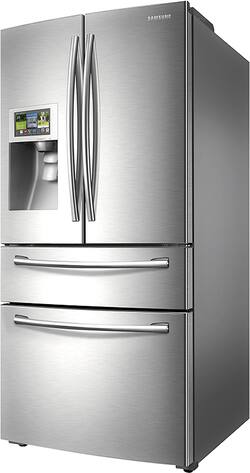
Samsung - 28.2 Cu. Ft. 4-Door French Door Apps Refrigerator with Thru-the-Door Ice and Water - Stainless steel
- Key Specs
- Product Height: 68.88 inches (The out of box height of the item. Height is measured as the vertical distance from the bottom of the item to the top as it would be primarily used or placed.)
- Product Width: 35.75 inches (The out of box width of the item. Width is measured as the horizontal distance from one side of the item to the other as it would be primarily used or placed.)
- Height To Top Of Door Hinge: 70 inches (Height from bottom of refrigerator to top of the door, including the top hinge.)
- Depth Without Handle: 34 inches (Measurement from the back of the product to its front (with door closed), not including handle.)
- Depth With Handle: 36.5 inches (Measurement from the back of the product to its front (with door closed), including the handle.)
- Refrigerator Style: French Door
- Lighting Type: LED
- Ice Maker: Yes
- App Compatible: true (The product can be connected to a program or software application on a mobile device, which then receives collected data from the product.)
- Color Finish: Stainless steel
- General
- Product Name: 28.2 Cu. Ft. 4-Door French Door Apps Refrigerator with Thru-the-Door Ice and Water
- Brand: Samsung
- Model Number: RF28HMELBSR
- Color Finish: Stainless steel
- Dimensions
- Product Height: 68.88 inches (The out of box height of the item. Height is measured as the vertical distance from the bottom of the item to the top as it would be primarily used or placed.)
- Product Width: 35.75 inches (The out of box width of the item. Width is measured as the horizontal distance from one side of the item to the other as it would be primarily used or placed.)
- Product Depth: 36.5 inches (The out of box depth of the item. Depth is measured as the distance from the front of the item to the back as it would be primarily used or placed.)
- Height To Top Of Door Hinge: 70 inches (Height from bottom of refrigerator to top of the door, including the top hinge.)
- Counter Depth: false (The product case installs flush with the depth of standard kitchen counters to provide a built-in appearance.)
- Depth Without Handle: 34 inches (Measurement from the back of the product to its front (with door closed), not including handle.)
- Depth With Handle: 36.5 inches (Measurement from the back of the product to its front (with door closed), including the handle.)
- Depth Without Door: 29.5 inches (Measurement from the back of the product to its front, not including the door.)
- Depth With Door 90 Degrees Open: 49.88 inches (Measurement from the back of the product to its front, with the door open at a 90-degree angle.)
- Product Weight: 374 pounds (The out of box weight of the item.)
- Capacity
- Refrigerator Capacity: 28.2 cubic feet (Total amount of space within the refrigerator compartment. Usable space may be reduced by shelves, cabinets, or other storage features.)
- Freezer Capacity: 8.4 cubic feet (Total amount of space within the freezer compartment. Usable space may be reduced by shelves, cabinets, or other storage features.)
- Features
- Configuration: Freestanding (The size, arrangement, and physical configuration of the product.)
- Refrigerator Style: French Door
- Dual Evaporation: true (A cooling system that works to create a stable climate for the refrigerator and freezer separately. This ensures that each compartment is able to maintain a separate humidity and temperature level ideal for the respective stored items. Freezers tend to require lower humidity while refrigerators require higher humidity to keep foods fresher for longer.)
- Door-Open Alarm: true
- Temperature Control Type: Digital
- Defrost Type: Automatic (Ice build-up can reduce the appliance’s cooling capacity, making it work harder and consume more energy. Defrosting is necessary to maintain its efficiency and each type has its own advantages depending on user needs and preferences. Manual defrost appliances require unplugging to melt ice naturally, but offer more space, lower energy consumption, and lower cost without the internal heating element. Frost-free appliances regulate temperature to prevent ice build-up automatically. Automatic defrost systems use a timer to circulate heat and prevent ice accumulation, while adaptive defrost systems use sensors to determine the optimal times for heat circulation.)
- Lighting Type: LED
- Ice & Water
- Ice Maker: Yes
- Dispensed Water Type: Cold Water
- Storage
- Dairy Center: false (Designated storage with closure for dairy items such as butter, yogurt, and cream cheese, helps keep these items accessible and may reduce the risk of cross-contamination.)
- Gallon Door Storage: true (Designated storage space for gallon-sized containers, such as milk, juice, and water.)
- Humidity-Controlled Crisper: true
- Deli Meat Drawer: true (Designated storage for deli and other meats helps keep these items accessible and may reduce the risk of cross-contamination.)
- Refrigerator Shelf Material: Spill-proof glass
- Freezer Info
- Freezer Compartment: true
- Freezer Location: Bottom
- Freezer Door Type: Pull Out Drawer
- Freezer Interior Light: true
- Quick Freeze: true (Feature that allows you to quickly reduce the temperature when needed, perfect for chilling drinks or freezing large quantities of fresh food. Fast freezing may help maintain food quality.)
- Filter Info
- Water Filtration: true
- Water Filter Model Number: HAF-CIN (The water filter model(s) recommended for use with the product.)
- Electrical Specification
- Voltage: 115 volts (Amount of power needed to support an electrical current.)
- Certifications Listings & Approvals
- ENERGY STAR Certified: true (Devices carrying the ENERGY STAR service mark, such as computer products and peripherals, kitchen appliances, and other products, generally use 20% to 30% less energy than required by federal standards.)
- ADA Compliant: false (Meets standards set by the Disabilities Act (ADA) Standards for Accessible Design)
- Compatibility
- App Compatible: true (The product can be connected to a program or software application on a mobile device, which then receives collected data from the product.)
- Other
- UPC: 887276966113
Stay connected while you cook. This smart Samsung refrigerator is equipped with an 8” Wi-Fi enabled LCD touch screen that can access the Web, apps, and more. Plus, keep ingredients evenly chilled, and store snacks and drinks within easy reach for the whole family.
- 8” Wi-Fi Enabled LCD: Access the Internet and your favorite apps, right from the refrigerator door. The LCD touch screen allows you to check notifications, mirror Samsung devices, and more.
- FlexZone™ Drawer: Store dairy, beverages and snacks at counter-height so kids can grab and go. Plus, cool down food fast and organize the drawer with the adjustable Smart Divider.
- 28.2 cu. ft. large capacity: The three-way shelf gives you more options. Slide it in or flip it up to arrange different-sized items exactly the way you want.
- Twin Cooling Plus™: Keep the fridge humid and the freezer dry. Fruits and veggies stay fresher for longer in higher levels of humidity, and frozen foods avoid freezer burn and taste better when they’re kept dry.
- Freezer drawer: The lower freezer drawer has an EZ-Open Handle and divider, so you can organize frozen foods your way.
- High-efficiency LED lighting: Don’t worry about excess heat and glare. The gentle LED lighting brightens the interior of the fridge without wasting energy or space. Plus, a door alarm will alert you if the door is left open.
- Ice Master: Use up to 10 lbs. of crushed or cubed ice per day. The ice maker sits in a small corner of the fridge, leaving plenty of room for all your groceries.
- Filtered water and ice dispenser: Fill pitchers and glasses for a chilled, refreshing drink. The external water and ice dispenser has extra height for convenience, and works as a filter.
- Water filter: The HAF-CIN/EX filter provides fresh, clean water for up to 6 months. Its convenient position makes it easy to change when the water filter life indicator alerts you.
Whats Included
- 28.2 Cu. Ft. 4-Door French Door Apps Refrigerator with Thru-the-Door Ice and Water
- Owner's manual
A: We also had an existing thru-the-door ice and water dispenser and purchased this refrigerator to upgrade. You do not need a new line. The delivery men easily connected the new line from the refrigerator to our existing water line.
Q: Does this work with iPhones also or just Samsung smart phones?
A: not all apps work with the iphone, the find the phone will only work with an android phone or Samsung
Q: Has the issue with connecting to the Google calendar app been resolved?
A: Bought in Dec 2015, google calendar app works for now - 3/2016, but not epicurious!!!
A: I'm sorry to hear you're having an issue with the Kitchen TV feature on your RF28HMELBSR. It's important that the Samsung TV is a compatible model and is connected to the same WiFi network as the refrigerator. If you've followed the step by step instructions on pages 53-54 of the manual, as well as the troubleshooting tips on page 110 and are still unable to connect, I would suggest calling 800-SAMSUNG to speak with an agent who will be happy to assist you. Please note that some TVs have a limit to the number of devices they can connect to, so you may need to check the TV manual to determine whether the TV's device capacity has been met. Thank you, Ms. Samsung
Q: The filter (red) light just came on. What should I do and how do I change the filter.
A: Check the manual however they sell them at most places that carry Samsung refrigerators. You just twist the filter and remove it and to install the new one, just insert and turn to tighten.
Q: How is the installation done?
A: The delivery people hooked up the fridge for free
Q: The LCD screen is unresponsive
A: The day I got mine, the wi-fi worked good for any hour then froze. I called Samsung and they had no clue. I unplugged the fridge, disconnected the wifi and started over and it's worked fine since.
A: Thanks for the question. I'm not sure if you're referring to the flip-up shelf next to the ice maker in your RF28HMELBSR or the retractable shelf that can be removed entirely or moved to other locations. The flip-up shelf which is attached to the side of the ice maker with a hinge should be able to flip up to the left so it's completely vertical. The front half of the retractable shelf can be pushed back so the shelf is about half of its full depth, but it can't flip up to be completely out of the way. - Ms. Samsung














