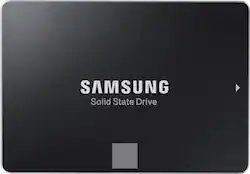
Samsung - 860 EVO 500GB SATA 2.5" Internal Solid State Drive
- General
- Product Name: 860 EVO 500GB SATA 2.5" Internal Solid State Drive
- Brand: Samsung
- Other
- UPC: 887276232300
Expand computer storage capacity with this Samsung EVO hard drive. Its solid-state architecture ensures fast startup times, and the 500GB provides plenty of space for photos, documents and music. This Samsung EVO hard drive has a read speed of up to 550MB/sec. and 520MB/sec. write for fast access to files and rapid data transfers. Speeds are consistent, even under heavy workloads and multi-tasking allowing for a faster file transfer. Benefit from faster, more fluid communication with your host system. The Samsung 860 EVO is specially designed to enhance performance of mainstream PCs and laptops.
- 500GB storage capacity: Provides ample storage space for your music, movies and other files.
- SATA III interface: Offers simple connection to your computer.
- Data transfer rates up to 600 MBps: For quick response when updating files.
- AES 256-bit hardware encryption: Helps safeguard sensitive data.
Whats Included
- Samsung 860 EVO 500GB Internal SATA Solid State Drive for Laptops
Q: Do you need a power cable and sata cable?
A: If your computer doesn't have them already, then yes, because this drive does not come with any cables. My computer had the power cord but I had to buy the SATA cable.
Q: Will this work with a desktop PC? and are there any restrictions or limits on the power supply?
A: This drive will work in any PC, desktop or notebook that has a standard SATA hard drive connection. It's a 2.5" drive, so to mount it in most desk top computers a 2.5" to 3.5" adapter would be useful however it can be mounted anywhere it will fit, even with double stick tape. Some folks that I've heard of just let it lay in the bottom of the computer or just let it hang from the wires. There are no power supply restrictions.
Q: Would the Samsung 860 EVO work with a 2012 MacBook Pro?
A: It will work with a non retina MacBook Pro.
A: Samsung SSDs are entitled to two important pieces of software, one is the data transfer wizard, the other is the Samsung magician software, which optimizes your device and improves performance significantly. The transfer wizard will pull all of your data, including your operating system and allow you to plug in your SSD via USB (I recommend this cable, also sold at Best Buy https://www.bestbuy.com/site/apricorn-data-transfer-cable-gray/3459621.p?skuId=3459621) run the simple transfer wizard, and then install your new SSD, with everything ready to go. No convoluted commands to rewrite the boot sector / bootloader, no need to worry about resizing partitions, it handles everything. I would highly advise making sure to use a USB 3. 0 port to speed up the process, but the cable I linked to above is perfect for this job, and needs no external power... Just that of the USB port itself. here's a link to the download page, make sure you get the transfer Wizard and magician software. https://www.samsung.com/semiconductor/minisite/ssd/download/tools/ Also check out rapid mode inside of the magician software, once everything has been transferred. It can improve your speeds from a base of 550 mbps per second all the way up to 3800 Mbps. Total project time should take less than 3 hours.
A: Yes, this is a direct replacement for the hard drive in that model of laptop. You will need to image the original drive to the SSD if you wish to preserve the original operating system and recovery partition. You will need to download the Samsung Migration Tool and purchase a USB/SATA interface cable, as well. Good luck!
Q: Does this come with the free Samsung cloning software?
A: You can download the cloning software from Samsung's website. It's currently called "Samsung Data Migration Software for Consumer SSD".
A: I used a SATA to USB cable to connect the ssd to my laptop for cloning.
Q: Will it work with an Asus laptop?
A: Depends on how old laptop is.it should work my laptop is over 4 years old and I'll tell you what this ssd made a big difference in speed I thought I needed more ram but I checked ram and still had not maxed it while using it so I put this ssd in and boy best money I put in overall yes it should fit its sata.