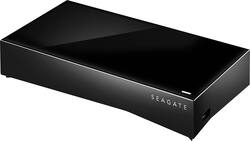
Seagate - Personal Cloud 3TB External Hard Drive (NAS) - Black
- Key Specs
- Storage Drive Type: HDD (Traditional, mechanical hard disk drives are the most common type of storage because they're relatively inexpensive and offer huge capacities. However, they also generate both noise and heat. Solid state drives, also known as SSDs, are many times faster than hard disk drives and have no moving parts to wear out, but typically offer less capacity for the same price.)
- Interface(s): Ethernet (Refers to the types of connections that devices use to interact and communicate with each other.)
- General
- Product Name: Personal Cloud 3TB External Hard Drive (NAS)
- Brand: Seagate
- Model Number: STCR3000101
- Performance
- Storage Drive Type: HDD (Traditional, mechanical hard disk drives are the most common type of storage because they're relatively inexpensive and offer huge capacities. However, they also generate both noise and heat. Solid state drives, also known as SSDs, are many times faster than hard disk drives and have no moving parts to wear out, but typically offer less capacity for the same price.)
- Compatibility
- Internal Or External: External
- External Hard Drive Type: Desktop (Physical characteristics of the hard drive, including size, weight and how you connect to your device.)
- Interface(s): Ethernet (Refers to the types of connections that devices use to interact and communicate with each other.)
- Minimum System Requirements: PC: Windows Vista, 7 or 8; Mac: OS X 10.7 or later; router with available Ethernet port; Internet connection; Internet Explorer, Firefox, Chrome or Safari
- Power
- Power Source: AC adapter
- Dimensions
- Product Height: 1.89 inches (The out of box height of the item. Height is measured as the vertical distance from the bottom of the item to the top as it would be primarily used or placed.)
- Product Width: 9.25 inches (The out of box width of the item. Width is measured as the horizontal distance from one side of the item to the other as it would be primarily used or placed.)
- Product Weight: 40.48 ounces (The out of box weight of the item.)
- Other
- UPC: 763649066492
This Seagate Personal Cloud STCR3000101 external USB and Ethernet hard drive features a 3TB capacity, so you can stream, share and manage media and other files whether you're at home or on the go.
- 3TB storage capacity: Provides plenty of space for music, movies, games, photos and other digital data.
- USB and Ethernet interfaces: Allow flexible connectivity.
- Personal Cloud: Makes it easy to share, stream and organize your files at home or on the go.
- Secure file sharing: Allows you to invite family and friends to access data via private e-mails.
- Data backup: Helps protect data stored on your PC or Mac or compatible smartphone or tablet and transfer files stored in a variety of Cloud services, including Dropbox, Google Drive, Baidu and Box.
- Wireless streaming: Lets you send media to devices with an Android, Apple® iOS, Kindle Fire or Windows 8 operating system, as well as a Samsung or LG smart TV, Roku player, Chromecast, AirPlay, Apple TV or other DLNA-capable device.
- Remote access: Enables you to enjoy your media while you're out and about via the Seagate Media app (download required).
Whats Included
- Personal Cloud 3TB External Hard Drive (NAS)
- Power supply, Ethernet cable
- Owner's manual
Q: Does it connect by ethernet or it connects wireless to the internet?
A: I just got mine in the mail. the setup was like this - plug via ethernet cable into the router, plug the drive into the power in the wall. Then it does a little setup deal with firmware and username and password stuff. there is one port for i believe another drive, you might be able to use this to xfer files, but I'm not sure - the documentation that came with this is like a childens book with pictures, no words - its literally all pictures. so i have no idea how to hook this up to my apple tv - trying to figure that out now. i went to copy 7.3 gigs in one shot and it said about 36 minutes to transfer over wifi - i think im hooked up via N connection. i also tried to backup my phones camera roll to the device, but it just times out - probably because i have no storage avail on my phone and it probably cant create temp directories, but what do i know...all i have is this 3 page booklet with pictures.
A: I plugged a USB drive into the usb port where the power and ethernet connections are and I can see it if I connect remotely. I don't see it when I connect to the sea gate drive when I look for it when I'm on my home computer
A: It doesn’t contain the firmware needed to do the actual cloning on the dock . There are free cloning softwares online if you only look it up. And you can use this device on Mac or pc. Or anything else for that matter with a usb slot.
A: You may let all your originals reside on this drive. They do not need to reside on your computer. However, you must have the drive accessible (plugged in) when ever you want to update your library or device(s). Even if you need to update to a larger drive sometime iin the future, you may copy or move the contents to a new drive. When itunes does not find the files, you follow the offered click to find a file, choose the new drive, then itunes will be able to find ALL your files again automatically. You only have to do this once. Having all your videos and photos on a separate drive, keeps your computer free for other things and you can easily upgrade to a new computer. I keep all my files on an external drive and back them up on a second external drive. I only keep programs, e-mail and apps on my computer(s). This way, nothing is ever lost unintentionally.
Q: windows 7
A: Yes software and hardware works with Windows 7, 8, and 10
Q: Would it be possible to buy two and either manually or automatically backup one to the other?
A: You wouldn’t need to by two, all you would need to do is buy 1 and then download a HD cloning software so that you can clone (Backup) your current hard drive to the new one.
Q: do you need to save your data to the cloud? Or, can it be saved to the Seagate drive?
A: Save to the hd
Q: Can this be used as a shared drive between several different users on the network?
A: Yes you can set up multiple users for this and share a public folder.