Kensington - Orbit Wireless Laser Trackball Mouse - Black
FREE shipping to
More Buying Options

Specifications
- Number of Buttons (Total)2
- Key Specs
- Number of Buttons (Total): 2
- General
- Brand: Kensington
- Model Number: K72352US
- Product Name: Orbit Wireless Laser Trackball Mouse
- Color: Black
- System Requirements: Chrome OS 44 and above, macOS 10.8, macOS 10.9, macOS High Sierra 10.13, macOS Sierra 10.12, macOS X 10.10, macOS X 10.11, Windows 10, Windows 7, Windows 8, Windows 8.1 (The software that a product must have for it to be able to integrate with another product.)
- Features
- Mouse Type: Standard
- Performance
- Mouse Operation: Button(s)
- Handedness: Ambidextrous
- Tracking Method: Trackball (There are several types of computer mice, optical and laser being among the most common. Optical mice detect less detail and provide more precise and accurate movement. Laser mice detect more detail and can be used on a wider variety of surfaces, but are more sensitive to small movements.)
- Number of Buttons (Total): 2
- Number of Programmable Buttons: 2
- Connectivity
- Wireless Connectivity: Radio Frequency (RF) (The manner in which a device sends data to another device over a short distance without the use of wires or cables.)
- Operating System Compatibility: Mac, Windows
- Plug and Play Operation: true
- Dimensions
- Product Height: 4.3 inches (The out of box height of the item. Height is measured as the vertical distance from the bottom of the item to the top as it would be primarily used or placed.)
- Product Width: 3.4 inches (The out of box width of the item. Width is measured as the horizontal distance from one side of the item to the other as it would be primarily used or placed.)
- Other
- UPC: 085896723523
Tackle complex tasks or browse documents effortlessly with this Orbit wireless mobile trackball. An ergonomic setup and ambidextrous design allow for comfortable use, while the touch operation provides accurate, efficient scrolling. Customize the two buttons using free downloadable software for even greater ease of operation. A wireless USB nano receiver makes it easy to connect this Orbit wireless mobile trackball to a PC or Mac device.
- 2.4GHz wireless connection: This mouse connects to your computer using a wireless USB receiver.
- Laser technology: This mouse uses a laser to detect ball movement with accuracy.
- Ambidextrous two-button design: Along with a centered compact 32mm ball, it works equally well for either right-handed or left-handed users.
- Compatible with most Chromebook, Windows and Mac computers: Works across a wide array of computers.
Whats Included
- Kensington Orbit Wireless Laser Trackball Mouse
- Nano receiver
- Owner's manual
Product Manuals
A: For larger hands, I always prefer the Logitech TrackMan Optical. It uses finger control of the ball instead of the side-ball for the thumb. I find that I have better control with fingers on the ball than thumb. Bought my first one (wired) in 1996 and it still works perfectly after all those years of almost daily use in CAD applications.
Q: I don't see a scroll wheel. What part performs this function?
A: The scroll wheel function is handled by sliding your finger up or down on either side of the collar surrounding the ball. In the photo the collar looks silverish on the one i have its black and slippery. occasionally it requires you to slid your fingers on both sides at the same time to make it work.
A: the picture i saw looks kinda like the trackball mouse. the photo just makes it look taller than is is for some reason it's a decent mouse for someone with smallish hands. Not quite so much if you have large hands as i do. it works good but i have to shift my grip frequently to click on the buttons. That could be partially from the old trackball mouse i had that was fat in the back and skinny in front. This one is skinny in the back and fatter in front.
A: It's 4" long, about 1 1/2 " high, the back is 2" wide and the front where the ball is, is 3" wide. I have a small hand, and it is small enough for me.
Q: Compatible with windows 10?
A: Yes, this is compatible with Windows 10.
Q: Is it powered by batteries or is it rechargeable?
A: Powered by 2 AA batteries.
Q: Is it compatible with Apple Mac book pro?
A: yes, will work with Mac device
A: Yep! Don’t know where the trackball picture is!
Compare similar products

Tackle complex tasks or browse documents effortlessly with this Orbit wireless mobile trackball. An ergonomic setup and ambidextrous design allow for comfortable use, while the touch operation provides accurate, efficient scrolling. Customize the two buttons using free downloadable software for even greater ease of operation. A wireless USB nano receiver makes it easy to connect this Orbit wireless mobile trackball to a PC or Mac device.

All-day comfort and scrolling come together in the Kensington Orbit Trackball with Scroll Ring. The scroll ring allows you to fly through web pages and documents. And all while delivering comfort and space savings no mouse can match.

Kensington Orbit Trackball Mouse: This trackball mouse requires minimal wrist movement during use and features an ergonomic, symmetrical design, so you can enjoy lasting comfort while working at your PC or Mac.
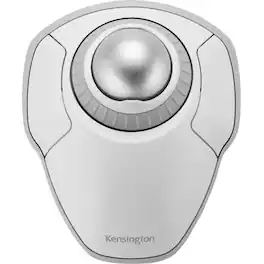
The Kensington trackball legacy continues with the latest addition to the patented Orbit Trackball with Scroll Ring - the Orbit Wireless Trackball with Scroll Ring. You asked for wireless, and we delivered, with the same great features that have made the Orbit Trackball with Scroll Ring so popular, including a patented scroll ring that allows you to scroll up & down pages with ease; customizable buttons; dual wireless connectivity offering the flexibility of 2.4 GHz and Bluetooth (3.0 and LE), with 128-bit AES government-grade encryption security; four DPI settings (400, 800, 1,200, or 1,600) that let you easily adjust the cursor speed to fit your needs; a detachable wrist rest; ambidextrous design; and plug-and-play ease for Mac or PC. More from the Manufacturer
Specs
Reviews
The vast majority of our reviews come from verified purchases. Reviews from customers may include My Best Buy members, employees, and Tech Insider Network members (as tagged). Select reviewers may receive discounted products, promotional considerations or entries into drawings for honest, helpful reviews.
- Rated 3 out of 5 stars
OK pointing device, Better choices exist today
works as a reliable pointing device. that's about it. Scroll ring is erratic at best and frustrating the rest of the time. no physical middle mouse button. Clicking both the left and right buttons to simulate middle mouse is problematic and leaves the user frustrated. At the time I started purchasing trackballs instead of mouse pointing device, I had developed carpel tunnel in my right arm and wrist and fingers and this was one of the better choices out there at that time. Now I would not recommend this as there are much better options in the marketplace.
This review is from Kensington - Orbit Wireless Laser Trackball Mouse - Black
Posted by JohnB
- Rated 4 out of 5 stars
As good as I can find.
This is a very nice piece of ergonomic equipment. As I only use the larger Kensington trackball for my desktop, I find that the scrolling action leaves a lot to be desired. But, it serves very will and is comfortable for a left handed person.
This review is from Kensington - Orbit Wireless Laser Trackball Mouse - Black
Posted by Architect
- Rated 5 out of 5 stars
Best one yet
I've used trackballs exclusively since they were invented. This is the best one yet. Who knew wireless was so good? Everyone but me apparently. Love it.
This review is from Kensington - Orbit Wireless Laser Trackball Mouse - Black
Posted by JamesS62