Logitech - MX Keys S Universal Full-size Wireless Scissor Keyboard for PC and Mac with Backlit keys - Pale Gray
Color
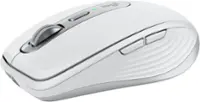
Pale Gray Logitech - MX Master 3S Wireless (USB-A) Laser Mouse with Ultrafast Scrolling - Wireless - Pale Gray$119.99
More Buying Options
Related Item

Specifications
- Lighting TypeSingle colorForm FactorFull-sizeKeyboard TechnologyScissorConnection TypeWireless
- Key Specs
- Lighting Type: Single color
- Form Factor: Full-size (The size, arrangement, and physical configuration of the product.)
- Keyboard Technology: Scissor (Type of technology that detects a key press.)
- Connection Type: Wireless
- General
- Brand: Logitech
- Model Number: 920-011559
- Product Name: MX Keys S Universal Full-size Wireless Scissor Keyboard for PC and Mac with Backlit keys
- Color: Pale Gray
- Features
- Lighting Type: Single color
- Customizable Lighting: false
- Numeric Keypad: true
- Touchpad: false
- Keyboard Type: Programmable
- Palm Rest: false
- Spill Resistant: false (Designed to resist some degree of accidental liquid spill. The level of spill-resistance is indicated by the product manufacturer, but the degree of protection may not be guaranteed after normal wear of the product.)
- Keyboard Features: Spherically dished keys, smart illumination, programmable keys, Smart Keys layout, Easy Switch to pair with up to 3 devices
- Functions
- Form Factor: Full-size (The size, arrangement, and physical configuration of the product.)
- Keyboard Technology: Scissor (Type of technology that detects a key press.)
- Adjustable Tilt Function: false
- Multimedia Keys: true
- Connectivity
- Connection Type: Wireless
- Wireless Connectivity: Radio Frequency (RF - 2.4 Ghz/Low Latency), Bluetooth (The manner in which a device sends data to another device over a short distance without the use of wires or cables.)
- Maximum Wireless Range: 33 feet
- Number Of USB Port(s): 1 (The total number of USB ports including all generations and versions.)
- Number of Devices Connectable Simultaneously: 3
- Compatibility
- Operating System Compatibility: Windows, Mac, Apple iPadOS, Chrome, Android, Linux
- Plug and Play Operation: true
- System Requirements: Via Bluetooth Low Energy technology: Windows 10, 11 or later, macOS 10.15 or later, Linux, Chrome OS, iPadOS 14 or later, Android 8.0 or later. Via Logi Bolt USB Receiver: Windows 10, 11 or later, macOS 10.15 or later, Linux, Chrome OS (The software that a product must have for it to be able to integrate with another product.)
- Power
- Rechargeable Battery: true
- Battery Chemistry: Lithium
- On/Off Switch: true
- Dimensions
- Product Height: 0.81 inches (The out of box height of the item. Height is measured as the vertical distance from the bottom of the item to the top as it would be primarily used or placed.)
- Product Width: 16.94 inches (The out of box width of the item. Width is measured as the horizontal distance from one side of the item to the other as it would be primarily used or placed.)
- Product Depth: 5.18 inches (The out of box depth of the item. Depth is measured as the distance from the front of the item to the back as it would be primarily used or placed.)
- Product Weight: 28.57 ounces (The out of box weight of the item.)
- Mouse
- Mouse Included: false
- Warranty
- Warranty - Parts: 1 year
- Warranty - Labor: None
- Other
- UPC: 097855187857
MX Keys S Logitech Wireless Keyboard — a low-profile full-size keyboard that offers a fluid, precise typing experience and customizable, time-saving Smart Actions that automate your most repetitive tasks with a single keystroke. The backlit keyboard features smart backlighting that lights up when your hands approach it and automatically adjusts to suit the time of day.
- Fluid typing experience: Laptop-like profile with spherically-dished keys shaped for your fingertips delivers a fast, fluid, precise and quieter typing experience.
- Automate repetitive tasks: Easily create and share time-saving Smart Actions shortcuts that perform multiple actions with a single keystroke with the Logi Options+ app.¹
- Smarter illumination: Backlit keyboard keys light up as your hands approach and adapt to the environment; now with more lighting customizations on Logi Options+.¹
- More comfort, deeper focus: Work for longer with a solid build, low-profile design and an optimum keyboard angle that is better for your wrist posture.
- Multi-device, multi OS Bluetooth keyboard: Pair with up to 3 devices on nearly any operating system (Windows, macOS, Linux) via Bluetooth Low Energy or included Logi Bolt USB receiver.²
- USB C rechargeable keyboard: Stays powered for up to 10 days on a full charge or up to 5 months (backlighting turned off); quick charge with the included USB-C charging cable.³
- Team with MX Master 3S mouse: Pair any MX wireless keyboard and mouse with Logi Options+ and seamlessly work, transfer text and files between up to 3 computers (Windows & macOS).
- Recycled plastic: Plastic parts in MX Keys S Wireless Keyboard include certified post-consumer recycled plastic — 15% for Black and 11% for Pale Grey.⁴
- 1-month of Adobe Creative Cloud on us (a value of $59.99)*: Pair two of the world’s top creative tools. Buy one MX Keys S and claim your free 1-month Adobe Creative Cloud membership. *Value calculated based on Adobe Creative Cloud All Apps monthly value of $59.99 valid on Adobe.com on Sept 12, 2024. Terms & Conditions apply.¹ ² ³
Whats Included
- Keyboard
- Logi Bolt USB receiver
- USB-C charging cable (USB-A to USB-C)
- User documentation
A: Hey there! Please note that the MX Keys S is a completely wireless keyboard and cannot be used in wired mode. The USB charging cable included in the box (USB-A to USB-C) is only to charge the keyboard and cannot transfer any data through it.
Q: do you have the keyboard in spanish?
A: Hey! Yes, the keyboard is available in Spanish layout.
Q: Is this Bluetooth or USB. It show both.
A: It's both. You can use Bluetooth like you would with headphones or a mouse. Or you can just plug in the USB dongle. If you're using two or three devices, you can use the dongle for a computer and Bluetooth for the other two.
Q: Dose this keyboard can use for Microsoft PC or only for MAC?
A: It comes with a Bluetooth dongle for PCs that don't offer Bluetooth connectivity. And works with most Apple products.
Q: Is it a quiet/silent keyboard when typing?
A: This is the quietest keyboard I have ever used. Nice feel in the keys too.
Q: How long does it take to charge.
A: If you’re going from red to full charge probably a couple hours. Plug it in when you go to bed and it will be fully charged when you wake up. It has pretty amazing battery life even if you leave it on all the time.
A: Hey! Please contact the BestBuy support team for queries related to order.
Compare similar products

MX Keys S Logitech Wireless Keyboard — a low-profile full-size keyboard that offers a fluid, precise typing experience and customizable, time-saving Smart Actions that automate your most repetitive tasks with a single keystroke. The backlit keyboard features smart backlighting that lights up when your hands approach it and automatically adjusts to suit the time of day.
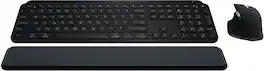
Master your flow with the MX Keys S Combo Wireless Mouse and Keyboard — the ultimate combo that combines the power of the fluid, fast precision typing of MX Keys S Wireless Keyboard with the precise, fast scrolling experience of MX Master 3S Wireless Mouse.

Introducing the JLab Epic Wireless Keyboard with Multi-device compatability and illuminated full-depth keys with number pad. Connect via Bluetooth or USB wireless dongle. Easily switch between three saved devices and enjoy the accessible shortcut keys and media knob to improve productivity for the ultimate home or work set up.

Type and click across computers effortlessly with the Logitech MK955 Signature Slim Wireless Keyboard and Mouse Combo made out of recycled plastic. Make work-life magic with customization and shortcuts that keep you in control of your wireless mouse and keyboard. Enjoy fast, precise scrolling and a familiar laptop-style keyboard feel that allows you to work even smarter with the Logi Options+ App’s custom shortcuts. Quiet keyboard typing and mouse clicking give you more focus and less disturbance to others. Connect wirelessly with Bluetooth or the included Logi Bolt USB receiver, and stay concentrated for longer with up to 36 months of battery life for the wireless keyboard and 24 months for the wireless mouse for larger hands.
| Pros for Logitech - MX Keys S Universal Full-size Wireless Scissor Keyboard for PC and Mac with Backlit keys - Pale Gray | |||
|---|---|---|---|
| Keyboard Quality, Battery Life, Key Feel, Ease of use, Connectivity | Keyboard Quality, Battery Life, Ease of use, Connectivity, Scroll Wheel | Keyboard Quality, Battery Life, Key Feel, Connectivity, Volume Control | There were no pros for this product— |
| Cons for Logitech - MX Keys S Universal Full-size Wireless Scissor Keyboard for PC and Mac with Backlit keys - Pale Gray | |||
| There were no cons for this product— | Palm Rest, Price | There were no cons for this product— | There were no cons for this product— |
Specs
Reviews
Customers are saying
Customers admire the MX Keys S keyboard for its quality, comfortable key feel, and ease of use with both PC and Mac. The long battery life and wireless connectivity are also appreciated. Some find the keyboard to be expensive compared to alternatives, while others feel the size is smaller than expected for the price. Overall, the keyboard's positive attributes seem to outweigh the concerns.
Customer Images
The vast majority of our reviews come from verified purchases. Reviews from customers may include My Best Buy members, employees, and Tech Insider Network members (as tagged). Select reviewers may receive discounted products, promotional considerations or entries into drawings for honest, helpful reviews.
- Rated 5 out of 5 stars
Great Keyboard
If you spend significant time typing, want a reliable, comfortable keyboard for desk use with multiple devices, the MX Keys S is a strong choice. Just ensure you’re comfortable with the size/weight and that you don’t rely heavily on super-bright backlighting or gaming-grade features.
Posted by rmv1
- Rated 5 out of 5 stars
Great All-Around Keyboard for Multi-Device Setups
I purchased this keyboard with the intention of using it between multiple devices, e.g. my desktop computer and laptop, and complementing my peripheral setup with various Logitech MX accessories as well. Before this keyboard, I had used a Logitech G610 keyboard and a ROCCAT Vulcan 122 as my main keyboards. For the most part, I am quite pleased with this keyboard. Despite using mechanical keyboards for years, I am still used to typing on low-profile keyboards, whether it be HP or Dell business keyboards or laptop keyboards. Even on my first few days of ownership, I was able to type at 80% of my accustomed speed, and it would only improve as time goes on. Pairing the keyboard to my computers, with either the Logitech Bolt receiver or Bluetooth, was very straightforward with Logitech's Options+ software. The keyboard, as it sits, is perhaps an inch thick, with a slight angle that naturally matches where your fingers will be. Since the keyboard is low profile, I didn't find a need to have a wrist rest. Additionally, each keycap is noticeably concave and helps with locating keys significantly. Although the keyboard is made of plastic, it is surprisingly heavy and won't get pushed around. If you have other Logitech MX peripherals in your setup, this keyboard will blend in perfectly. The biggest downsides of this keyboard is that compared to wireless mice, which seem to last forever on a single charge, the keyboard will not last as long. Between 10 days of on/off use with auto-backlight since I had fully charged my keyboard, it is at 30% charge. Turning off the backlight will dramatically improve battery life though. For gaming, I would not recommend this keyboard because of possible wireless latency issues and the keys don't feel as satisfying to keep pressed down for extended periods compared to a linear or tactile mechanical keyboard. Overall, I would recommend this keyboard to anyone looking to improve their work/productivity computer setup, has existing Logitech MX peripherals or have to use a keyboard with multiple devices, as this keyboard can pair with 3 devices with the push of a button.
Posted by William
- Rated 5 out of 5 stars
My favorite
I recently purchased this slim keyboard, and it has quickly become my favorite accessory. Right out of the box, the aesthetic is striking — a sleek, modern design that fits perfectly with a minimalist workspace. Despite its slim profile, it has a surprising heft to it, giving a solid, durable feel that’s reassuring to type on. The keys are smooth and responsive, providing a satisfying typing experience without the bulk of traditional keyboards. It’s the perfect blend of form and function, combining style with substance. If you’re looking for a keyboard that looks great and feels built to last, this one is definitely worth it!
Posted by ElaP