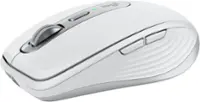
Logitech - MX Mechanical Mini for Mac Compact Wireless Mechanical Clicky Switch Keyboard for macOS/iPadOS/iOS with Backlit Keys - Pale Gray
Color
Pale GrayFREE shipping to
More Buying Options
Related Item

Specifications
- Lighting TypeSingle colorForm FactorCompact (60%)Keyboard TechnologyMechanicalKey Switch BehaviorTactileConnection TypeWireless
- Key Specs
- Lighting Type: Single color
- Form Factor: Compact (60%) (The size, arrangement, and physical configuration of the product.)
- Keyboard Technology: Mechanical (Type of technology that detects a key press.)
- Key Switch Behavior: Tactile (Refers to the mechanisms under the keycaps on a keyboard that enable you to type faster and more precisely. Linear switches move straight up and down without any sound or bump. Tactile switches provide a noticeable bump in the key press, and no sound. Clicky switches provide a bump in the key press and "clicky" sound.)
- Connection Type: Wireless
- General
- Brand: Logitech
- Model Number: 920-010553
- Product Name: MX Mechanical Mini for Mac Compact Wireless Mechanical Clicky Switch Keyboard for macOS/iPadOS/iOS with Backlit Keys
- Color: Pale Gray
- Features
- Lighting Type: Single color
- Numeric Keypad: false
- Touchpad: false
- Palm Rest: false
- Spill Resistant: false (Designed to resist some degree of accidental liquid spill. The level of spill-resistance is indicated by the product manufacturer, but the degree of protection may not be guaranteed after normal wear of the product.)
- Foldable: false
- Functions
- Form Factor: Compact (60%) (The size, arrangement, and physical configuration of the product.)
- Keyboard Technology: Mechanical (Type of technology that detects a key press.)
- Adjustable Tilt Function: false
- Key Switch Behavior: Tactile (Refers to the mechanisms under the keycaps on a keyboard that enable you to type faster and more precisely. Linear switches move straight up and down without any sound or bump. Tactile switches provide a noticeable bump in the key press, and no sound. Clicky switches provide a bump in the key press and "clicky" sound.)
- Multimedia Keys: true
- Connectivity
- Connection Type: Wireless
- Wireless Connectivity: Bluetooth, Radio Frequency (RF) (The manner in which a device sends data to another device over a short distance without the use of wires or cables.)
- Maximum Wireless Range: 33 feet
- Number Of USB Port(s): 1 (The total number of USB ports including all generations and versions.)
- Number of Devices Connectable Simultaneously: 3
- Compatibility
- Operating System Compatibility: Mac, Apple iPadOS, Apple iOS
- System Requirements: Bluetooth Low Energy technology enabled device: macOS 10.15 or later, iPadOS 14 or later, iOS 14 or later; Internet connection for software download of Logi Options+ (The software that a product must have for it to be able to integrate with another product.)
- Power
- Rechargeable Battery: true
- Battery Chemistry: Lithium
- On/Off Switch: true
- Dimensions
- Product Height: 1.02 inches (The out of box height of the item. Height is measured as the vertical distance from the bottom of the item to the top as it would be primarily used or placed.)
- Product Width: 12.3 inches (The out of box width of the item. Width is measured as the horizontal distance from one side of the item to the other as it would be primarily used or placed.)
- Product Depth: 5.17 inches (The out of box depth of the item. Depth is measured as the distance from the front of the item to the back as it would be primarily used or placed.)
- Product Weight: 21.58 ounces (The out of box weight of the item.)
- Mouse
- Mouse Included: false
- Warranty
- Warranty - Parts: 1 year
- Warranty - Labor: None
- Other
- UPC: 097855174505
A minimalist keyboard mastered for Mac with extraordinary feel, precision, and performance. Low-profile mechanical switches deliver a satisfying and quiet typing experience. Dual colored keycaps with a key layout for Mac computers help improve precision through your peripheral vision. Plus, get a complimentary 1-month Creative Cloud subscription with your purchase of MX Mechanical Mini For Mac and create, make, and do like never before.
- Mastered for Mac: MX Mechanical Mini for Mac Bluetooth keyboard features a key layout for Mac designed for feel and productivity, optimized for macOS and compatible with iPadOS and iOS.¹
- Precise and quiet typing: Mechanical Tactile Quiet switches have a satisfying tactile bump you feel but barely hear, for precise feedback, reactive key reset, and a fluid typing experience.
- Mini size with low-profile keys and ergonomic comfort: Experience more comfort with the minimalist, compact form factor featuring low-profile mechanical keys, for effortless precision and better ergonomics.
- Smart illumination: Backlit keys light up the moment your hands approach the cordless keyboard and automatically adjust to suit changing lighting conditions.
- Multi Mac connectivity: Pair MX Mechanical Mini for Mac multi-device keyboard via Bluetooth Low Energy with up to 3 Mac computers or iPads and switch between them seamlessly.
- Faster workflow, more customization: Customize Fn keys, assign backlighting effects, enable Flow cross-computer control with MX Master 3S for Mac, and more in the improved Logi Options+.²
- USB-C to USB-C rechargeable: MX Mechanical Mini for Mac stays powered up to 15 days on a full charge or up to 10 months with the backlighting turned off.³
- Sustainable design: Plastic parts in MX Mechanical Mini for Mac include certified post-consumer recycled plastic - Pale Gray: 36% and Space Gray: 47% (excludes plastic in printed wiring assembly (PWA), cables, and packaging).
- Mastered for Mac: MX Mechanical Mini for Mac Bluetooth keyboard features a key layout for Mac designed for feel and productivity, optimized for macOS and compatible with iPadOS and iOS.¹
- Precise and quiet typing: Mechanical Tactile Quiet switches have a satisfying tactile bump you feel but barely hear, for precise feedback, reactive key reset, and a fluid typing experience.
- Mini size with low-profile keys and ergonomic comfort: Experience more comfort with the minimalist, compact form factor featuring low-profile mechanical keys, for effortless precision and better ergonomics.
- Smart illumination: Backlit keys light up the moment your hands approach the cordless keyboard and automatically adjust to suit changing lighting conditions.
- Multi Mac connectivity: Pair MX Mechanical Mini for Mac multi-device keyboard via Bluetooth Low Energy with up to 3 Mac computers or iPads and switch between them seamlessly.
- Faster workflow, more customization: Customize Fn keys, assign backlighting effects, enable Flow cross-computer control with MX Master 3S for Mac, and more in the improved Logi Options+.²
- USB-C to USB-C rechargeable: MX Mechanical Mini for Mac stays powered up to 15 days on a full charge or up to 10 months with the backlighting turned off.³
- Sustainable design: Plastic parts in MX Mechanical Mini for Mac include certified post-consumer recycled plastic - Pale Gray: 36% and Space Gray: 47% (excludes plastic in printed wiring assembly (PWA), cables, and packaging).
Whats Included
- MX Mechanical Mini Keyboard for Mac
- USB-C charging cable (USB-A to USB-C)
- User documentation
- MX Mechanical Mini Keyboard for Mac
- USB-C charging cable (USB-A to USB-C)
- User documentation
Q: Does this keyboard work for PC/windows?
A: Funny enough, yes it does. Do note that obviously you will have different effect with alt, cntrl and windows keys as that isnt present here. Also that this uses usb-c to usb-c. And finally there is of course windows or multi versions of this that are not mac specific so to speak for sale, just not currently in white colorway.
Q: Can this be connected to a smart TV?
A: If your smart TV allows for bluetooth connection accessories yes it can.
A: Unfortunately you’re right - Best Buy’s description is inaccurate. The Mac edition is only linear keystrokes.
Q: Can the key caps be removed?
A: Yes
Compare similar products

A minimalist keyboard mastered for Mac with extraordinary feel, precision, and performance. Low-profile mechanical switches deliver a satisfying and quiet typing experience. Dual colored keycaps with a key layout for Mac computers help improve precision through your peripheral vision. Plus, get a complimentary 1-month Creative Cloud subscription with your purchase of MX Mechanical Mini For Mac and create, make, and do like never before.

Introducing MX Keys Mini for Mac, a smaller, smarter, and mightier minimalist wireless keyboard with a layout for Mac made for creators. The minimalist form factor provides improved ergonomics by aligning your shoulders and allowing you to place your mouse closer to your keyboard for less arm reaching, more comfort, and better body posture. Perfect Stroke keys are shaped for your fingertips with optimal key stability and tactile responsiveness to keep you oriented and in your flow. The backlit keys light up the moment your hands approach, and automatically adjust to suit changing lighting conditions. Smart Dictation, Mic Mute/Unmute and Emoji keys streamline your workflow even further.
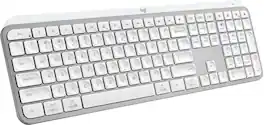
MX Keys S Logitech Wireless Keyboard — a low-profile full-size keyboard that offers a fluid, precise typing experience and customizable, time-saving Smart Actions that automate your most repetitive tasks with a single keystroke. The backlit keyboard features smart backlighting that lights up when your hands approach it and automatically adjusts to suit the time of day.

Introducing MX Mechanical Mini- a minimalist keyboard with extraordinary feel, precision, and performance. Low-profile mechanical typing delivers satisfying feedback in your choice of key switches – Tactile Quiet, Clicky, or Linear. MX Mechanical Mini is crafted for ergonomic comfort, with smart illumination and Easy-Switch – allowing you to connect up to 3 devices and stay in your flow for hours.
| Pros for Logitech - MX Mechanical Mini for Mac Compact Wireless Mechanical Clicky Switch Keyboard for macOS/iPadOS/iOS with Backlit Keys - Pale Gray | |||
|---|---|---|---|
| There were no pros for this product— | There were no pros for this product— | Keyboard Quality, Battery Life, Key Feel, Connectivity, Ease of use | Keyboard Quality, Battery Life, Key Feel, Connectivity, Size |
| Cons for Logitech - MX Mechanical Mini for Mac Compact Wireless Mechanical Clicky Switch Keyboard for macOS/iPadOS/iOS with Backlit Keys - Pale Gray | |||
| There were no cons for this product— | There were no cons for this product— | There were no cons for this product— | Price, Number Pad, Weight |
Specs
Reviews
Customer Images
The vast majority of our reviews come from verified purchases. Reviews from customers may include My Best Buy members, employees, and Tech Insider Network members (as tagged). Select reviewers may receive discounted products, promotional considerations or entries into drawings for honest, helpful reviews.
- Rated 5 out of 5 stars
Awesome small footprint wireless Mac keyboard
The Logitech MX Mechanical Mini for Mac keyboard is an excellent solution for freeing up desk space. Unboxing and Setup The MX Mini comes in a sleek-looking black box with illustrated instructions inside the top cover. A QR code leads to the website for clear steps and downloading the Logi Options+ app. I connected the keyboard via Bluetooth and installed the Options+ app. The Keyboard This compact keyboard is very solid. The combination of weight, a rubber bottom front bar, and rubber rear lift feet will prevent movement while typing. A brushed aluminum plate sits below the keys. A power switch and USB-C recharging port are on the right back. While the keys are tightly spaced, they are large enough for my touch typing without accidentally hitting other keys. The stroke distance and pressure are comfortable on the smooth texture tops. I appreciate how quiet the keystrokes are. The white backlighting is under and through the keys. Logi Options+ App While the special function keys provide much control over the backlighting, Bluetooth connections, and media control, the Options+ app offers another layer of keyboard customization. Function keys can be assigned to other actions, and keyboard shortcuts can be created. The backlighting effects can be selected, Bluetooth connections can be chosen, and the Settings page provides support links, firmware updating, overall keyboard settings, and the ability to back up the device settings to the cloud for use on another computer. Summary I'm pretty happy with the MX Mechanical Mini. I ran into a few issues with the Bluetooth configuration on my Mac. Still, the clear FAQ instructions on the support site were beneficial and cleared up my problems. The keyboard is perfect for meeting my typing needs with three computers and an iPad on my desk. Features • Dictation key for talk-to-text. • Emoji key • Do not disturb key • Ambient light sensor adapts the backlighting levels • Backlighting up/down keys • Backlighting effects ○ Static, Contrast, Breathing, Waves, Reaction, Random • Toggle between media and function keys with Fn+Esc • Can pair and switch between 3 devices • Battery charge time empty to full is 4 hours • Battery life of 15 days with backlighting, 10 months without • Actuation distance: 1.3mm • Actuation force: 55g/ounce
This review is from Logitech - MX Mechanical Mini for Mac Compact Wireless Mechanical Clicky Switch Keyboard for macOS/iPadOS/iOS with Backlit Keys - Pale Gray
Posted by TimothyTrimble
- Rated 5 out of 5 stars
Finally! A backlit mechanical keyboard for Mac!
The title of my review almost says it all, finally us macOS users can a backlit wireless mechanical keyboard without having to re-map a Windows keyboard. The Logitech MX Mechanical I have and use is the mini-version and it's a joy to type on. I'm not sure what the switches are, but they're quiet, so you can feel at peace using this in an office or sneaking in an email during a Zoom call without anyone knowing. The backlit on the keyboard is great (see photo) and they keys themselves are full size, so easier to type on the Logitech's other macOS keyboard (see photo for side by side example). Setup was easy, the MX Mechnical Mini paired directly to my Mac. Oddly, Logitech has the least descriptive name, it shows up as the "MX MCHNCL M" because apparently Logitech didn't want to use vowels (haha) but jokes aside it setup in an instant no software or drivers needed. The only real watchout with the keyboard is Logitech has mapped the function keys to different settings than standard macOS. For example, F10 on a macOS keyboard is mute, while on the Mechnical Mini it's search, F7 instead of skip backwards is emoji... just something to keep in mind. The Mechnical Mini can pair with up to 3 apple devices (Mac, iOS, iPadOS) and not being full size, it's small enough to throw in a bag but it does have a bit more weight than Logitech's K380 and is a bit bigger too (see photo). I own both and I prefer the Mechanical Mini for typing by a long shot. And that's the thing, the MX Mechanical Mini is so nice to type on and feels so premium, it's what Apple would make if they made a proper mechanical keyboard. Definitely recommended and you won't be disappointed. PS. The keyboard charges via USB C to C cable (included) and the internal rechargeable is rated 10 days. FYI, there's no fingerprint reader or TouchID equivalent, but that's an Apple decision and not Logitech's fault.
This review is from Logitech - MX Mechanical Mini for Mac Compact Wireless Mechanical Clicky Switch Keyboard for macOS/iPadOS/iOS with Backlit Keys - Pale Gray
Posted by teasten
- Rated 5 out of 5 stars
Must have keyboard for on the go
Out of all the keyboards that I have ever used I have always like the Logitech ones the best. I have been in search of a good keyboard for on the go. The MX mini is a great full size, compact, mechanical keyboard. This keyboard is made from high-quality plastics and metals. They keys are close together, but this helps to keep the size small and overall, it is more comfortable to type on than either a laptop or on-screen iPad keyboard. The mechanical keys have a nice travel and tactile feel to them which I prefer. It is backlit and the brightness is adjustable. One of the coolest features in my opinion is that the backlight will turn off but when your hands get within proximity the lights come back on without even touching it. It does not have a USB dongle so it will only connect via Bluetooth or the USB-c wire. The battery is built in and is expected to last for plenty of time. It can connect with 3 devices at a time and switch between them easily with the click of a button. This is a feature that Logitech includes in many of their mouses and other peripherals. It makes it easy if you have for example an iPad and Mac that you plan to use it with. Although it says this product is for MAC, it will work with windows devices as well. However, the keys and shortcuts are all set up for MAC. If you like to type on a full-size mechanical keyboard but want the versatility to be able to take it on the go, this is the keyboard for you. I have been using it on my iPad pro and it is the perfect companion. I love how small it is and it is easy to put inside a bag or backpack. I will not longer be without a real keyboard when I am on the go. If you are someone who is limited on space on your desk this is also another great use for it.
This review is from Logitech - MX Mechanical Mini for Mac Compact Wireless Mechanical Clicky Switch Keyboard for macOS/iPadOS/iOS with Backlit Keys - Pale Gray
Posted by dlowen