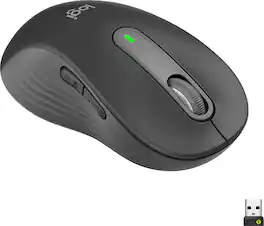
Logitech - Signature M650 L Wireless Left-Handed Scroll Mouse with Silent Clicks - Wireless - Graphite
FREE shipping to
More Buying Options

Specifications
- Maximum Sensitivity4000 dots per inchNumber of Buttons (Total)5Connection TypeWireless
- Key Specs
- Maximum Sensitivity: 4000 dots per inch (Mouse sensitivity is measured in dots per inch (DPI). The higher the DPI, the more sensitive the mouse is and may be more useful for high-density pixel screens. Lower DPI typically means more precision and accuracy in mouse movement.)
- Number of Buttons (Total): 5
- Connection Type: Wireless
- General
- Brand: Logitech
- Model Number: 910-006234
- Product Name: Signature M650 L Wireless Left-Handed Scroll Mouse with Silent Clicks
- Color: Graphite
- System Requirements: Windows 10, 11 or later, macOS 10.15 or later, Linux, Chrome OS, iPadOS 13.4 or later, Android 8.0 or later (The software that a product must have for it to be able to integrate with another product.)
- Features
- Mouse Type: Standard
- Performance
- Mouse Operation: Scroll wheel, Button(s)
- Mouse Grip Style: Standard (In comparison to many palm and claw grips, ergonomic grip mice are designed for a specific handedness and put the hand and wrist in a position to promote comfort. Customizable grips feature buttons/keys that can be configured to perform specific actions and may also have customizable calibration and sensitivity settings.)
- Handedness: Left-handed
- Tracking Method: Optical (There are several types of computer mice, optical and laser being among the most common. Optical mice detect less detail and provide more precise and accurate movement. Laser mice detect more detail and can be used on a wider variety of surfaces, but are more sensitive to small movements.)
- Maximum Sensitivity: 4000 dots per inch (Mouse sensitivity is measured in dots per inch (DPI). The higher the DPI, the more sensitive the mouse is and may be more useful for high-density pixel screens. Lower DPI typically means more precision and accuracy in mouse movement.)
- Minimum Sensitivity: 400 dots per inch (Mouse sensitivity is measured in dots per inch (DPI). The higher the DPI, the more sensitive the mouse is. Lower DPI typically means more precision and accuracy in mouse movement, but higher DPI may be useful for high-density pixel screens.)
- Number of Buttons (Total): 5
- Number of Thumb Buttons: 2
- Number of Programmable Buttons: 5
- Adjustable Weight: false
- Connectivity
- Connection Type: Wireless
- Wireless Connectivity: Radio Frequency (RF), Bluetooth (The manner in which a device sends data to another device over a short distance without the use of wires or cables.)
- Maximum Wireless Range: 33 feet
- Operating System Compatibility: Windows, Mac, Chrome, Linux, Apple iPadOS, Android
- Plug and Play Operation: true
- Power
- Mouse Power Source: Battery-powered
- On/Off Switch: true
- Rechargeable Battery (Mouse): false
- Number of Batteries Required: 1
- Batteries Included: true (Indicates whether the product comes with the required batteries for its operation.)
- Included
- Mouse Pad Included: false
- Dimensions
- Product Height: 4.6 inches (The out of box height of the item. Height is measured as the vertical distance from the bottom of the item to the top as it would be primarily used or placed.)
- Product Width: 2.6 inches (The out of box width of the item. Width is measured as the horizontal distance from one side of the item to the other as it would be primarily used or placed.)
- Product Weight: 115.4 grams (The out of box weight of the item.)
- Other
- UPC: 097855167613
Upgrade to smarter scrolling, better comfort, and more productivity with the Signature M650 L Left. The versatile mouse features an adaptive scroll SmartWheel that delivers line-by-line precision, and auto-switches to super-fast free spin mode with the flick of a finger. A choice of sizes for smaller, larger and left hands means there's a perfect fit for anyone. Seamless wireless connectivity, customizable side buttons, and a comfort shape keep you comfortably and productive hour after hour. Logitech’s SilentTouch technology delivers silent clicks to keep you focused – while the up to 24-month battery life and universal operating system compatibility ensure hassle-free performance.
- Scroll smarter: With Logitech Signature M650 Wireless Mouse you get line-by-line precision for documents and super-fast scrolling for long web pages; simply switch modes with a flick of the SmartWheel.
- Left-handed design: This comfortable full-size mouse is designed for larger hands, for the optimal fit for left-handed users.
- Upgrade your comfort: This work mouse provides long hours of comfort thanks to a contoured shape, soft thumb area, and rubber side grips that keep your hand snug and in place.
- Connect the way you like: Connect this cordless computer mouse in an instant via Bluetooth Low Energy or Logi Bolt USB receiver.
- Less noise, more focus: Whether working at the office or at home, Logitech Signature M650 is a quiet mouse, allowing you to enjoy 90 percent less click noise with SilentTouch technology.*
- Customizable side buttons: Customize the side buttons on the computer mouse with Logitech Options+, available on Windows and macOS, to your favorite shortcuts – like back/forward or copy/paste.
- 24 month battery life: Work for up to 2 years on the single AA battery that comes with your multi-device mouse.**
- Works on multiple platforms: Experience seamless compatibility with Windows, macOS, Linux, ChromeOS, iPadOS, and Android operating systems; it is also a Works with Chromebook certified product.
- More sustainable: Plastic parts in Signature M650 L Left Graphite include 68% certified post consumer recycled plastic*. Certified carbon neutral: the carbon impact of the product and packaging has been reduced to zero..³
- Scroll smarter: With Logitech Signature M650 Wireless Mouse you get line-by-line precision for documents and super-fast scrolling for long web pages; simply switch modes with a flick of the SmartWheel.
- Left-handed design: This comfortable full-size mouse is designed for larger hands, for the optimal fit for left-handed users.
- Upgrade your comfort: This work mouse provides long hours of comfort thanks to a contoured shape, soft thumb area, and rubber side grips that keep your hand snug and in place.
- Connect the way you like: Connect this cordless computer mouse in an instant via Bluetooth Low Energy or Logi Bolt USB receiver.
- Less noise, more focus: Whether working at the office or at home, Logitech Signature M650 is a quiet mouse, allowing you to enjoy 90 percent less click noise with SilentTouch technology.*
- Customizable side buttons: Customize the side buttons on the computer mouse with Logitech Options+, available on Windows and macOS, to your favorite shortcuts – like back/forward or copy/paste.
- 24 month battery life: Work for up to 2 years on the single AA battery that comes with your multi-device mouse.**
- Works on multiple platforms: Experience seamless compatibility with Windows, macOS, Linux, ChromeOS, iPadOS, and Android operating systems; it is also a Works with Chromebook certified product.
- More sustainable: Plastic parts in Signature M650 L Left Graphite include 68% certified post consumer recycled plastic*. Certified carbon neutral: the carbon impact of the product and packaging has been reduced to zero..³
Whats Included
- M650 L Left Wireless Mouse
- USB Receiver
- 1 AA Battery
- User documentation
- M650 L Left Wireless Mouse
- USB Receiver
- 1 AA Battery
- User documentation
Q: What is the little part called that you show with the mouse that plugs into it
A: It is a USB receiver and it is needed for the mouse to communicate via Bluetooth with your laptop /computer.
Compare similar products
Upgrade to smarter scrolling, better comfort, and more productivity with the Signature M650 L Left. The versatile mouse features an adaptive scroll SmartWheel that delivers line-by-line precision, and auto-switches to super-fast free spin mode with the flick of a finger. A choice of sizes for smaller, larger and left hands means there's a perfect fit for anyone. Seamless wireless connectivity, customizable side buttons, and a comfort shape keep you comfortably and productive hour after hour. Logitech’s SilentTouch technology delivers silent clicks to keep you focused – while the up to 24-month battery life and universal operating system compatibility ensure hassle-free performance.

Upgrade to smarter scrolling, better comfort, and more productivity with the Signature M550 – featuring SmartWheel scrolling that delivers precision and speed in an instant. A choice of sizes for smaller or larger hands means there's a perfect fit for anyone. Seamless wireless connectivity, silent clicks, and a comfort shape keep you comfortable and productive hour after hour.

Upgrade to smarter scrolling, better comfort, and more productivity with the Signature M650 L. The versatile mouse features an adaptive scroll SmartWheel that delivers line-by-line precision, and auto-switches to super-fast free spin mode with the flick of a finger. A choice of sizes for smaller, larger and left hands means there's a perfect fit for anyone. Seamless wireless connectivity, customizable side buttons, and a comfort shape keep you comfortably and productive hour after hour. Logitech’s SilentTouch technology delivers silent clicks to keep you focused – while the up to 24-month battery life and universal operating system compatibility ensure hassle-free performance.
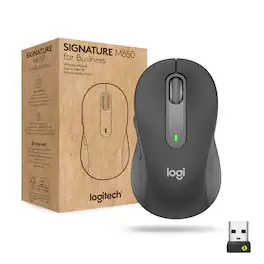
The easy-to-deploy (and manage) Signature M650 for Business Wireless Mouse improves employee productivity by 50% vs laptop touchpads. And it provides Secure Connections Only Mode—Bluetooth Low Energy Security Mode 1, Level 4 protection when paired with a Logi Bolt USB receiver. Or connect via Bluetooth Low Energy when cross-platform flexibility matters. Get line-by-line precision for documents – and super fast scrolling for long web pages by switching modes with a flick of the SmartWheel. It’s also 90% less “clicky” thanks to SilentTouch technology. In two sizes for small or large hands, and a contoured shape and soft thumb area for comfort.
| Pros for Logitech - Signature M650 L Wireless Left-Handed Scroll Mouse with Silent Clicks - Wireless - Graphite | |||
|---|---|---|---|
| There were no pros for this product— | Overall Performance, Size, Ease of Use, Connectivity, Ergonomics | Size, Overall Performance, Ease of use, Bluetooth, Silent Clicks | There were no pros for this product— |
| Cons for Logitech - Signature M650 L Wireless Left-Handed Scroll Mouse with Silent Clicks - Wireless - Graphite | |||
| There were no cons for this product— | Scroll Wheel | Scroll Wheel, Price, Side Buttons | There were no cons for this product— |
Specs
Reviews
Customer Images
The vast majority of our reviews come from verified purchases. Reviews from customers may include My Best Buy members, employees, and Tech Insider Network members (as tagged). Select reviewers may receive discounted products, promotional considerations or entries into drawings for honest, helpful reviews.
- Rated 5 out of 5 stars
Excellent left-handed mouse
I got this mouse for my teenage daughter who is left-handed. She is used to using the generic shaped mice with less buttons, because most of the premium options have the additional buttons on the wrong side. Now not only does she have configurable thumb buttons she can use, but a very well-designed mouse overall. - Comfortable curved shape and soft touch plastic - Quiet and smooth operation of both the scroll wheel and buttons - Easy setup: perforated packaging is easy to open; the battery is preinstalled and once I pulled the tab my computer recognized the mouse immediately (over Bluetooth) - Easily replaceable AA battery included - Multiple connection options: Bluetooth or USB wireless receiver - USB receiver can be stored in the battery compartment when not in use - 2 thumb buttons - on the correct side for left-handed users (normally forward and back, but configurable with the Logitech app) - No issues with tracking on every surface we have tried. I would definitely recommend and I might get the right-handed version for myself! The variable speed scrolling and quiet buttons would be a useful upgrade from my current mouse at work.
This review is from Logitech - Signature M650 L Wireless Left-Handed Scroll Mouse with Silent Clicks - Wireless - Graphite
Posted by MGoose
- Rated 5 out of 5 stars
If you are left handed, with larger hands....
If you are left handed, with larger hands the LOGI M650 is for us. The left hand mouse allows the natural left hand thumb to access the two (2) programmable side buttons. Pairing is fast and easy with Bluetooth. No Bluetooth, the M650 comes with the standard USB transceiver for rock solid mouse operation. The feel of the embossed rubber fins is awesome. They make the mouse a pleasure especially for long periods of use. The center wheel not only serves as a center button, but smooth scrolling as well. Super accurate laser scanning over most surfaces, even glass. Happily, the single AA battery is said to last 2-years. Along with that is a true on/off switch.
This review is from Logitech - Signature M650 L Wireless Left-Handed Scroll Mouse with Silent Clicks - Wireless - Graphite
Posted by JerryZ
- Rated 5 out of 5 stars
smooth & ease to use for performance
Review of M650 Lefthand - Large Size. The Logitech M650 for left hand is simple and easy to use inline with most of Logi mouses. It’s key attributes are: - Made for large sized left hands; - SmartWheel - Silent Clicks - Customizable Side Buttons - Comfort and upgraded for long hours - Connect via Bluetooth or with included Logi Bolt USB Receiver - Comes in smaller size. Upon unpacking and connecting to MacBook or Windows machines were straight and simple. It need to go through regular setting to customize to adjust to personal preferences. In this aspect it doesn’t require or have any differences with existing models. I have used the smart wheel and silent clicks mostly. And the silent click was most remarkable way of using compared to previous or other models. As click doesn’t feel that plastic touching noise that we are used. As click, works perfectly but smooth almost like something is missing but in the same time glad it is the way. It is battery based charging and according to the manufacturer claim should last 24 Months. But naturally will vary one length of personal usage.
This review is from Logitech - Signature M650 L Wireless Left-Handed Scroll Mouse with Silent Clicks - Wireless - Graphite
Posted by MigDigital