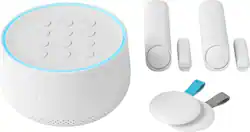
Google - Nest Secure Alarm System - White
- Key Specs
- Number Of Sensors Accommodated: 30
- Wireless Connectivity: Wi-Fi (The manner in which a device sends data to another device over a short distance without the use of wires or cables.)
- Works With: Google Assistant, Nest (Compatible with or able to be connected to other smart devices or applications.)
- Power Source: Battery-powered, Plug-in
- Number Of Sensors Included: 2
- General
- Product Name: Nest Secure Alarm System
- Brand: Google
- Model Number: H1500ES
- Color: White
- Detection
- Alarm External Notification: App
- Detector Type: Motion
- Number Of Sensors Accommodated: 30
- Connectivity
- Wireless: true
- Wireless Connectivity: Wi-Fi (The manner in which a device sends data to another device over a short distance without the use of wires or cables.)
- Compatibility
- Works With: Google Assistant, Nest (Compatible with or able to be connected to other smart devices or applications.)
- Voice Assistant Built-in: No (A digital assistant built into the device that uses voice commands to answer questions and control smart devices.)
- App Compatible: true (The product can be connected to a program or software application on a mobile device, which then receives collected data from the product.)
- Operating System Compatibility: Android, Apple iOS
- Environmental
- Indoor Or Outdoor Use: Indoor and outdoor (Indicates the appropriate environment product was designed to be used in.)
- Power
- Power Source: Battery-powered, Plug-in
- Battery Backup: true (Provides power if the main power source is unavailable.)
- Rechargeable Battery: true
- Charging Interface(s): DC Jack (The connection for transmitting power to charge the device.)
- Included
- Number Of Sensors Included: 2
- Control Center Included: true
- Other
- UPC: 813917020500
Tough on bad guys. Easy on you.
The Nest Secure alarm system is easy to live with every day. Just tap Nest Tag on Nest Guard to arm and disarm the alarm - no passcode needed. Nest Detect sensors look out for doors, windows and rooms. And with the Nest app, you can keep an eye on what matters.
- Arm and disarm however you like: Use the Nest app from anywhere, tap Nest Tag on Nest Guard or enter a passcode. Or just say, "Hey Google, set security to Away and guarding," and the built-in Google Assistant will arm for you.
- Get Remind Me alerts: If you forget to arm your alarm, you can get a Remind Me alert on your phone so you can arm right from the Nest app.*
- Look out for doors, windows and rooms: Nest Detect is a sensor that does many things. Stick it on a window, and it detects open/close. Stick it on a wall, and it senses motion. On a door, it does both. With a built-in motion sensor, Nest Guard also protects a room.
- Open quietly: Press the button on Nest Detect to open a door without setting off the alarm. The house stays armed and the alarm stays silent.
- It's easy for everyone: Tap Nest Tag on Nest Guard to arm and disarm the alarm. Without a passcode. Put one on your keychain and give one to someone you trust.
- Know what's happening at home: With the free Nest app, you can arm and disarm from anywhere. Check in on your home anytime. And if the alarm goes off, you'll get a security alert.
- Just ask Google.: The built-in Google Assistant can help you manage tasks, get answers and control your home.
Whats Included
- Adhesive strips
- Mounting screws
- Nest Guard
- Quick Start Card
- Two Nest Detect sensors (with required CR123 battery included)
- Two Nest Tags
- Two corner mounting brackets
- Two flat mounting brackets
- Two open/close magnets
- User's Guide
A: The Nest Secure system has an option called open tone. When Open Tone is enabled, and the alarm is set to Off , the Guard will sound a friendly tone when someone opens a door or window.
A: The Nest Secure system comes with two Nest Detects which can be placed on a door or window. The Nest Guard does have a motion sensor on the front, however you can choose to disable this within the settings.
A: The alarm will arm with or without a window/door open. The message light will be orange indicating a window or door is open and all other sensors will work. There is a setting to change so the system can go off instantly if you want it too. That'as a recent change, though.
A: The Nest Guard which is the main control for the Nest Secure system plugs into a normal outlet to be powered at all times and will need to be placed on a flat surface to get the most out of the motion sensor in the front of the Nest Guard. In case power is lost, it also has a 12 hour battery backup. More details about the Nest Secure can be found here: https://nest.com/support/article/Frequently-asked-questions-about-Nest-Secure
A: You can get notifications on your phone without having to pay for the subscription. The guard will chime when a door opens if the alarm is off but will announce the specific door/window if the guard is set to home & guarding or away and guarding.
A: You can try setting it to the lower detection mode - but with a 100 lb dog that may not be enough (it is designed for about 40lb dogs)
A: Professional Monitoring by MONI doesn't include Nest Aware Video History for cameras. These are two separate subscriptions, so you can add one or both to your setup depending on which products you own. For customers that use both Nest Secure and Nest cameras, we're also working on making video alarm verification available to professional security monitoring services.
A: The time setting are: No delay 15 sec 30 sec 45 sec 1 min 3 min 5 min Bother home armed and away armed can be set independent of each other. I have no delay when home armed and 30 sec delay when away armed. You can set sensors independent each other as well for both home and away.




















