Customer Ratings & Reviews


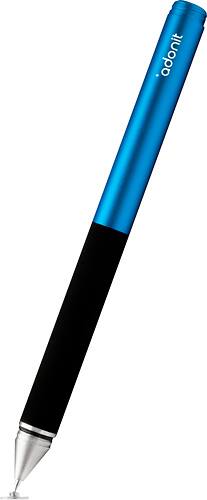
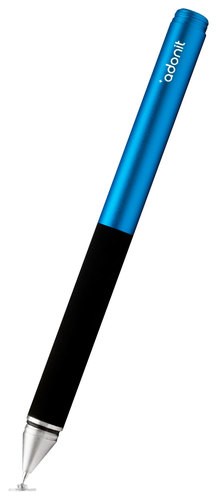
- Model:
- ADJPDT
- |
- SKU:
- 8476358
Customer reviews
Rating 4 out of 5 stars with 66 reviews
(66 customer reviews)to a friend
Customers are saying
Customers are impressed with the Jot Pro Fine-Point Stylus's ease of use and accuracy for drawing and note-taking on various touchscreens. Many appreciate its precision and compatibility with different devices. However, some users note that the tip takes some getting used to and may limit use of the screen's edges. Overall, the stylus is praised for its effectiveness in creating precise lines and strokes.
This summary was generated by AI based on customer reviews.
Rated 4 out of 5 stars
Great stylus for the price.
Posted .This reviewer received promo considerations or sweepstakes entry for writing a review.I like the feel and handling of this stylus. Very well balanced. The actual touch on screen is a little off from end of stylus, but can adjust. I plan on using this for drawing.
I would recommend this to a friend- Pros mentioned:Ease of use
Rated 4 out of 5 stars
Good value for what I use it for.
Posted .This reviewer received promo considerations or sweepstakes entry for writing a review.I purchased it because Best Buy offered it a really great price. Definitely don't regret it. I'm sure the upgrade would be more to my liking but for what I paid. It has by far dwarfed any others I've used thus far. I can't stand the way a stylus feels like writing with a crayon. This product (when paired with the right app) is the closest thing to a real pen I've found.
This review is from Adonit - Jot Pro Fine-Point Stylus for Most Capacitive Touch-Screen Displays - Gunmetal
I would recommend this to a friend Rated 5 out of 5 stars
Great stylus for handwriting
Posted .This reviewer received promo considerations or sweepstakes entry for writing a review.Bought this stylus to use with the tablets our school purchased for us. Works great for taking handwritten notes in OneNote or the Handwriting Panel in Windows 8.
This review is from Adonit - Jot Pro Fine-Point Stylus for Most Capacitive Touch-Screen Displays - Gunmetal
I would recommend this to a friendRated 3 out of 5 stars
not as good as i have expected
Posted .This reviewer received promo considerations or sweepstakes entry for writing a review.I have iPad air, but this stylus only worked on and off. :(
No, I would not recommend this to a friendRated 2 out of 5 stars
Feels good in hand, skips too much
Posted .This reviewer received promo considerations or sweepstakes entry for writing a review.I love Noteshelf for iPad and wanted to love this stylus to use with it. It was great, when it worked... but I found that it skipped so much that I was constantly having to go back and re-do my writing due to said skipping. I ended up returning mine and going back to my AYL stylus that is reliable and consistent.
This review is from Adonit - Jot Pro Fine-Point Stylus for Most Capacitive Touch-Screen Displays - Red
No, I would not recommend this to a friendRated 3 out of 5 stars
Okay...
Posted .This reviewer received promo considerations or sweepstakes entry for writing a review.I bought this stylus thinking it would be more like a pen. It is not or maybe my expectations were too high. I wanted something to give me the results like what you see as a sample in note-taking apps. I am still going to keep it, I think it works great for selecting. As a pen, it is not that accurate.
This review is from Adonit - Jot Pro Fine-Point Stylus for Most Capacitive Touch-Screen Displays - Silver
No, I would not recommend this to a friend
People also viewed
- $129.00Your price for this item is $129.00
- $79.00Your price for this item is $79.00
- $129.00Your price for this item is $129.00
- $39.99Your price for this item is $39.99
- $99.00Your price for this item is $99.00
- $39.99Your price for this item is $39.99
- $54.99Your price for this item is $54.99$69.99The comparable value for this item is $69.99
- $9.99Your price for this item is $9.99
- $139.97Your price for this item is $139.97$179.99The comparable value for this item is $179.99
- $24.99Your price for this item is $24.99$32.99The comparable value for this item is $32.99
- $34.99Your price for this item is $34.99$49.99The comparable value for this item is $49.99
- $104.99Your price for this item is $104.99$129.99The comparable value for this item is $129.99
- $79.99Your price for this item is $79.99
- $82.99Your price for this item is $82.99
- $49.99Your price for this item is $49.99
- $99.99Your price for this item is $99.99
- $49.99Your price for this item is $49.99
- $40.99Your price for this item is $40.99
- $79.00Your price for this item is $79.00
- $19.99Your price for this item is $19.99