Customer Ratings & Reviews
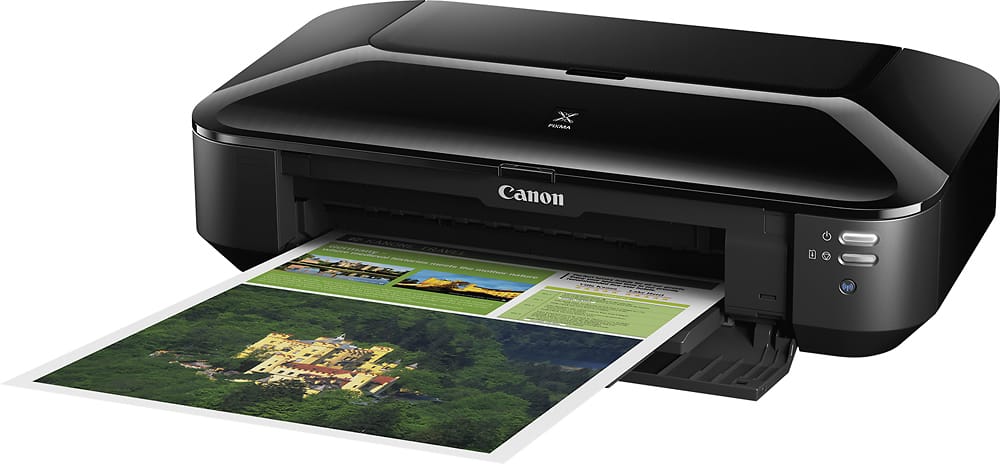
- Model:
- 8747B002
- |
- SKU:
- 10851620
Customer reviews
Rating 4.5 out of 5 stars with 291 reviews
(291 customer reviews)Rating by feature
- Value4.6
Rating 4.6 out of 5 stars
- Quality4.6
Rating 4.6 out of 5 stars
- Ease of Use4.3
Rating 4.3 out of 5 stars
Customers are saying
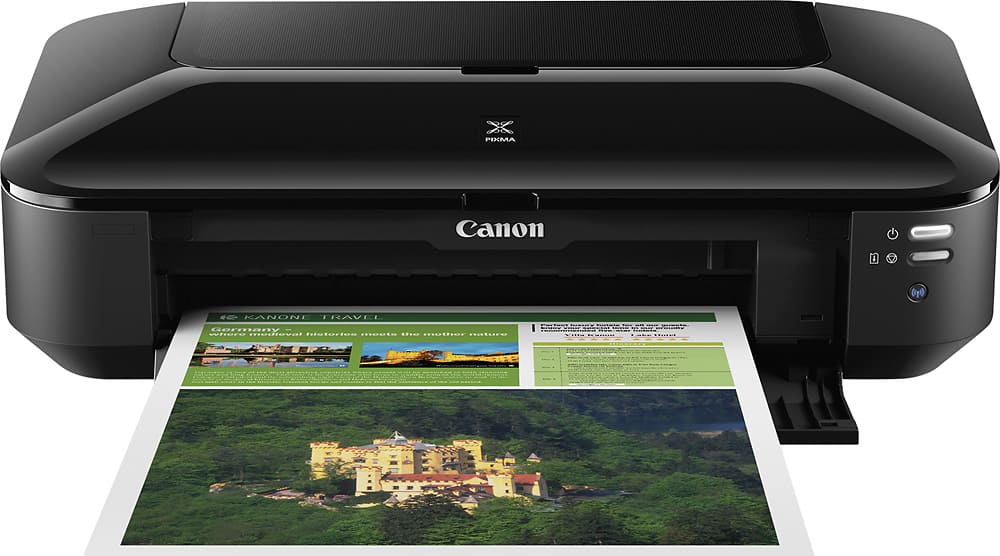
Customers consistently note the PIXMA iX6820 Wireless Inkjet Printer for its excellent print quality and ease of use. Many appreciate its overall performance and reasonable price. However, some customers have experienced connectivity issues and find the printer's size to be large considering its features, while others have found the initial setup to be a bit confusing.
This summary was generated by AI based on customer reviews.
- Pros mentioned:Print quality
Rated 5 out of 5 stars
Excellent printer
||Posted .This reviewer received promo considerations or sweepstakes entry for writing a review.This printer was an excellent choice! I was looking for a printer that would print up to 11x14 size. Be advised that this printer is large. It does take up a lot of desk real estate. Most images of the printer just show a picture coming out of the printer in a folded up state. By the time you open up the feeder guides and the catch tray, a lot of room is needed. I know some will miss having a small lcd operating panel on the printer, but you get used to working with the software on your computer or device. I wanted a dependable, high quality photo printer and that is what this printer is.
This review is from Canon - PIXMA iX6820 Wireless Inkjet Printer - Black
I would recommend this to a friend - Pros mentioned:Print qualityCons mentioned:Setup
Rated 4 out of 5 stars
HD Printing, crisp lines, great detail
||Posted .This reviewer received promo considerations or sweepstakes entry for writing a review.Finally found a printer that can handle the high quality printing I'm looking for. The DPI on this printer is incredible, resulting in crisp lines, and super clear details on small fonts / logos / etc. Only reason it gets 4 stars is b/c the setup was a little confusing without their being a screen, but the wizard I was able to download from Canon's website assisted through setup. Overall, great printer for the month I've had it.
This review is from Canon - PIXMA iX6820 Wireless Inkjet Printer - Black
I would recommend this to a friend - Pros mentioned:Print quality
Rated 4 out of 5 stars
Great Printer
||Posted .This reviewer received promo considerations or sweepstakes entry for writing a review.Good product. I got it specially to print on vellum paper and it works just fine.
This review is from Canon - PIXMA iX6820 Wireless Inkjet Printer - Black
I would recommend this to a friend - Pros mentioned:Print quality
Rated 5 out of 5 stars
Simple and fast printing
||Posted .This reviewer received promo considerations or sweepstakes entry for writing a review.Easy to set up. Easy to install software. I liked the led lights on the ink cartridges that light when inserted properly. I set the printer to grey scale as I use it only to print tabloid sized architectural / construction plans. The top feeding paper path works perfectly every time with excellent detail accuracy for auto-cad engineering plans. Startup time and print output is fast. The printer shuts off after factory set inactivity timeout. The power button must be manually pressed to restart the printer. Large but lightweight with a sleek modern look for an oversize paper printer.
This review is from Canon - PIXMA iX6820 Wireless Inkjet Printer - Black
I would recommend this to a friend - Pros mentioned:Price, Print quality
Rated 5 out of 5 stars
Great scrapbooking printer
||Posted .This reviewer received promo considerations or sweepstakes entry for writing a review.I was searching for a wide format printer to print out 12 x 12 scrapbook pages and found this printer. I love it!!! It works great and the quality far exceeds what I expected for its price. If you are are on the edge about purchasing this printer, go ahead and buy it. You won't be sorry.
This review is from Canon - PIXMA iX6820 Wireless Inkjet Printer - Black
I would recommend this to a friend - Pros mentioned:Print quality
Rated 4 out of 5 stars
Very Wide Printer 13x9 prints here I come!
||Posted . Owned for less than 1 week when reviewed.This reviewer received promo considerations or sweepstakes entry for writing a review.I think this is the last CLI 250/251 printer they make. As you know those print cartridges are very cheap and easy to find. The printer I received seemed quite basic, no frills options. No, screen, no scanner, no duplexer... However, it appears to be quite well built and looks like it's meant to last a while. I find that printers that rear feed have less paper jamming issues. Also the print cartridges slots are wide open once you lift the lid. It does have WIFI, which is a must these days, I used WPS to set it up, follow the instructions, power it on and hold the wifi button, wifi light will blink, go press the WPS button on your router, if successful it will change to solid. Printer is capable of 13x9 prints and canon sells the paper for an affordable price, approx less $1 per sheet. The print quality is on par with printers of this price range, it uses 5 cartridges MCYB and photo Black. If you do a lot of prints, then you want a printer that uses CLI 250/251 cartridges. But it is a BIG printer so be prepared for it, it's a wide format printer and if you need that then this is for you!
This review is from Canon - PIXMA iX6820 Wireless Inkjet Printer - Black
I would recommend this to a friend - Pros mentioned:Overall performance, Print quality
Rated 5 out of 5 stars
AMAZING printer. Great value. Workhorse!
||Posted .This reviewer received promo considerations or sweepstakes entry for writing a review.AMAZING printer. Quite a workhorse! It prints beautifully on so many surfaces. Perfect for my art prints and wedding stationery. The printer driver is amazing for self cleaning and troubleshooting. Highly recommend this product!
This review is from Canon - PIXMA iX6820 Wireless Inkjet Printer - Black
I would recommend this to a friend - Pros mentioned:Print quality
Rated 3 out of 5 stars
Great printer but has no scanner capabilities
||Posted .This reviewer received promo considerations or sweepstakes entry for writing a review.The quality of the printing is great. However, I was disappointed to find out that tis printer does not have a scanner. I had the exact same model of this previously which is why I repurchased this model. The earlier model had a scanner while this one does not.
This review is from Canon - PIXMA iX6820 Wireless Inkjet Printer - Black
No, I would not recommend this to a friend - Pros mentioned:Ease of use, Print quality
Rated 4 out of 5 stars
Great printer for photos
||Posted .This reviewer received promo considerations or sweepstakes entry for writing a review.Easy to set up. Printing photos on this printer, it don't get any better than this printer for photo printing.
This review is from Canon - PIXMA iX6820 Wireless Inkjet Printer - Black
I would recommend this to a friend - Pros mentioned:Print quality
Rated 5 out of 5 stars
Great printer for thick stock paper/cards.
||Posted .This reviewer received promo considerations or sweepstakes entry for writing a review.I only bought this printer for one purpose, to address advertising post cards I get from my commercial printing house. Commercial mailing houses use super fast inkjets that cost thousands of dollars to address mailers/postcards. This printer works perfectly fine for that, and it's fairly fast to boot. The printer has a fairly straight print path, from the flip up tray on the rear of the printer to the output tray in the front. It fed through postcards printed on 14 point (about equal to 114 pound index stock) cardstock just fine. I think the fact that this can print on 13x19 inch paper, they built in a more robust feeding system, which handles the postcards without any misfeeds at all! The ink dries within 20 minutes. I'm happy with this printer for the purpose that I'm using it for. Most commercial mail houses charge around 8 to 10 cents a postcard address, and I've already run through 700 postcards, so 2 more mailings of 700 cards, and the printer has paid off for itself!
This review is from Canon - PIXMA iX6820 Wireless Inkjet Printer - Black
I would recommend this to a friend - Pros mentioned:Print quality
Rated 5 out of 5 stars
very nice printer
||Posted .This reviewer received promo considerations or sweepstakes entry for writing a review.great printer once it was set up. set up was a bit challenging but once done i couldn't be happier, i printing on 110lb card stock and it works perfectly. now i only print 1 page at a time. i dont want to take a chance of causing a jam. oh i have an hp7100 series and this printer is better, but i cant use it for copying but hp software stinks so for printing canon way to go.
This review is from Canon - PIXMA iX6820 Wireless Inkjet Printer - Black
I would recommend this to a friend - Pros mentioned:Print qualityCons mentioned:Size
Rated 5 out of 5 stars
Great Printer
||Posted .This reviewer received promo considerations or sweepstakes entry for writing a review.Very good printer. Prints photos outstanding. It's a big printer so make sure you have the space to put it before you purchase it.
This review is from Canon - PIXMA iX6820 Wireless Inkjet Printer - Black
I would recommend this to a friend - Pros mentioned:Print quality
Rated 5 out of 5 stars
Great picture quality.
||Posted . Owned for less than 1 week when reviewed.This reviewer received promo considerations or sweepstakes entry for writing a review.I have always been an HP fan. But my last HP printer had a problem handling photo paper. My wife and I want to print pictures without always running to Walgreen's. We decided to get this printer for that particular purpose. I chose Canon because of the good reviews and my assumption that - since photography is their business - they would strive for good picture quality. We have not been disappointed. So far, we have printed 75+ Christmas and Birthday photos with no problems. The quality is excellent. The set-up was relatively simple - even for someone like me - that am not highly computer savvy. Please note - the printer does have a rather large footprint - but for us - it does not present a problem. If photos are important to you - this is a great printer.
This review is from Canon - PIXMA iX6820 Wireless Inkjet Printer - Black
I would recommend this to a friend Rated 5 out of 5 stars
Great but software should be updated
||Posted . Owned for 1 month when reviewed.This reviewer received promo considerations or sweepstakes entry for writing a review.Great printer, just installation process is a hassle if you have a MacBook. Took awhile to get installed.
This review is from Canon - PIXMA iX6820 Wireless Inkjet Printer - Black
I would recommend this to a friend- Pros mentioned:Ease of use, Print quality
Rated 5 out of 5 stars
Excellent Printer
||Posted .This reviewer received promo considerations or sweepstakes entry for writing a review.Unless you are a professional photographer, the prints are wonderful. It prints very fast and documents are printed from the last page to the first so you do not have to collate the document.Set up is easy and it is no problem to replace the cartridges.
This review is from Canon - PIXMA iX6820 Wireless Inkjet Printer - Black
I would recommend this to a friend - Pros mentioned:Print quality
Rated 5 out of 5 stars
Does it have the drivers for older PCs?
||Posted .This reviewer received promo considerations or sweepstakes entry for writing a review.The answer is: the program that is provided with the pixma ix6820 canon printer actually will search online for you and download the drivers needed. What a relief! At first I couldn't get it to print, but once I got to the troubleshooting part of the program it handled the problem with the driver. Very simple, and kudos to Canon for staying one step ahead of all the other brands. Prints beautifully from either my editing programs or my own folders. Be sure to go in to printing preferences and choose correct settings like paper type, quality, and portrait or landscape. You can also use the printers provided program as well. I've always had a more professional printer so I'm very picky indeed. But so far the prints are excellent. I do not use the wireless. The 13x19 print available is an added plus.
This review is from Canon - PIXMA iX6820 Wireless Inkjet Printer - Black
I would recommend this to a friend - Pros mentioned:Ease of use
Rated 5 out of 5 stars
Super Printer
||Posted .This reviewer received promo considerations or sweepstakes entry for writing a review.Great printer. Ive been looking for relatively inexpensive over sized printer. Very easy to set up runs great.
This review is from Canon - PIXMA iX6820 Wireless Inkjet Printer - Black
I would recommend this to a friend - Pros mentioned:Print quality
Rated 5 out of 5 stars
Repeated purchase
||Posted . Owned for more than 2 years when reviewed.This reviewer received promo considerations or sweepstakes entry for writing a review.This is my second one. I love this printer, especially as an artist and teacher. I get quality prints, troubleshooting is simple, and I LOVE the borderless printing sizes. It’s easy to replace ink, and cost effective. If something happens to this printer, I will buy a 3rd one.
This review is from Canon - PIXMA iX6820 Wireless Inkjet Printer - Black
I would recommend this to a friend - Pros mentioned:Overall performance
Rated 5 out of 5 stars
CANON - PIXMA iX6820
||Posted .This reviewer received promo considerations or sweepstakes entry for writing a review.Works great, easy to install, easy to connect to wifi. Very flexible with different types of projects.
This review is from Canon - PIXMA iX6820 Wireless Inkjet Printer - Black
I would recommend this to a friend - Pros mentioned:Print quality
Rated 5 out of 5 stars
Great Professional Printer
||Posted .This reviewer received promo considerations or sweepstakes entry for writing a review.This printer was a replacement for the iP8720. I chose the Pixma iX because the printer head was different and more capable of printing dots closer together on matte type paper than the iP. I am absolutely loving this printer for thicker paper needs! The rear tray is a luxery, not a nuisance, and although the printer is pretty wide, I enjoy using it for professional size prints.
This review is from Canon - PIXMA iX6820 Wireless Inkjet Printer - Black
I would recommend this to a friend