Customer Ratings & Reviews
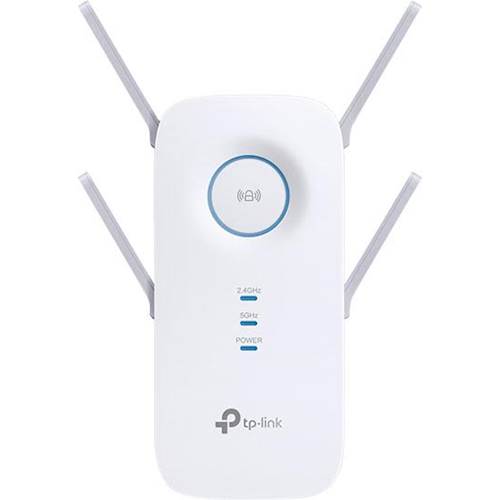

- Model:
- RE650
- SKU:
- 5844809
Rating by feature
- Value
Rating 4.2 out of 5 stars
- Quality
Rating 4.4 out of 5 stars
- Ease of Use
Rating 4.2 out of 5 stars
Customers are saying
Customers regard the AC2600 Wi-Fi Range Extender very favorably, frequently praising its ability to extend Wi-Fi range and ease of setup. Many also highlighted the improved signal strength and broader coverage provided by the device. However, some users experienced performance issues, including occasional disconnections requiring a reboot.
This summary was generated by AI based on customer reviews.
Didn't reach intended areas
||Posted .This reviewer received promo considerations or sweepstakes entry for writing a review.This didn't reach the intended areas that should have been within range.
No, I would not recommend this to a friendBrand response from TPLinkSupport
Posted .Hi,
Thank you for your review. If you haven't noticed a significant improvement in WiFi coverage after installing the extender, we recommend relocating the unit to a position in your home where the router's WiFi signal is sufficiently strong; yet far enough from the router to effectively extend its range. Please verify the RE status LED is indicating a solid connection.
If you'd like assistance with any of these steps, please send an e-mail with your contact information and a link to this review to [email protected] and we'll gladly have a Support Agent follow up with you directly.
Best Regards,
TP-Link Support
[email protected]
- Cons mentioned:Performance
Range extender
||Posted .This reviewer received promo considerations or sweepstakes entry for writing a review.It did not work. It would die and I would have to reboot it.
No, I would not recommend this to a friendBrand response from TPLinkSupport
Posted .Hi,
If you haven't noticed a significant improvement in WiFi coverage after installing the extender, we recommend relocating the unit to a position within your home where the router's WiFi signal is sufficiently strong; yet far enough from the router to effectively extend its range. Please verify the RE status LED is indicating a solid connection.
We also recommend ensuring the extender's firmware is fully up to date using the steps outlined in our FAQ here: https://www.tp-link.com/us/support/faq/1406/
If you'd like assistance with any of these steps, please reach out to our free support team using any of the resources included with the product, or from our official website, and we'll gladly have a Support Agent follow up with you directly.
Thank you,
TP-Link Support
Great paperweight
||Posted . Owned for 1 month when reviewed.This reviewer received promo considerations or sweepstakes entry for writing a review.I tried to set it up and just as I was about to finish the set up it shut down and now I cannot set it back up it does not appear there’s any online or technical information that can help me sort through this process other than that it makes a great paperweight
No, I would not recommend this to a friendBrand response from TPLinkSupport
Posted .Hi,
Thank you for your review. If you're experiencing difficulty connecting the extender to your router, we recommend setting up the device in the same room as your router, then relocating it after setup is complete. We also suggest re-verifying your router's WiFi password during setup, or if using the WPS setup method, ensuring the WPS process is performed in the correct order. The extender's indicator LEDs will help you determine which position in your home is ideal.
We also recommend ensuring the extender's firmware is fully up to date using the steps outlined in our FAQ here: https://www.tp-link.com/us/support/faq/1406/
If you'd like help with any of these steps, please send an e-mail with your contact information and a link to this review to [email protected] and we'll have a Support Agent follow up with you directly.
Best Regards,
TP-Link Support
Dr. Joe
||Posted . Owned for 5 months when reviewed.This reviewer received promo considerations or sweepstakes entry for writing a review.Did not work at all with my system. Could not get it to link with my wifi. Wifi could not find the unit. I returned it.
No, I would not recommend this to a friendSlowed down my upload speed
||Posted .This reviewer received promo considerations or sweepstakes entry for writing a review.I have an ATT 2line router that this extender did not work well with.
No, I would not recommend this to a friendBrand response from TPLinkSupport
Posted .Hi,
If you haven't noticed a significant improvement in WiFi coverage after installing the extender, we recommend relocating the unit to a position in your home where the router's WiFi signal is sufficiently strong; yet far enough from the router to effectively extend its range. Please verify the RE status LED is indicating a solid connection. If you'd like assistance with any of these steps, please send an e-mail with your contact information and a link to this review to [email protected] and we'll gladly have a Support Agent follow up with you directly.
Best Regards,
TP-Link Support
[email protected]
https://community.tp-link.com
- Pros mentioned:Wi-fi range
Great with 2.4GHz, Not Connecting to the 5GGz
Posted .This reviewer received promo considerations or sweepstakes entry for writing a review.Instructions could be better. The final step resulted in a spinning that never stopped. I reset and same problem. Finally did a chat and learned that is common and to ignore it. Although my Frontier router has both 2.4GHz and 5GHz, this device does not show light confirming it is sync with the 5GHz - so seems useless for 5GHz. I do get more range and can use laptop in backyard which was not an option before installing. I like that I can connect use ethernet port to connect smart tv to the device. For me, the device did NOT negatively affect upload download speeds. I obtained the TETHER APP and instructions again, not very clear - communication on installation could be better. How are we to know what is common and to ignore if the manufacturer doesn't communicate that! Not knowing the spinning was common and to ignore, and that the set up was complete seems to be something TP-LINK should work on or at best communicate so that we don't waste our time!!!! Sad that the 5GHz is not lighting up. I did reconfirm that my router has both 2.4GHz and 5GHz, so it being a dual router it would be nice for this price to have that option working!!!
I would recommend this to a friend - Pros mentioned:Wi-fi range
Up and running, WPS setup, not so much
Posted .This reviewer received promo considerations or sweepstakes entry for writing a review.Like another who reviewed this item, could not get the WPS setup to work. However the quick start guild was spot on. Except, what's not in the instructions: step one when WPS fails, use the reset button before proceeding to Web Browser set up. Why I needed this. Purchased an elliptical and the wife said, in the detached garage, we don't have room for it in the house (we do, she just does not want to look at it). The router is in the front bedroom and the garage has alleyway access, a long way from the router. In the garage I had consistent 1 bar and on a good day 2 bars on the iPad / elliptical machine. With this activated and working, I now get a solid 3 bars on both the iPad & elliptical wireless connection. Very happy and yes, I recommend this product.
I would recommend this to a friend - Pros mentioned:Setup
Excellent Extender
Posted .This reviewer received promo considerations or sweepstakes entry for writing a review.Range extenders continue to get faster and better and this one by TP-Link is no exception. This one comes with 4 antennas and is good for AC2600 dual-band wi-fi over both 2.4Ghz and 5Ghz channels. The setup was very easy and using the TP Tether app to manage configuration setting is very straight forward. In addition, the gigabit ethernet is useful when placing ti near other network devices that could benefit from a wired connection. I have over 25+ devices on my network at any given time and probably half would connect to range extender with no dropped connections or noticeable slowdown. Overall this is a great extender to use. Submitted as part of a free sample program
I would recommend this to a friend Very nice model. Great range and easy to setup
Posted .This reviewer received promo considerations or sweepstakes entry for writing a review.I own a couple of wireless network extenders made by TP-Link and this one works as claimed just like the others. I love these things. I live in an home where for some reason my Wi-Fi signal gets severely limited at the half way point. I have one on one side of my house and another in my garage. I also use one to extend the range when I fly my drones. The range off the extender is about as good as the range on my router. You do need to position right at about the 1 bar point from the signal your replicating / extending to maximize your range but if you do, you add significant range to your Wi-Fi. When I run this at a park, I believe I do get about 14,000sqft in range across the open field I tested it at. If not 14,000sqft it was very close to the mark. I didn't know the speeds for the Wi-Fi where I was so it wouldn't be right to even try to measure but I definitely got about double distance on my Drone which it what I've gotten with other extenders rated at around 15ksqft.
I would recommend this to a friend- Pros mentioned:Setup
CenturyLink DSL wireless extender.
Posted .This reviewer received promo considerations or sweepstakes entry for writing a review.Easy to setup and configure. Works great with my CenturyLink C2000T VDSL wireless High Speed router. It extends and holds my wireless connect in remote parts of our home very effectively. Cured my wireless connection drops!! This is the device that CenturyLink recommends.
I would recommend this to a friend - Pros mentioned:Signal strength
Good choice
Posted .This reviewer received promo considerations or sweepstakes entry for writing a review.My router is on the 2nd floor, the RE650 extender improved the signal for first floor much much better than the $40s one I used to have.
I would recommend this to a friend