Customer Ratings & Reviews
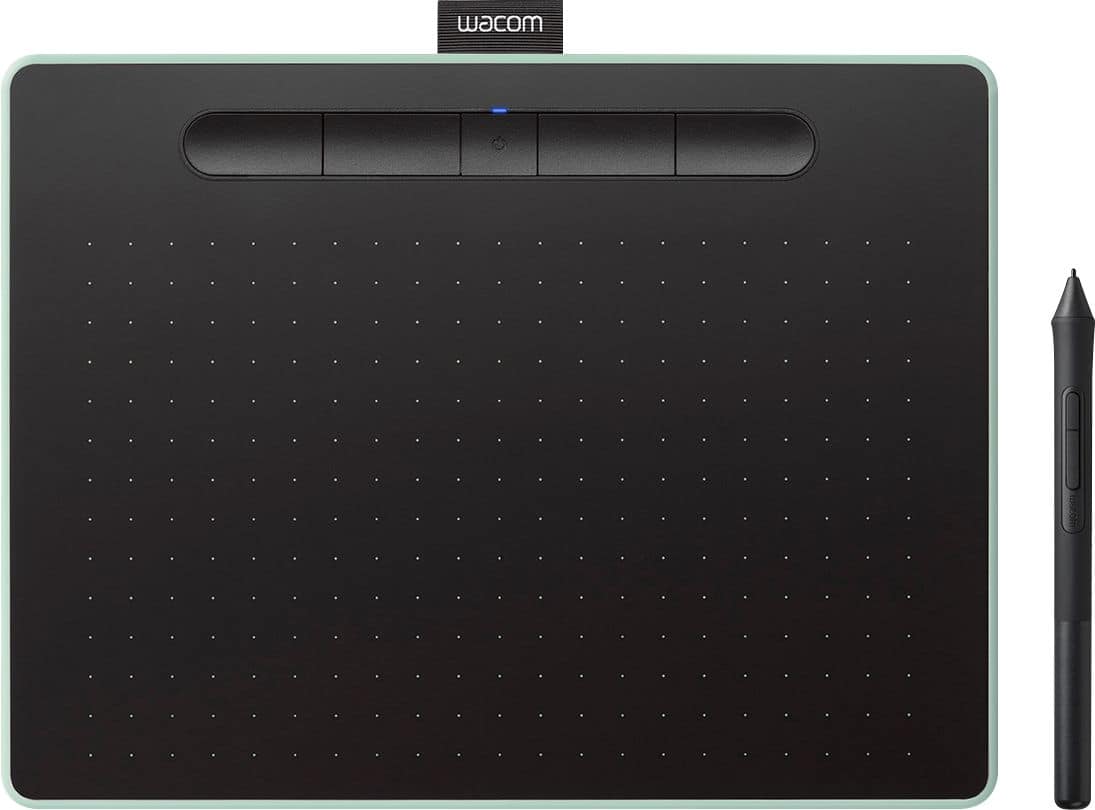




- Model:
- CTL6100WLE0
- |
- SKU:
- 6196631
Customer reviews
Rating 4.6 out of 5 stars with 650 reviews
(650 customer reviews)Rating by feature
- Value4.4
Rating 4.4 out of 5 stars
- Quality4.6
Rating 4.6 out of 5 stars
- Ease of Use4.4
Rating 4.4 out of 5 stars
Customers are saying
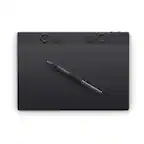
Customers are impressed with the Intuos Graphic Drawing Tablet, particularly its ease of use, quality, and ideal size. Many appreciate the convenience of its wireless feature and find it suitable for drawing. Some customers have noted concerns about the software, compatibility, lag, learning curve, and setup.
This summary was generated by AI based on customer reviews.
- Pros mentioned:Size
Rated 4 out of 5 stars
Exactly what my daughter need
||Posted . Owned for 2 months when reviewed.This reviewer received promo considerations or sweepstakes entry for writing a review.My daughter wanted to do more drawing digitally and this was a perfect way to get her started. There are certainly cheaper options but the size and sensitivity keep her from being limited in what she can do. This will last her a good long while.
This review is from Wacom - Intuos Graphic Drawing Tablet for Mac, PC, Chromebook & Android (Medium) with Software Included (Wireless) - Black
I would recommend this to a friend Rated 4 out of 5 stars
Essential tablet without all the side buttons.
||Posted . Owned for 1 month when reviewed.This reviewer received promo considerations or sweepstakes entry for writing a review.I have both the Intuos pro medium and this one. The pro version actually seems like it uses better materials, but the function of the tablet (levels of pressure, etc) I can't tell a difference. I've been using wacom tables since early 2000s when they were still on externally powered serial bus. They have gotten better over time, but these two models seem identical in terms of function for me. I actually like the surface on this one because it doesn't have all the fancy buttons that the pro has (I never use those side buttons anyways).
This review is from Wacom - Intuos Graphic Drawing Tablet for Mac, PC, Chromebook & Android (Medium) with Software Included (Wireless) - Black
I would recommend this to a friend- Pros mentioned:Ease of use
Rated 5 out of 5 stars
Wonderful Merchandise for coloring
||Posted . Owned for 1 month when reviewed.This reviewer received promo considerations or sweepstakes entry for writing a review.My grandkid loves it. Easy to navigate and use. Portable enough that he can carry it wherever he goes.
This review is from Wacom - Intuos Graphic Drawing Tablet for Mac, PC, Chromebook & Android (Medium) with Software Included (Wireless) - Black
I would recommend this to a friend - Pros mentioned:Ease of use
Rated 5 out of 5 stars
Easy to use and worth the price.
||Posted . Owned for 11 months when reviewed.This reviewer received promo considerations or sweepstakes entry for writing a review.For a beginner drawing tablet this is the one to get. Easy to use and worth the price. I am completely happy with my purchase and will be sticking with the Wacom brand for future upgrades.
This review is from Wacom - Intuos Graphic Drawing Tablet for Mac, PC, Chromebook & Android (Medium) with Software Included (Wireless) - Black
I would recommend this to a friend - Pros mentioned:Ease of use
Rated 5 out of 5 stars
Easy to setup and operate
||Posted . Owned for 1 month when reviewed.This reviewer received promo considerations or sweepstakes entry for writing a review.Easy to set up and super easy to operate. I used it to extract some very detailed background from a photo and it worked beautifully.
This review is from Wacom - Intuos Graphic Drawing Tablet for Mac, PC, Chromebook & Android (Medium) with Software Included (Wireless) - Black
I would recommend this to a friend - Pros mentioned:Ease of use
Rated 5 out of 5 stars
Excellent Beginner Drawing Tablet
||Posted .This reviewer received promo considerations or sweepstakes entry for writing a review.This is a great introductory drawing tablet. It is intuitive, responsive, and transition of drawing on tablet to connected device looks great.
This review is from Wacom - Intuos Graphic Drawing Tablet for Mac, PC, Chromebook & Android (Medium) with Software Included (Wireless) - Black
I would recommend this to a friend - Pros mentioned:Ease of use
Rated 5 out of 5 stars
Works and feels naturally
||Posted . Owned for 1 month when reviewed.This reviewer received promo considerations or sweepstakes entry for writing a review.Love the realistic feel to the pen and pad. Very easy to use, and the Bluetooth functionality is really handy!
This review is from Wacom - Intuos Graphic Drawing Tablet for Mac, PC, Chromebook & Android (Medium) with Software Included (Wireless) - Black
I would recommend this to a friend - Pros mentioned:Ease of use
Rated 5 out of 5 stars
Wacom and virtual teaching
||Posted . Owned for 5 months when reviewed.This reviewer received promo considerations or sweepstakes entry for writing a review.Easy to install. Works great with many applications. It is sensitive to the pens touch but once you start using it, it is very easy to write with and explain concepts to students.
This review is from Wacom - Intuos Graphic Drawing Tablet for Mac, PC, Chromebook & Android (Medium) with Software Included (Wireless) - Black
I would recommend this to a friend - Pros mentioned:Ease of use
Rated 5 out of 5 stars
Excellent product
||Posted .This reviewer received promo considerations or sweepstakes entry for writing a review.It's an excellent product. I use it to teach a university level course and it's fantastic to use with any virtual whiteboard or to make presentations with MS-PowerPoint.
This review is from Wacom - Intuos Graphic Drawing Tablet for Mac, PC, Chromebook & Android (Medium) with Software Included (Wireless) - Black
I would recommend this to a friend - Pros mentioned:Ease of use
Rated 5 out of 5 stars
wacom intuos wireless drawing tablet.
||Posted . Owned for 4 months when reviewed.This reviewer received promo considerations or sweepstakes entry for writing a review.this wacom intuos tablet is a decent buy because it lets you doodle on your computer. driver download is a must for use of the stylus.
This review is from Wacom - Intuos Graphic Drawing Tablet for Mac, PC, Chromebook & Android (Medium) with Software Included (Wireless) - Black
I would recommend this to a friend - Pros mentioned:Wireless
Rated 4 out of 5 stars
Expensive but worth it
||Posted . Owned for 1 month when reviewed.This reviewer received promo considerations or sweepstakes entry for writing a review.I bought this for use in my classroom. It is pricey compared to some of the other alternatives but the wireless feature and writing pad area make it worth the cost. Very precise writing and works well across platforms.
This review is from Wacom - Intuos Graphic Drawing Tablet for Mac, PC, Chromebook & Android (Medium) with Software Included (Wireless) - Black
I would recommend this to a friend - Pros mentioned:Wireless
Rated 4 out of 5 stars
Nice tablet
||Posted . Owned for 1 month when reviewed.This reviewer received promo considerations or sweepstakes entry for writing a review.Had a Wacom bamboo tablet and when I got a new computer I wanted to upgrade to a wireless one. This was a good price the only down side is that there is no touch on the pad to zoom in and out just the pen. Gotta get used to it.
This review is from Wacom - Intuos Graphic Drawing Tablet for Mac, PC, Chromebook & Android (Medium) with Software Included (Wireless) - Black
I would recommend this to a friend - Pros mentioned:Wireless
Rated 5 out of 5 stars
Does what it's supposed too.
||Posted . Owned for 1 month when reviewed.This reviewer received promo considerations or sweepstakes entry for writing a review.Works as it should. Coming from a corded tablet, I love the wireless.
This review is from Wacom - Intuos Graphic Drawing Tablet for Mac, PC, Chromebook & Android (Medium) with Software Included (Wireless) - Black
I would recommend this to a friend Rated 5 out of 5 stars
Drawing
||Posted . Owned for 3 weeks when reviewed.This reviewer received promo considerations or sweepstakes entry for writing a review.Is very accurate and has a very good battery life. So no stopping at some of the most teadous times. Also being able to set anywhere to draw or draft, was really nice.
This review is from Wacom - Intuos Graphic Drawing Tablet for Mac, PC, Chromebook & Android (Medium) with Software Included (Wireless) - Black
I would recommend this to a friendRated 5 out of 5 stars
Awesome, worth the money
||Posted . Owned for 3 weeks when reviewed.This reviewer received promo considerations or sweepstakes entry for writing a review.It works well. No connection issues. Awesome tool for my artwork. No lag and great pressure sensitivity.
This review is from Wacom - Intuos Graphic Drawing Tablet for Mac, PC, Chromebook & Android (Medium) with Software Included (Wireless) - Black
I would recommend this to a friend- Pros mentioned:Ease of use
Rated 5 out of 5 stars
Easy accessibility
||Posted .This reviewer received promo considerations or sweepstakes entry for writing a review.Easy to use, very smooth and great to use if you’re an artist yourself. This helped me easily transition into digital art! Lots of great tools to work with.
This review is from Wacom - Intuos Graphic Drawing Tablet for Mac, PC, Chromebook & Android (Medium) with Software Included (Wireless) - Black
I would recommend this to a friend - Pros mentioned:Ease of use
Rated 5 out of 5 stars
Neat!
||Posted . Owned for 11 months when reviewed.This reviewer received promo considerations or sweepstakes entry for writing a review.My kids both have one of these and they are really neat for drawing apps. Easy to use and connect. One kid got one and the other one had to have one too.
This review is from Wacom - Intuos Graphic Drawing Tablet for Mac, PC, Chromebook & Android (Medium) with Software Included (Wireless) - Black
I would recommend this to a friend - Pros mentioned:Size
Rated 5 out of 5 stars
Great for Graphic Designers
||Posted .This reviewer received promo considerations or sweepstakes entry for writing a review.This tablet it great, especially for beginning graphic designers. The size is perfect. The pen feels like a real pen. The programs it comes with (digital download) work great. I prefer ClipStudio for drawing.
This review is from Wacom - Intuos Graphic Drawing Tablet for Mac, PC, Chromebook & Android (Medium) with Software Included (Wireless) - Black
I would recommend this to a friend - Pros mentioned:Ease of use
Rated 4 out of 5 stars
Great for beginners
||Posted . Owned for 2 months when reviewed.This reviewer received promo considerations or sweepstakes entry for writing a review.Bought this for my son for Christmas, he loves it and it is user friendly
This review is from Wacom - Intuos Graphic Drawing Tablet for Mac, PC, Chromebook & Android (Medium) with Software Included (Wireless) - Black
I would recommend this to a friend - Pros mentioned:Software
Rated 5 out of 5 stars
The ultimate graphics tablet for the price!
||Posted .This reviewer received promo considerations or sweepstakes entry for writing a review.I bought this for my grandson who has developed a deep interest for the arts. Great setup instructions get you drawing in a short time. The bonus pro software packages are worth the price of the device!
This review is from Wacom - Intuos Graphic Drawing Tablet for Mac, PC, Chromebook & Android (Medium) with Software Included (Wireless) - Black
I would recommend this to a friend