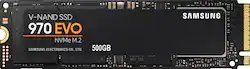
Samsung - 970 EVO 500GB PCIe Gen 3 x4 NVMe Internal Solid State Drive with V-NAND Technology
- Key Specs
- Storage Capacity: 500 gigabytes (Measured in megabytes (MB), gigabytes (GB) and terabytes (TB), this is the amount available for storing files, music, movies, photos and more. The total includes the capacity of the hard disk drive and solid state drive if both are included on the computer.)
- Storage Drive Type: SSD (Traditional, mechanical hard disk drives are the most common type of storage because they're relatively inexpensive and offer huge capacities. However, they also generate both noise and heat. Solid state drives, also known as SSDs, are many times faster than hard disk drives and have no moving parts to wear out, but typically offer less capacity for the same price.)
- Interface(s): PCIe Gen 3 x4 (Refers to the types of connections that devices use to interact and communicate with each other.)
- General
- Product Name: 970 EVO 500GB PCIe Gen 3 x4 NVMe Internal Solid State Drive with V-NAND Technology
- Brand: Samsung
- Model Number: MZ-V7E500BW
- Capacity
- Storage Capacity: 500 gigabytes (Measured in megabytes (MB), gigabytes (GB) and terabytes (TB), this is the amount available for storing files, music, movies, photos and more. The total includes the capacity of the hard disk drive and solid state drive if both are included on the computer.)
- Performance
- Storage Drive Type: SSD (Traditional, mechanical hard disk drives are the most common type of storage because they're relatively inexpensive and offer huge capacities. However, they also generate both noise and heat. Solid state drives, also known as SSDs, are many times faster than hard disk drives and have no moving parts to wear out, but typically offer less capacity for the same price.)
- Compatibility
- Internal Or External: Internal
- Product Compatibility: Desktop computers, Laptop computers
- Interface(s): PCIe Gen 3 x4 (Refers to the types of connections that devices use to interact and communicate with each other.)
- Features
- Security Features: None
- Data Encryption: true
- Encryption Algorithm: 256-bit AES (The algorithm standard used to encrypt data on a device.)
- Usage: Backup, Enterprise/server, Everyday computing, Gaming, Low power storage
- Memory
- NAND Flash Memory Type: TLC (Single Level Cell (SLC) stores 1 bit of data per memory cell; Multi Level Cell (MLC) stores 2 bits per cell, Triple Level Cell (TLC) 3 bits, and Quad Level Cell (QLC) 4 bits. Vertical NAND (V-NAND) or 3D NAND stores more data by layering cells vertically. Similarly, there are 3D MLC, 3D TLC and 3D QLC stacked cells.)
- Dimensions
- Product Height: 3.15 inches (The out of box height of the item. Height is measured as the vertical distance from the bottom of the item to the top as it would be primarily used or placed.)
- Product Width: 0.87 inches (The out of box width of the item. Width is measured as the horizontal distance from one side of the item to the other as it would be primarily used or placed.)
- Product Weight: 0.09 ounces (The out of box weight of the item.)
- Other
- UPC: 887276261881
Enjoy superior performance with this 500GB Samsung EVO solid-state drive. It uses V-NAND storage technology for fast boot time operation, and it has a sequential read speed of 3300 MB/sec. and a write speed of 2500 MB/sec. to keep things moving. This Samsung EVO solid-state drive uses Samsung Magician software to monitor its status and optimize performance.
- 500GB storage capacity: Provides ample storage space for your music, movies and other files.
- PCI Express 3.0 x4 (NVMe) interface: Offers simple connection to your computer.
- AES 256-bit hardware encryption: Helps safeguard sensitive data.
Whats Included
- Samsung 970 EVO 500GB Internal PCI Express 3.0 x4 (NVMe) Solid State Drive for Laptops with V-NAND Technology
Q: What is the main difference between the 970 evo and the 970 pro.
A: Samsung 970 PRO uses latest Samsung 64-layer 3D MLC V-NAND whereas the Samsung 970 EVO uses Samsung 64-layer 256Gb 3D TLC. Both use the same Samsung Phoenix NAND controller. 970 PRO is a little faster for sequential and random writes and uses a little less power. Here's a link to a comparison: https://www.anandtech.com/show/12674/samsung-announces-970-pro-and-970-evo-nvme-ssds There is also a new 970 EVO Plus which utilizes a burst write buffer to improve write performance for most application that produce bursts of write but not sustained writes. Here's a link to performance comparison of all 970s. https://www.pcworld.com/article/3334876/computers/samsung-970-evo-plus-review-samsungs-entry-level-nvme-ssd-is-faster-and-cheaper.html
Q: Is this SSD compatible with a 2015 15” Retina MacBook Pro?
A: I know they make an adapter to address the pin difference. I've heard different answers on this. Some people say it'll work and some say it won't.
Q: Does this works on Lenovo ideapad y700 15ISK 80NV ?
A: Yes. according to lenovos website it does have an M.2 Port inside. it will require some moderate dissassembly but its easily doable.
A: Yes it will work as long as you have an m.2 slot on your motherboard. I swapped out the optane memory board to do this on my dell desktop
Q: Is it compatible with Dell XPS 15 9560?
A: After looking at the specs for the XPS 15 9560 here: https://topics-cdn.dell.com/pdf/xps-15-9560-laptop_specifications_en-us.pdf, Yes this drive will work in that model of laptop. The XPS 15 9560 has 1 M.2 interface which is what you need for this SSD.
Q: Is this compatible with a MSI GS63VR6F laptop?
A: I could not find MSI GS63VR6F on a quick Google search. Did you mean the GS63VR 6RF Stealth Pro? If so, it looks like this SSD will work in your laptop, provided 2 things: 1) This SSD requires an M Key socket, which means the connector on the card has a small notch toward the right hand side (from the perspective of looking into the socket). A B Key socket, on the other hand, accepts a card with the notch toward the left hand side. Some sockets accept both B Key and M Key cards. 2) This SSD has a 2280 form factor, meaning the card is 22mm wide on the connector side and 80mm in length. So the motherboard in your laptop would have to have the physical space and a screw & standoff 80mm from the socket to secure the far end of the card. I do not see in the specs of this laptop what form factors of M.2 SSDs it will accept. Your best bet may be to open up the case, pull out the current card if necessary, and look at the socket type and card lengths it will support.
Q: Will thus fit Dell G7 I want to change the 128gb Thanks
A: Yes, this M.2 drive works very well in a Dell G7 laptop...I have personally tested this M.2 in the G7 and there were no issues.
Q: Do you also have expert install for this item?
A: It is the easiest hard drive you will ever install. There are no wires or anything it snaps in like a RAM stick and you place a holding pin. I am sure best buys geek squad would do it for you for a small fee but I would recommend just doing it yourself it is very easy.














