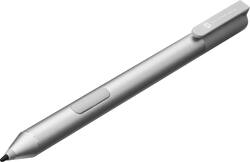
Active Stylus Pen for HP Spectre x2 Laptops - Silver
- Key Specs
- Model Compatibility: HP Spectre x2
- Screen Compatibility: Built for Windows Ink (Active)
- General
- Brand: HP
- Model Number: t5e12aa#abl
- Product Name: Active Stylus Pen for HP Spectre x2 Laptops
- Color: Silver
- Compatibility
- Brand Compatibility: HP
- Model Compatibility: HP Spectre x2
- Screen Compatibility: Built for Windows Ink (Active)
- Features
- Comfort Grip: true
- Ergonomic Design: false
- Replaceable Stylus Tip: false
- Integrated Writing Pen: false
- Pocket Clip: true
- Dimensions
- Product Length: 4.88 inches (The out of box length of the item. Length is measured as the longest dimension of the item.)
- Product Diameter: 0.55 inches (The out of box diameter of the item, measured as a straight line passing from side to side of the item, through its center.)
- Product Weight: 0.59 ounces (The out of box weight of the item.)
- Warranty
- Warranty - Parts: 1 year
- Warranty - Labor: 1 year
- Other
- UPC: 889894578037
Take your HP Spectre x2 laptop's touch-screen to the next level with this HP Active t5e12aa#abl stylus pen, which features palm rejection technology and a fine tip for accurate interaction with your device. The comfort grip allows extended use.
- Designed for HP Spectre x2 laptops: For touch-screen interaction.
- Palm rejection technology: Helps prevent accidental marks on the screen while using the stylus pen.
- Active, sleep, hover and touch features: Enable versatile use.
- Pocket clip: Lets you keep the stylus pen within reach.
- Power button: Allows you to turn off the stylus and conserve battery life.
- Comfort grip: For use when taking notes or preparing projects.
- Designed for HP Spectre x2 laptops: For touch-screen interaction.
- Palm rejection technology: Helps prevent accidental marks on the screen while using the stylus pen.
- Active, sleep, hover and touch features: Enable versatile use.
- Pocket clip: Lets you keep the stylus pen within reach.
- Power button: Allows you to turn off the stylus and conserve battery life.
- Comfort grip: For use when taking notes or preparing projects.
Whats Included
- AAAA battery
- Active Stylus Pen for HP Spectre x2 Laptops
- Owner's manual
- AAAA battery
- Active Stylus Pen for HP Spectre x2 Laptops
- Owner's manual
Q: Is this compatible with the Spectre x360?
A: NOOO it is not! I was disappointing to find this out. After I was told by the salesman it would work with all spectre devices.
Q: Is this stylus Compatibel with "HP Spectre x2 12-a009nr Intel Core M5 6Y54"?
A: It did not work with my HP Spectre. I had to return it and call HP to get the right stylus
A: The pen works like a general product just like a mouse. It should work.
A: This computer allows for you to write as you would naturally with the palm rejection technology. As you described, this allows you to write naturally by resting your palm on the screen while writing.
Q: is this pen compatible with ASUStek Intel(R) core (TM) 64-bit OS/?
A: If your finger will work, then this generic stylus will work.
A: Yes. This is the very reason I purchased it. It works on the 2015 model. Not sure about the 2017 version of the X2. This is the model on the HP store that's meant for the 2015 X2. http://store.hp.com/us/en/pdp/hp-active-pen-p-t5e12aa-abl--1?source=aw&subacctid=78888&subacctname=Skimlinks&awc=7168_1501282280_3c06be924d20d4e69fe8c718a7ea0b02&jumpid=af_gen_nc_ns&utm_medium=af&utm_source=aw&utm_campaign=textlink
Q: Is this stylus compatible with the HP Envy touchscreen laptop??
A: No, the stylus is not compatible with the HP Envy.
A: Absolutely not. The Spectre X2 has an Elan digitizer that is "somewhat" Wacom AES compatible (but will not install the Wacom Feel driver). The x360 has a Synaptics digitizer. It is not Wacom AES compatible.



















![The text on the image reads:
17 F8 Home P End F10 PgUp it PgDn F12 Ies Del * 8 ( 9 ) 0 I I + = Backspace I o P : [ ] ] I / K L : : .. . Enter M V > . ? / Shift Alt <
The corrected text should be:
17 F8 Home PgUp it PgDn F10 F12 Ies Del * 8 ( 9 ) 0 I I + = Backspace I o P : [ ] ] I / K L : : .. . Enter M V > . ? / Shift Alt <
The corrected text groups the keys in a more organized manner, making it easier to read and understand.](https://pisces.bbystatic.com/image2/BestBuy_US/images/products/699c06f5-6aba-4ab2-bbf6-114986b58b2a.jpg;maxHeight=144;maxWidth=200?format=webp)



