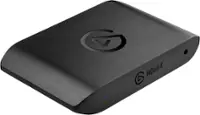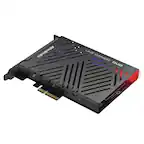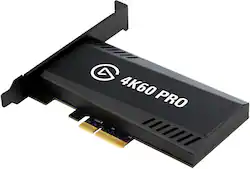
Elgato - Game Capture 4K60 Pro MK.2 - Black
- Key Specs
- Video Input(s): HDMI
- Video Output(s): HDMI
- Maximum Supported Resolution (Video Capture): 2160p (4K) @ 60 FPS (The highest video resolution supported by the device to capture video from another source.)
- Maximum Supported Resolution (Video Passthrough): 2160p (4K) @ 60 Hz (The highest video resolution supported by the device for passing through video to another device.)
- Compatible Platform(s): Windows
- General
- Brand: Elgato
- Model Number: 10GAS9901
- Product Name: Game Capture 4K60 Pro MK.2
- Color: Black
- Device Type: PC Card
- Connectivity
- Video Input(s): HDMI
- Audio Input(s): HDMI
- Video Output(s): HDMI
- Audio Output(s): HDMI
- Display
- Maximum Supported Resolution (Video Capture): 2160p (4K) @ 60 FPS (The highest video resolution supported by the device to capture video from another source.)
- Maximum Supported Resolution (Video Passthrough): 2160p (4K) @ 60 Hz (The highest video resolution supported by the device for passing through video to another device.)
- High Dynamic Range Format (Video Capture): HDR 10 (The industry standard format in which HDR content is captured from another source. HDR technology can support one or multiple formats, each with various benefits to picture quality.)
- Dimensions
- Product Height: 0.75 inches (The out of box height of the item. Height is measured as the vertical distance from the bottom of the item to the top as it would be primarily used or placed.)
- Product Width: 4.76 inches (The out of box width of the item. Width is measured as the horizontal distance from one side of the item to the other as it would be primarily used or placed.)
- Product Length: 2.2 inches (The out of box length of the item. Length is measured as the longest dimension of the item.)
- Product Weight: 0.23 pounds (The out of box weight of the item.)
- Compatibility
- Compatible Platform(s): Windows
- Minimum System Requirements: Windows 10 (64-bit) or newer 6th-generation Intel Core i7 CPU (i7-6xxx) / AMD Ryzen 7 (or better) NVIDIA GeForce GTX 10xx (or better) PCIe x4/x8/x16-slot
- Warranty
- Warranty - Parts: 2 years
- Warranty - Labor: 2 years
- Other
- UPC: 840006610946
Record stunning, crystal-clear video from live streams with this Elgato Game Capture Pro MK.2 capture card. The multi-feed technology lets you capture video streams from multiple apps simultaneously, and ultralow latency provides precise captures. Multi-card support enables multiple Elgato Game Capture Pro MK.2 capture card units within a single PC.
- Game capture card: Allows you to capture 4K HDR10 content at 60 fps.
- Compatible with most streaming software: Use this game capture card with most broadcasting software, such as OBS, XSplit and more. Produce the high-quality stream your audience deserves on Twitch or YouTube.
- Instant Gameview: Powers your workflow with ultra-low-latency technology.
- High pass-through: Provides 240Hz pass-through on your dual-PC setup, which allows you to simultaneously capture video in multiple apps.
- Local recording: Record unlimited 4K HDR10 footage directly to your hard drive. In addition, you can use flashback recording to save video retroactively.
- Tune your stream: Add and fine-tune your voice with Live Commentary.
- PCIe interface: Offers a compact design and massive performance.
- HDMI input and output: Helps stream and record from your device with ease.
- System requirements: Windows 10 (64-bit); 6th-generation Intel Core i7 CPU (i7-6xxx)/AMD Ryzen 7 (or better); NVIDIA GeForce GTX 10xx (or better); PCIe x4/x8/x16 slot; Internet connection.
- Game capture card: Allows you to capture 4K HDR10 content at 60 fps.
- Compatible with most streaming software: Use this game capture card with most broadcasting software, such as OBS, XSplit and more. Produce the high-quality stream your audience deserves on Twitch or YouTube.
- Instant Gameview: Powers your workflow with ultra-low-latency technology.
- High pass-through: Provides 240Hz pass-through on your dual-PC setup, which allows you to simultaneously capture video in multiple apps.
- Local recording: Record unlimited 4K HDR10 footage directly to your hard drive. In addition, you can use flashback recording to save video retroactively.
- Tune your stream: Add and fine-tune your voice with Live Commentary.
- PCIe interface: Offers a compact design and massive performance.
- HDMI input and output: Helps stream and record from your device with ease.
- System requirements: Windows 10 (64-bit); 6th-generation Intel Core i7 CPU (i7-6xxx)/AMD Ryzen 7 (or better); NVIDIA GeForce GTX 10xx (or better); PCIe x4/x8/x16 slot; Internet connection.
Whats Included
- Elgato Game Capture 4K60 Pro MK.2
- High and low profile bracket
- HDMI cable
- Elgato Game Capture 4K60 Pro MK.2
- High and low profile bracket
- HDMI cable
Q: How is the Elgato Game Capture connected to a PC?
A: The Elgato Game Capture is a PCIe interface card.
Q: Which streaming software is this Elgato Game Capture compatible with?
A: This game capture card is compatible with most major broadcasting software, including OBS and XSplit.
Q: Does this capture card have local recording capabilities?
A: Yes, it allows for local recording of 4K HDR10 footage directly to your hard drive.
Q: What operating system is required for this capture card?
A: This capture card requires Windows 10 (64-bit).
Q: What does this game capture card allow you to capture?
A: This game capture card allows users to capture 4K HDR10 content at 60 fps.
Q: What is the maximum resolution supported for video capture?
A: The maximum resolution supported is 2160p (4K) @ 60 FPS.
Q: Can you use the Elgato camlink 4k and the 4k 60 pro 2 at the same time?
A: Hi Hustle, Depending on the use, they may both simultaneously function. I suggest getting in touch with support for clarification: support.elgato.com -Albert
Q: Will this capture 4K video if I have an AMD Vega 64 graphics cards?
A: Hi Dave, Assuming all other requirements are met, that shouldn't be a problem! If you have anything else we can help with, please reach out: help.elgato.com -Art