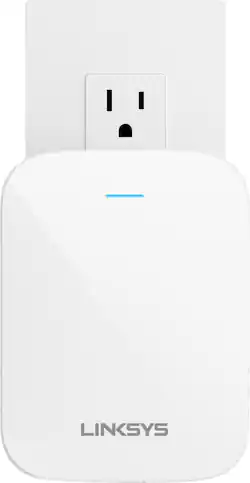
Linksys - Max-Stream Wi-Fi 6 Range Extender - White
- Key Specs
- Wi-Fi Speed: 1.8 gigabits per second (The maximum rate at which data is transferred between a network device and wireless router.)
- Wireless Standard: AX, AC, N (The wireless networking protocol used by the device. Each iteration of the protocol is based on the 802.11 standard developed by the Institute of Electrical and Electronics Engineers (IEEE) Standards Association. Denoted by letters following 802.11 (802.11a, 802.11ac, etc.), each version, published in alphabetical order, encompasses all previous versions.)
- Wi-Fi Range: 2000 square feet (The device will provide a Wi-Fi connection to this approximate area.)
- Maximum Throughput: 1.8 gigabytes per second (The maximum rate of data that is successfully delivered over a communication channel.)
- Form Factor: Plug-in (The size, arrangement, and physical configuration of the product.)
- Band Technology: Dual (Refers to the number of frequency bands used to wirelessly transmit an internet signal. For example, dual-band devices may use one 2.4 and one 5 GHz band, while tri-band devices may use one 2.4 and two 5 GHz bands. Multiple bands also provide more flexibility for designating connected devices to specific band use.)
- Frequency Band: 2.4 GHz, 5.0 GHz (Bands may be grouped into categories such as low- and high-band VHF (Very High Frequency), low- and high-band UHF (Ultra High Frequency), or certain frequency channels (measured in MHz or GHz). Generally, higher frequencies transmit information faster but have shorter range than lower frequencies.)
- Antenna Type: Internal
- Number of LAN Ports: 1 (Number of devices able to be connected to the Local Area Network (LAN). LAN ports allow wired connections to other networking devices (wireless access points, range extenders, etc.) in order to share the internet connection received through a WAN port.)
- Wireless Networking Standard: Wi-Fi 6 (The wireless networking standard used by the device. Each iteration of the standard developed by the Wi-Fi Alliance corresponds to an existing IEEE 802.11 protocol; for example, standard 802.11ac (or AC) is termed Wi-Fi 5. Refers specifically to the standard the device is designed to use, but ultimately determines product interoperability and backward compatibility including previous versions.)
- General
- Product Name: Max-Stream Wi-Fi 6 Range Extender
- Brand: Linksys
- Model Number: RE7350
- Color: White
- Network
- Wi-Fi Range: 2000 square feet (The device will provide a Wi-Fi connection to this approximate area.)
- Maximum Coverage Area: 2000 square feet
- Wireless Networking Standard: Wi-Fi 6 (The wireless networking standard used by the device. Each iteration of the standard developed by the Wi-Fi Alliance corresponds to an existing IEEE 802.11 protocol; for example, standard 802.11ac (or AC) is termed Wi-Fi 5. Refers specifically to the standard the device is designed to use, but ultimately determines product interoperability and backward compatibility including previous versions.)
- Connection Type: Wireless, Wired
- Ports
- Number Of USB Port(s): 0 (The total number of USB ports including all generations and versions.)
- Security
- Encryption Type: WPA2-Personal, WPA3-Personal (The security protocols or certification programs that protect the Wi-Fi network.)
- Dimensions
- Product Height: 1.77 inches (The out of box height of the item. Height is measured as the vertical distance from the bottom of the item to the top as it would be primarily used or placed.)
- Product Weight: 0.531 pounds (The out of box weight of the item.)
- Warranty
- Manufacturer's Warranty - Parts: 1 year
- Manufacturer's Warranty - Labor: 1 year
- Other
- UPC: 745883814411
Wi-Fi 6 extender delivers fast speeds and greater range for a greater number of devices. Get better coverage and a stronger signal in more places throughout your home with enhanced Wi-Fi 6 technology. It’s easy to set up, and Spot Finder technology helps find the best location. With a smooth and stable signal extended to more parts of your home, everyone can stream, game, and tweet without interruption, wherever they are. And with built-in AP Mode, you can upgrade your existing ISP network to Wi-Fi 6 quickly and easily.
- Wi-Fi 6: Next-gen networking with higher speeds for more devices. Your connected home will be more efficient and worry free.
- Easy to set up, easy to use: Use Spot Finder technology to find the best location in your home
- Dual-band: 2.4 GHz and 5 GHz for double the bandwidth.
- Works with any router: Compatible with all routers, even those from service providers—no need to modify your router setting.
- Beamforming technology: Focuses signal to devices for optimal performance.
Whats Included
- RE7350
- Quick Start Guide
- Documentation
A: Hi, Howard. The Linksys RE7350 will extend and enhance your existing Wi-Fi network at its full coverage. However, this is not a Mesh-range extender.
A: Hi. The Linksys RE7350 can extends your wifi coverage of up to 2000 sq.ft. It helps increase your network, expanding it to hard-to-reach locations at your home such as the backyard and garage. For better coverage, place your range extender halfway between the router and the device you want to connect.
Q: Will this extender work with Ring devices? My spotlight cam has a very poor Wi-Fi signal
A: Hi, Dave. Yes, The Linksys RE7350 works with most Wifi enabled devices. It delivers fast speeds and greater WiFi range for a greater number of devices and helps you extend your Wifi signal in hard-to-reach locations at your home.
A: It all depends on your square footage. Anything under 1400 sq ft one would be ok to place it between the router and the low/dead spot.
A: You can use the Ethernet port either way, Tim. You can connect the extender to the router via Ethernet, allowing it to function as an access point. Alternatively, you can plug a wired device directly into the extender. Both methods will work effectively.
A: It appears to be able to work with nearly any wireless router, and no, you do not need any cables or switch boxes. You only either need the password to the WiFi, or need to be able to physically access the router to push the WPS button.
A: Hello, Chuck. We'd like to understand more about your network topology so we can provide a suitable recommendation that fits your home network. Let's discuss things in detail by sending us an email at [email protected].
Q: How can I tell if is working? There's a yellowish orange light blinking.
A: Hi, Andy. A blinking orange light indicates that the extender is ready for setup. You can follow these steps in setting up the product: https://bit.ly/3HZV9KV