Customer Ratings & Reviews












- Model:
- 910-005178
- SKU:
- 10735054
Rating by feature
- Value
Rating 4.4 out of 5 stars
- Quality
Rating 4.7 out of 5 stars
- Ease of Use
Rating 4.7 out of 5 stars
WHERE HAVE YOU BEEN ALL MY LIFE??
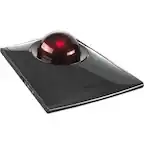
||Posted . Owned for 1 month when reviewed.This reviewer received promo considerations or sweepstakes entry for writing a review.I love this trackball mouse. It has an easy setup and is ergonomically easy on the wrist. I have had a trackball mouse before but it needed to be plugged into the laptop via a USB port. The lack of wires makes it easier to take from place to place. It is kind of bulky and I am not sure I would recommend it for people who travel, I use it at home and in my office, but soon I am going to get another one so I don't have to transport it from one place to another. Worth every penny,
I would recommend this to a friend
very responsive!
|Posted .This reviewer received promo considerations or sweepstakes entry for writing a review.I’ve been a Logitech user for decades! This mouse is great, compact, and fits well in the hand. I have it connected to my Surface Pro 4 pairing took less than 30 seconds and works smoothly and responsively. Trackball makes jobs done faster and smoother. Rechargeable and long lastng battery can last up to 4 months on a single full charge “Logitech source” i have been using for two days and after plugging it in to charge it took 6-10 minutes for full charge. works on both OS Windows 8 and MacOs 10.12. You can download Logitech options application to customize buttons.
I would recommend this to a friendGreat, Comfortable Mouse
||Posted . Owned for 1 year when reviewed.This reviewer received promo considerations or sweepstakes entry for writing a review.Easy setup and quick switching between two different computers. The battery life has been great and long lasting with daily use. As long as you periodically remove and clean the trackball, there will be smooth operation. Also, easily adjustable and very ergonomic, no wrist issues since I began using this trackball mouse. The added weight of the magnetic base easily keeps it in place on the desk.
I would recommend this to a friendGreat ergonomic input device
||Posted . Owned for 3 weeks when reviewed.This reviewer received promo considerations or sweepstakes entry for writing a review.I remember having used a trackball mouse many years ago, and thought it was time to try one again. The MX ERGO exceeded expectations. It’s comfortable and very intuitive to use. I find it to be quicker than a traditional mouse. The buttons are well-positioned and operate smoothly. The precision button is helpful for moments when high accuracy is required. Overall the build quality is excellent, and the design fits the natural position of my hand. I highly recommend this trackball.
I would recommend this to a friendGlad I Finally got a Trackball Mouse!!
||Posted . Owned for 1 month when reviewed.This reviewer received promo considerations or sweepstakes entry for writing a review.A trackball mouse has been on my wish list for as long as I can remember and I finally got one!! I was iffy about getting this model vs the alternative trackball that Logitech offers for about 1/3 of the cost; but I'm happy to have purchased this one. Having the ability to sync via bluetooth vs requiring Logitech's little USB adapter is awesome, not to mention being able to sync the mouse to two computers and switching by simply clicking a button. At first, the ability to angle the mouse vs let it sit flat seemed like a gimmick; but it really makes a difference depending on where you place the mouse and how you're sitting or standing. The mouse comes with software, that your computer will try to install without needing a disk or to download something, and the software allows one to customize mouse speed, what buttons do, and other such things. I changed the speed of the mouse since the default was really slow, and another awesome feature is that if I'm working on something that requires precision there's a button towards the top of the ball that can be clicked on with the thumb, and it slows down the movement. The mouse has tons of options, which I'm still learning after almost a month, so I can see why some might find the mouse to be intimidating; it's not bad though. Also, this isn't the most travel-friendly of mice - it's huge and heavy. With that said, it might still be the perfect travel mouse since it can be used on any surface vs a regular mouse where one needs enough room to move the mouse around and a flat surface for the laser to work well. My only complain - how the mouse charges. Charging needs to be updated to USB-C, or maybe even wireless/Qi, instead the mouse still uses old-school micro-USB. Thankfully the battery lasts a long time and it comes with the cable because I recycled all my micro-USB cables a couple of years ago.
I would recommend this to a friendBest In The Game
||Posted . Owned for 10 months when reviewed.This reviewer received promo considerations or sweepstakes entry for writing a review.Took a leap to try a roller ball mouse. Started with the baseline model & was instantly hooked. Decided to go wild & try this top model and wow, yes quite an upgrade! The ergonomics are so high that I’m kinda mad I didn’t try this sooner, No more shoulder pain from too much mouse-work, I use this for heavy graphic design, audio production and everyday use. I bought a second one, one for each workplace. It’s a high quality build, never loses connection, stellar battery life & perfect ergonomics.
I would recommend this to a friendBrand response from Logitech
Posted .We're thrilled to hear that you're loving the Logitech MX ERGO Plus Wireless Trackball Mouse! Your feedback about the comfort, performance, and overall experience is truly appreciated. We're glad it's enhancing your productivity and alleviating any discomfort. Thank you for choosing Logitech!
Best mouse for hand/wrist pain
||Posted .This reviewer received promo considerations or sweepstakes entry for writing a review.I love this mouse. I love not have to move the mouse around as with a laser mouse. I love that I’ve been able to easily adapt to the trackball. I thought it would be sluggish but, it’s not too fast or too slow. My favorite thing about this mouse is that it’s helped my hand and wrist pain tremendously. My one criticism is that it’s pretty big. However, my hands are probably on the smaller side. I would definitely recommend, even at the price.
I would recommend this to a friendGreat mouse with BestBuy exclusive addtl. riser
||Posted . Owned for 2 months when reviewed.This reviewer received promo considerations or sweepstakes entry for writing a review.This mouse is amazing! I work on my laptop all day, and often had pain in my wrist from moving my laser mouse around. Please note that this model comes with an extra riser NOT available anywhere else! It can be added or removed to give the mouse another 15% angle. That's my preferred configuration. Go, get it!
I would recommend this to a friendGreat for MSFS2020
||Posted . Owned for 2 months when reviewed.This reviewer received promo considerations or sweepstakes entry for writing a review.Bought this for use with MSFS2020. My wrist got tired from constantly dragging the mouse around the cockpit. It fits in my hand nice, the track ball is easy to use especially in precision mode. Love that it connects either Bluetooth or via Unifying. My PC is too far away for Unifying, but works great with Bluetooth. Battery life is great. Have not had to charge it yet! Definitely eased the wrist strain.
I would recommend this to a friendNice update to the M570
||Posted . Owned for 1 month when reviewed.This reviewer received promo considerations or sweepstakes entry for writing a review.I have used Logitech thumb wheel trackballs literally for decades, starting with wired PS2 versions. If you're considering switching to this after long-term use of a different type of mouse or trackball, expect an adjustment time - a lot of people who use mine don't like it. But I'd never use anything else at this point. This has some key features that I have found useful. I have 2 of these - one at home and one in the office. 1) The ability to adjust the angle, with 2 different settings available on the Best Buy model (the "plus"). While some might like the ability to tweak it more than the discrete settings, for my home one that is used with a laptop and gets banged around A LOT, it would just be a potential failure point, so IMO this design was a good call. 2) The ability to work with 2 computers, which is a big plus at my office, where I frequently test things out on a laptop, but most of the time work on my desktop workstation. 3) The "fine tune mode", which is nice at times for the software I work on. People trying to do basic drawing may also find it useful for detail work. I imagine the majority will ignore it, but it's nice to have if you need it. I have mixed feelings about it being rechargeable, because with the M570 I just put in a new AA if it went dead, which was seldom, but this one also has months of life in all-day use, and you can charge and use at the same time if you let it go too long and drain it, so it's not really a big negative. If I were ever caught with it dead and had no AA battery handy, I'd consider it a positive, because I could recharge from the computer while using it.
I would recommend this to a friendBest trackball available
||Posted . Owned for 3 weeks when reviewed.This reviewer received promo considerations or sweepstakes entry for writing a review.Very easy to use and easy on your hand and wrist, with the angle available. The rubber grips in the bottom of the trackball itself and the metal angle add-on are non-slip, much better than the older design. Plus the buttons are easily configured with their software. It can be found cheaper occasionally on Amazon, but the quality is still worth it. One extra advantage is it is internally recharged, no battery to change.
I would recommend this to a friendFixed Carpal Tunnel
||Posted . Owned for 1 month when reviewed.This reviewer received promo considerations or sweepstakes entry for writing a review.I am a CAD tech and over the past two years I started suffering from moderate carpal tunnel issues. I tried everything, I was reluctant to move to a trackball but the learning curve was so worth it. I also like the on the fly wrist position adjustment built in. If the trackball feels gritty, take a tiny bit of Vaseline and roll it around in your hands. Will scroll smooth as silk.
I would recommend this to a friendBrand response from Logitech
Posted .We're thrilled to hear that the ergonomic design and wrist rest have helped alleviate your carpal tunnel issues. The MX ERGO Plus was designed with comfort and productivity in mind, and we're glad it's making a positive difference for you.

Daily work mouse comfort
||Posted . Owned for 3 months when reviewed.This reviewer received promo considerations or sweepstakes entry for writing a review.This is great "mouse" As a touch point to computer,the interaction was a quick learn. Its comfortable in hand, use roller-ball with thumb. LOGITECH did well with design. For business,daily use, surfing. I still use a game mouse but rarely game but it probably work though the dpi or features are best for business.
I would recommend this to a friendBrand response from Logitech
Posted .We're so glad the MX ERGO Plus is providing you with comfortable daily use! It's great to hear you're enjoying the design and functionality.
It does it's job!
||Posted . Owned for 1 week when reviewed.This reviewer received promo considerations or sweepstakes entry for writing a review.I love how this mouse is magnetic! It actually stays on my laptop and doesn't fall off like the others do. I don't like the amount of buttons because it's hectic trying to figure out which one does what. I haven't seen any kind of app for it to reset the buttons or personalized them. Example - It gets annoying when I accidently push one certain button and my scrolling is super slow. Yes, it's wireless. I haven't had to reconnect this mouse since I've set it up. It's not very heavy.
I would recommend this to a friendBrand response from Logitech
Posted .Thank you for your feedback on the Logitech MX ERGO Plus. We appreciate your honesty about both the positive and negative aspects of the product. We understand your concern about the button configuration and customization options. We'll consider this for future product improvements.
The best for lack of options...
||Posted .This reviewer received promo considerations or sweepstakes entry for writing a review.I've been using thumb driven Logitech trackballs for over 20 years and ever since Logitech had to stop producing affordable corded trackballs for legal reasons this is easily the better of the two options in their product line. The good: The button switches are rated for significantly more clicks than their cheaper m570. The rubber coating on the housing and larger base overall feel better than the m570. Bluetooth and USB receiver connections can be toggled on the fly quickly makes this great for using on multiple computers. The battery life so far has been good for me. The ball rolls smoother, but feels like it has slightly more resistance than the m570 (the actual standoffs for the ball housing look exactly the same and you will need to clean them regularly like any trackball). The mediocre: The button placed above the trackball is too out of place to be of any significant use. I wish the mouse 4 and 5 buttons next to the left click were more like the m570's. The bad: The tilt feature is completely unnecessary. It offers no fine adjustment since it is all or nothing being held on with magnets on the bottom. There is nothing to lock the trackball in the flat 0 degree tilt mode so you'll have to keep your hand from resting too heavily on the right side and overpowering the magnets. People with large hands may find their pinky finger over and under the right side of the trackball. The bottom base plate has to be removed in order to access the off/on switch or clean the trackball guides. And the most bizarre thing I find on the device is the micro USB charging port is built in a fashion to practically force you to use the included charging cable only. The included charging cable is curved on the plastic housing behind the micro USB connector much like a USB-C cable and all the other micro USB cables in my house from various other devices will not fit because the plastic housing around the metal micro USB connector is too large and can't fit in the tiny space leading to the charging port.
I would recommend this to a friendGreat trackball, but expensive
||Posted .This reviewer received promo considerations or sweepstakes entry for writing a review.The trackball is really good functionally. It’s better fit and feels better in the hand. It’s more ergonomically designed as well. It’s reachable and battery last for months between recharge. Overall it’s a great product. The only downside is it’s a bit over priced. The cheaper model m570 does the job for fraction of the cost. But if you are looking for better ergonomics and premium feel, go for it.
I would recommend this to a friendLove this mouse
||Posted . Owned for 1.5 years when reviewed.This reviewer received promo considerations or sweepstakes entry for writing a review.I work in front of a computer 8 plus hours a day plus spend a lot of time after work on the computer. This mouse has been awesome. I can switch between two laptops seamlessly, the battery lasts forever and the feel of the mouse helps with my carpal tunnel. Highly recommend.
I would recommend this to a friendSmooth Trackball, great feel
||Posted .This reviewer received promo considerations or sweepstakes entry for writing a review.The Logitech MX Ergo is a justifiable upgrade from the M570 and is the best trackball mouse (in my own opinion) on the market. I have one at my office, one at home and will not go back to a traditional mouse ever again! It takes some time to get used to, but eventually (after a few days) you move much faster and effortlessly on your screen. The MX Ergo has the trackball, two standard click buttons, scroll wheel and four other programable buttons. The software for the mouse can be downloaded on the Logitech website and from it, you are able to program the buttons for a plethora of shortcuts and macros. You can even get as detailed as to programing gestures and buttons for different aps. As an example, for excel, holding down one of the buttons and moving the track ball a certain direction allows me to copy, paste, run functions I use often and much more. You charge the mouse via a USB cable and I've found that it can hold a charge for about 6 months, (this is with the mouse on at all times too). The device overall is a complete upgrade as far as materials and design. I like that you can change the resting position of it and also that it is heavier and sleeker looking as well. The price tag is steep, but if you plan on using it daily, I find it a justifiable purchase.
I would recommend this to a friendA definite keeper: comfortable and programmable.
||Posted . Owned for 3 weeks when reviewed.This reviewer received promo considerations or sweepstakes entry for writing a review.This is an amazing device and a definite step up from my previous Logitech ergonomic mouse. I love the 20 degree tilt function which is a game changer in terms of comfort, plus the programmable functions through the app makes this mouse truly "mine". I cannot believe people use anything lesser than this. One word of caution though: it's heavy. Not the kind of thing you want to carry everywhere with you.
I would recommend this to a friendBrand response from Logitech
Posted .We're thrilled to hear that the Logitech MX ERGO Plus wireless trackball has exceeded your expectations! Your positive feedback on its ergonomic features, programmability, and overall comfort make it a fantastic choice. Thank you for sharing your experience.
An almost perfect mouse
||Posted . Owned for 2 weeks when reviewed.This reviewer received promo considerations or sweepstakes entry for writing a review.I had the original Logitech M570. The buttons have started to require double clicking to interact so it was time for an upgrade. I was deciding between this one and the Ergo M575 and ended up going with this one because of the two device bluetooth support. I have to say this is a major improvement over the original. I also like the tilt feature and the additional stand that is included. It took me about a day to adjust to the new mouse, but now I can't imagine going back to the other one. The scrolling seems smoother and the precision feature is a nice additional option. If I had only one complaint I'd prefer it to support 3 devices instead of two, but that is only a small complaint.
I would recommend this to a friend