Customer Ratings & Reviews












- Model:
- 910-005178
- |
- SKU:
- 10735054
Customer reviews
Rating 4.6 out of 5 stars with 1992 reviews
(1,992 customer reviews)Rating by feature
- Value4.4
Rating 4.4 out of 5 stars
- Quality4.7
Rating 4.7 out of 5 stars
- Ease of Use4.7
Rating 4.7 out of 5 stars
Rated 5 out of 5 stars
Yes, worth it.
||Posted . Owned for 1 month when reviewed.This reviewer received promo considerations or sweepstakes entry for writing a review.At first I was skeptical. “Do I really need a $100 trackball?” I asked myself once my 4 year old trackball began showing its age? Yes, yes I did. The tilt on it makes it so comfortable for long uses at home and at work. It’s Bluetooth connectivity means that on most modern laptops I won’t have to use an extra USB port for the dongle. The rechargeable battery keeps me from having to search for hidden AA batteries at critical moments. Only complaint is the location of the precision mode button. But that is far outweighed by the positives. I was glad when I expensed one at work, even more so now that I’ve gotten one for Christmas.
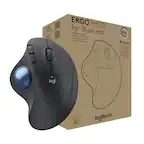
This review is from Logitech - MX ERGO Plus Wireless Trackball Mouse with Ergonomic design - Wireless - Graphite
I would recommend this to a friendRated 5 out of 5 stars
Great trackball
||Posted . Owned for 1 month when reviewed.This reviewer received promo considerations or sweepstakes entry for writing a review.I have using track balls for years, I love the fact that they sit in one place, intitially it takes a little getting used to, but I will never intentionally go back to mice, I like the fact that it's rechargable, bluetooth and you can set it up for two different computers, like laptop and desktop
This review is from Logitech - MX ERGO Plus Wireless Trackball Mouse with Ergonomic design - Wireless - Graphite
I would recommend this to a friendRated 5 out of 5 stars
Great Trackball, Love the upgrades
||Posted . Owned for 2 months when reviewed.This reviewer received promo considerations or sweepstakes entry for writing a review.I've been using trackballs for a long time now. This is the best one so far. Pros: Rechargeable Bluetooth AND usb dongle Can use with multiple computers at the same time, easy to switch between them new angel is great Cons: The base it sits on to be angled is a little interesting. It's just a magnetic plate and base that sets the angle. Something more fixed and solid might have been a better solution. However, after a few months of use, it hasn't been as big of an issue as I thought it would. Every once in a while the base pops off when traveling. If it was just stationary on a desk, I don't think it'd be an issue at all. Overall, Love it!
This review is from Logitech - MX ERGO Plus Wireless Trackball Mouse with Ergonomic design - Wireless - Graphite
I would recommend this to a friendRated 5 out of 5 stars
Ultimate Mouse
||Posted . Owned for 1 month when reviewed.This reviewer received promo considerations or sweepstakes entry for writing a review.Love this mouse. If you edit photos or videos, it is highly recommended. The adjustable angle reduces hand/arm fatigue for those long editing jobs. The rechargeable batterie lasts a long time. If you are looking for a great mouse, this is the one.
This review is from Logitech - MX ERGO Plus Wireless Trackball Mouse with Ergonomic design - Wireless - Graphite
I would recommend this to a friendBrand response from Logitech
Posted .We're glad to hear the MX ERGO Plus is a great fit for your editing work! The adjustable angle is a favorite feature for many users, especially for those spending long hours on creative projects. The long-lasting battery is another plus. Thanks for sharing your feedback!
Rated 5 out of 5 stars
Best version of the latest Logitech trackball
||Posted . Owned for 3 weeks when reviewed.This reviewer received promo considerations or sweepstakes entry for writing a review.Best Buy is the only place to find this exclusive version of Logitech's latest trackball. The exclusive gets you a plastic wedge that magnetically connects to the base plate. The base plate magnetically attaches to the device and lets you rock the device and change the angle. The wedge adds another 10 degrees of angle. The Amazon version doesn't include the wedge. The device uses Bluetooth or a unifying receiver (one is included). It doesn't work with Logi-Bolt receivers.
This review is from Logitech - MX ERGO Plus Wireless Trackball Mouse with Ergonomic design - Wireless - Graphite
I would recommend this to a friendRated 3 out of 5 stars
Good ergonomics, bad vertical scrolling, outdated
||Posted . Owned for less than 1 week when reviewed.This reviewer received promo considerations or sweepstakes entry for writing a review.I chose the MX Ergo over the Lift and Vertical because it had more programmable buttons like my MX Master 3. The reason I'm giving The MX Ergo 3 out of 5 stars is because the horrible out-of-the-box vertical scrolling, and the mouse feels a little cheap and outdated for the premium price. Understandable since it hasn't been updated since 2017. The Ergo's two main mouse buttons are loud and clicky, and the trackball definitely isn't as smooth as it could or should be. It's ok, but it's not as smooth as I would like it to be. The worst part about this mouse is the lack of smooth vertical scrolling. The Ergo scroll wheel jumps/bumps as you scroll, it's not smooth like the MX Master 3. You need to buy third-party software in order to make the scrolling smoother (I chose Smooze Pro for $19). The app works well with the Ergo, but it's not a perfect solution. And why isn't this functionality built into LogiOptions? Why am I paying a third-party for functionality that should already be there? Logitech never fails to confound me. They never seem to get anything right. So far, I'm satisfied enough that I am going to keep the Ergo. I don't really see other better options for this type of mouse on a Mac. The different ergonomics this mouse offers has definitely alleviated my wrist pain. I use the Ergo about 75% of the time now, and the MX Master 3 the rest. I still prefer the MX Master for fine/precision/detail work, but the Ergo is satisfactory for everything else. If using a traditional mouse 100% of the time is causing you wrist pain, then the Ergo is worth trying. Just realize, you will need to buy third-party software to improve the vertical scrolling, and there is a very high likelihood Logitech releases a new and improved version of the MX Ergo sometime soon, 2023-2024.
This review is from Logitech - MX ERGO Plus Wireless Trackball Mouse with Ergonomic design - Wireless - Graphite
I would recommend this to a friendRated 5 out of 5 stars
Adore this mouse!
||Posted . Owned for 6 months when reviewed.This reviewer received promo considerations or sweepstakes entry for writing a review.Sooooo, I've been using roller ball mice for 10+ years now. I absolutely adore them. This one is phenomenal. I absolutely adore it. The base of it is pretty strange, but after you get used to it - it is fine. It does come with a charge cord. It is easy peasy. Mine rarely needs to be charged up. I would say I have moderate-use. Week nights about 2 hours and weekends 4+ hours at least. I've had to charge mine once so far (so you have a reference point). I had the old version of this one with a cord. Mine was getting older and I just decided it was time. I am very happy with my decision!
This review is from Logitech - MX ERGO Plus Wireless Trackball Mouse with Ergonomic design - Wireless - Graphite
I would recommend this to a friendRated 5 out of 5 stars
AMAZING MOUSE
||Posted . Owned for 1 month when reviewed.This reviewer received promo considerations or sweepstakes entry for writing a review.This mouse is saving my wrist from carpal tunnel! I was having wrist pain from using a regular mouse, and this mouse keeps my wrist in a comfortable and painless position. Took a few days to get used to thumb ball controls, but once you're used to it its great!
This review is from Logitech - MX ERGO Plus Wireless Trackball Mouse with Ergonomic design - Wireless - Graphite
I would recommend this to a friendBrand response from Logitech
Posted .We're truly amazed to hear about your positive experience with the MX Ergo Plus and we are grateful that you took the time out to leave us a review. We appreciate all the insights that you have shared. At Logitech, our goal is to make sure that our customers enjoy the products as much as we do. Thanks so much!
Rated 5 out of 5 stars
Rechargeable thumb trackball for the win!
||Posted . Owned for 3 months when reviewed.This reviewer received promo considerations or sweepstakes entry for writing a review.I am usually using the M570 (blue thumb trackball). This is almost the same but includes a weighted base (highly recommended) and has a rechargeable battery. This is an awesome product and will save me a ton in battery costs. The one difference is that this ball seems to pick up more dead skin from my hand and I need to clean the ball sensors a bit more often. (At least I am not cleaning by big blue ball anymore). This is well worth the better ease of use due to the weighted and angled base. I don't think I will ever go back to my trusty M570.
This review is from Logitech - MX ERGO Plus Wireless Trackball Mouse with Ergonomic design - Wireless - Graphite
I would recommend this to a friendRated 5 out of 5 stars
Great trackball, best yet. Comfortable angles.
||Posted . Owned for 1 month when reviewed.This reviewer received promo considerations or sweepstakes entry for writing a review.I've been using this MX ERGO trackball for a few months now. It's very comfortable, quick, accurate, and stable. I didn't think I'd like the optional two-angle stand it comes with, but I've grown to love it. I'll switch between angles throughout a work day to change up the muscles I use a bit. I find long sessions are fine, maybe 4-5 hours at time now, then I'll need to switch to track-pad or mouse for a bit. The first week was around 3-4 hours until my thumb got tired of doing all the work, so I expect that duration to continue to extend over time. Overall I look forward to my sessions with this device everyday. Since it requires very little space, and doesn't move across the surface, I can have comfortable accurate computing from just about anywhere. I'll set it on my recliner arm, on my bed next to me, on the couch - just about anywhere suddenly becomes a solid work environment with minimal space. For this reason, I take it when I travel now because hunting for mouse surfaces on the go is futile. Problem solved. As for gaming - I wouldn't use this for any FPS style games that require quick sudden accuracy, but for slower paced games, and all other modes, it works a treat.
This review is from Logitech - MX ERGO Plus Wireless Trackball Mouse with Ergonomic design - Wireless - Graphite
I would recommend this to a friendRated 5 out of 5 stars
Fantastic Upgrade
||Posted .This reviewer received promo considerations or sweepstakes entry for writing a review.I have been using a Logitech M570 trackball for years and years! Love it. However, until this purchase re: new Logitech MX Ergo, I had no idea what I was missing! The fit and finish are superb (my trusty M570 feels like a toy in comparison). It takes a bit of time to adapt to the revised ergonomics, but afterwards it feels much better in hand. I am 100% satisfied with this upgrade! The MX Ergo is the new “standard” for trackballs. Pros: Superb fit and finish Great ergonomics once adapted No more batteries to replace Cons: Scroll wheel makes clicking noise Thank you Logitech for another win in my book...
This review is from Logitech - MX ERGO Plus Wireless Trackball Mouse with Ergonomic design - Wireless - Graphite
I would recommend this to a friendRated 5 out of 5 stars
Got rid of my carpal tunnel
||Posted . Owned for 2 weeks when reviewed.This reviewer received promo considerations or sweepstakes entry for writing a review.I was starting to get really bad carpal tunnel pain in my wrist/forearm from using the typical mouse so my husband suggested I get this one and to let your thumb do all the moving. I was a bit hesitant because I have fairly small hands and this isn't exactly small. At first, I was not too happy with it because it takes some getting used to-moving the thumb instead of the mouse. I've been using it for about 3 weeks now and the pain in my forearm has gone away. It's been great on the plane because I don't have to move the mouse around on the tray table anymore.
This review is from Logitech - MX ERGO Plus Wireless Trackball Mouse with Ergonomic design - Wireless - Graphite
I would recommend this to a friendRated 5 out of 5 stars
Best trackball ever
||Posted . Owned for 1 month when reviewed.This reviewer received promo considerations or sweepstakes entry for writing a review.The amount of configuration you can do to the buttons is the best feature about this. I also like that you can use either Bluetooth or Unify connectivity and switch between two computers if you want. Feels really good in my hand. My go-to pointing device. I use this 8+ hours a day at work and I have one at home too. When using this with any graphics applications such as Blender or Photoshop it makes me more accurate. There is also a "precision" button that will enable a higher resolution slower tracking speed so you can be more accurate when it comes down to the pixel.
This review is from Logitech - MX ERGO Plus Wireless Trackball Mouse with Ergonomic design - Wireless - Graphite
I would recommend this to a friendRated 5 out of 5 stars
Wireless mouse
||Posted . Owned for 3 months when reviewed.This reviewer received promo considerations or sweepstakes entry for writing a review.Awesome easy to use . Battery life is good… fits hand perfectly
This review is from Logitech - MX ERGO Plus Wireless Trackball Mouse with Ergonomic design - Wireless - Graphite
I would recommend this to a friendRated 5 out of 5 stars
Perfect for Digital Marketers
||Posted . Owned for 8 months when reviewed.This reviewer received promo considerations or sweepstakes entry for writing a review.Awesome improvement. I never had any issues with the previous model, but with the new stand it makes it even more comfortable. No wrist pain either. Of course it takes time to adjust to the thumb/ball movement, but just give a week or two.
This review is from Logitech - MX ERGO Plus Wireless Trackball Mouse with Ergonomic design - Wireless - Graphite
I would recommend this to a friendBrand response from Logitech
Posted .We're thrilled to hear about your positive experience with the MX Ergo Plus and we are grateful that you took the time out to leave us a review. We appreciate all the insights that you have shared. At Logitech, our goal is to make sure that our customers enjoy the products as much as we do. Thanks so much!
Rated 5 out of 5 stars
Great relief
||Posted . Owned for 1 month when reviewed.This reviewer received promo considerations or sweepstakes entry for writing a review.I like the ergonomic mouse much better than the traditional. I like the wireless connectivity. Bluetooth is an option, and I'm able to connect back-and-forth quickly between my desktop and laptop. I was nervous about using the trackball but have found it much better to navigate than having to continuously pick up a traditional mouse. The only negative I've experienced is connectivity with my laptop, but it might be more of an issue with the laptop's bluetooth, for which I have to reset the connection every few days.
This review is from Logitech - MX ERGO Plus Wireless Trackball Mouse with Ergonomic design - Wireless - Graphite
I would recommend this to a friendRated 5 out of 5 stars
Great mouse
||Posted . Owned for 3 weeks when reviewed.This reviewer received promo considerations or sweepstakes entry for writing a review.Great mouse especially for travel. I went from the MX master (which is also great) to this because I was getting tired of having to move the physical mouse to mouse around. And while traveling you dont need much room to use the mouse either. It works great on Mac and Windows. I often switch with a click of a button once I’m done with the day job to have creative fun on my mac. It does take a bit to get used to but once you get the hang of it, it’s great!
This review is from Logitech - MX ERGO Plus Wireless Trackball Mouse with Ergonomic design - Wireless - Graphite
I would recommend this to a friendRated 5 out of 5 stars
A little pricey, but I love it!
||Posted .This reviewer received promo considerations or sweepstakes entry for writing a review.My wife and I, pretty much, only use Logitech trackballs. These can be SUPER precise at the touch of the side button with thumb. Then go right back to speedy by re-touching the side button with thumb. What brings these up above the prior Trackballs is that they can both use the, normal, included Logitech Dongle, or just use your computer's Bluetooth (if avail) and forget the Dongle! OR, use the SAME trackball on 2 computers. One with Dongle, one with Bluetooth. Just tap the 1-2 button just below the scroll. Even better? Never replace the battereis! Rechargable via MicroUSB cable. Bought 2 of these
This review is from Logitech - MX ERGO Plus Wireless Trackball Mouse with Ergonomic design - Wireless - Graphite
I would recommend this to a friendRated 4 out of 5 stars
Comfortable for smaller hands
||Posted . Owned for 11 months when reviewed.This reviewer received promo considerations or sweepstakes entry for writing a review.I have small hands, if this was just a hair smaller it’d be the perfect size. The rollerball is a little stiff and slow to get started first thing in the am, but hey, so am I. A quick spin of the rollerball before we start the day and all is well. The buttons are well placed and have a nice touch. I’ve accidentally hit the lock button just a couple times, but once you figure that out, you learn where how to hold your hand on it better. I hate having to use my old mouse when I forget to charge this one (plug in, charges fast) or I have to work in my husbands office and his mouse interferes with this mouse, so I end up using the old tiny one. Makes me realize what a difference it has made on my hand and wrist!
This review is from Logitech - MX ERGO Plus Wireless Trackball Mouse with Ergonomic design - Wireless - Graphite
I would recommend this to a friendBrand response from Logitech
Posted .We're glad to hear that you're finding the ergonomic design comfortable, and we apologize that the rollerball might feel a bit stiff at first. We're continually working to improve our products, and your feedback is valuable in helping us do so.
Rated 5 out of 5 stars
Best track ball for the job!
||Posted .This reviewer received promo considerations or sweepstakes entry for writing a review.I've owned this mouse for a few years now and I absolutely love it. I was a little hesitant at first just cause of the price and being new to track ball mice. But now at work I wouldn't want to use anything else. I do electrical design and this thing rocks! There's a small learning curve for those of us that have never used a track ball style mouse but once you get used to it...pure joy! I wish this was a gaming mouse! Buying my one for my wife to use at her work!
This review is from Logitech - MX ERGO Plus Wireless Trackball Mouse with Ergonomic design - Wireless - Graphite
I would recommend this to a friend