Customer Ratings & Reviews












- Model:
- 910-005178
- SKU:
- 10735054
Rating by feature
- Value
Rating 4.4 out of 5 stars
- Quality
Rating 4.7 out of 5 stars
- Ease of Use
Rating 4.7 out of 5 stars
Quality device
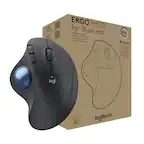
||Posted . Owned for 2 months when reviewed.This reviewer received promo considerations or sweepstakes entry for writing a review.Very pleased with this mouse. I have always used a trackball device. fits good in my hand, doesnt slide around the desk, good battery life and great when a small deskspace is used. Nothing but positive experiences with the 3 I have used.
I would recommend this to a friendBrand response from Logitech
Posted .Happy to hear you've consistently enjoyed the MX ERGO Plus's comfort, stable design, and long battery life!
Best track ball for the job!
||Posted .This reviewer received promo considerations or sweepstakes entry for writing a review.I've owned this mouse for a few years now and I absolutely love it. I was a little hesitant at first just cause of the price and being new to track ball mice. But now at work I wouldn't want to use anything else. I do electrical design and this thing rocks! There's a small learning curve for those of us that have never used a track ball style mouse but once you get used to it...pure joy! I wish this was a gaming mouse! Buying my one for my wife to use at her work!
I would recommend this to a friendBest Logitech thumb trackball to date
||Posted .This reviewer received promo considerations or sweepstakes entry for writing a review.I'm not sure if this trackball will make converts who have never used a trackball, but for those users who are looking for a replacement or upgrade, this trackball is worthwhile. I have been a trackball user for quite some time. On of my first trackballs was the original Trackman Marble. I also used a Microsoft Trackball Explorer (one of the best finger style trackballs) for my desktop workstation. I still have the Microsoft Explorer, but unfortunately the ball has some warping to it. I had used the wireless Logitech M570 for laptops. Now that I have a slim laptop, and it only has 2 USB 3 ports, I thought I'd upgrade to the MX Ergo Plus (chiefly so that I didn't have to tie up a USB port with receiver and use Bluetooth instead). Very few vendors have the Plus version of the Ergo, which includes a bottom wedge that adds another 10 degrees. I've found that accessory a great option for when I have the trackball resting on the arm of my recliner. There are many features of it that are an improvement of the M570: it's larger and heavier. It's wider so that my pinkie doesn't dangle like when I'm using the M570. It has a grippy texture, and the form has a higher curve (so my hand rests on it better then the M570). I really like the Logitech Options software, which lets you enable the flow feature to quickly track from my laptop to a home theater PC. It also lets me copy over files to my HTPC. I also use the trackball while working on development and light graphics work (for illustration, I have a graphics tablet and stylus). I'm finding the horizontal scroll from the left and right scroll tilt to be very welcome: I can quickly horizontally scroll with a code editor or Photoshop. Though with Photoshop, I had to enable Application specific custom control and set the left and right tilt to zoom in and zoom out. I haven't needed to use the precision mode, and I may try setting it to have less high DPI (seems a bit too sluggish when I have tried it). The other unique design to this trackball is that it has a metal plate on the base (with rubber on the underside, so it won't mark your desk). There's a strong magnetic force, so when you forcefully push on one side of the trackball, you can change the angle from 0 or 20 degrees. The extra 10 degree Plus bottom only attaches when the trackball is at 20 degrees (for a total of 30 degrees). I'm finding 30 degrees to be perfect for my armchair, but may use 20 degrees for a desk. The extra wedge is the only difference between the Plus and non-Plus versions. So I think this trackball is a good upgrade for any trackball user, and is a no brainer for someone looking for a replacement of their current trackball. As to whether it will see a lot of converts from mice...it may sway some who are looking for better ergonomics or smaller footprints.
I would recommend this to a friendBy far the best mouse out there.
||Posted . Owned for 6 months when reviewed.This reviewer received promo considerations or sweepstakes entry for writing a review.The best mouse I have ever had. I work IT from home so ergonomically it helps avoid stiffness and pain. I like the thumb ball and the button just above the ball back a little that slows the mouse down if you need to fine tune or click a small area. The best part is the button behind the wheel that lets me switch from my work computer to my home computer in an instant. Buttons are also programmable.
I would recommend this to a friendBrand response from Logitech
Posted .We're thrilled to hear you consider the MX ERGO Plus the best mouse you've ever had! It's fantastic that it's helping with your ergonomic needs and boosting your productivity with the dual-computer switching. Thank you for sharing your detailed and positive experience.

Versatile ergonomic trackball!
||Posted .This reviewer received promo considerations or sweepstakes entry for writing a review.After trying multiple different ergonomic mice, I think I've found the mouse for me. The trackball was easy to get used to, and the three angle options allow for the individual user to adjust to their comfort - I personally prefer the middle option, but the inclusion of the extension is cool for users who prefer an almost vertical mouse-like experience. Other cool features include the ability to swap between the wireless unifying receiver or Bluetooth, so I can use the same mouse on my desktop AND on my laptop with just the press of a button. And my personal favorite, HORIZONTAL SCROLLING!
I would recommend this to a friendAdvanced Trackball Features
||Posted .This reviewer received promo considerations or sweepstakes entry for writing a review.This trackball mouse pairs perfectly with your PC wireless with either the USB 2.4 GHZ receiver or by Bluetooth. It can even be toggled back and forth to control two computers if needed. The MX Ergo Plus comes with the additional wedge base adapter to customize the angle of the mouse even more. I've always preferred trackball mouses over traditional because of their stationary positioning while scrolling the ball with only your thumb to move the cursor. This trackball mouse and included software is advanced with technology so why would you choose anything less to pair with your advanced PC.
I would recommend this to a friendVery good working mouse
||Posted . Owned for 3 weeks when reviewed.This reviewer received promo considerations or sweepstakes entry for writing a review.One of the best mouses I have ever used. Very good design and very easy to setup and use. It is little bit expensive however it is worth it.
I would recommend this to a friendQuality
||Posted . Owned for 1 month when reviewed.This reviewer received promo considerations or sweepstakes entry for writing a review.I recently purchased the Logitech MX ERGO Trackball Mouse and I couldn't be happier with my decision! This mouse has exceeded my expectations in every way. First of all, the design is amazing. The ergonomic shape and adjustable angle make it incredibly comfortable to use for extended periods of time. The trackball is also very responsive and precise, allowing me to easily navigate my computer screen without any issues. Additionally, the customizable buttons are a great feature that I use frequently. It allows me to easily access my most commonly used functions and programs without having to go through a series of clicks. One of the biggest selling points for me was the fact that this mouse can connect to multiple devices at once. This means that I can seamlessly switch between my laptop and desktop without having to constantly unplug and re-plug the mouse. Overall, I highly recommend the Logitech MX ERGO Trackball Mouse to anyone in the market for a new mouse. It's comfortable, responsive, and highly customizable, making it a great investment for anyone who spends a lot of time on their computer. Five stars!
I would recommend this to a friendMade for the human hand
||Posted . Owned for 1 year when reviewed.This reviewer received promo considerations or sweepstakes entry for writing a review.The Logitech - MX ERGO Plus Wireless Trackball Mouse with Ergonomic design will ruin you for anything else. I love ❤️ the ease and flow of using it, and the natural hand position.
I would recommend this to a friendBrand response from Logitech
Posted .Thank you so much for your wonderful feedback on the MX ERGO Plus Wireless Trackball Mouse! We’re thrilled to know it’s meeting your expectations. Your support means a lot to us.
I absolutely love this trackball mouse
||Posted . Owned for 1 month when reviewed.This reviewer received promo considerations or sweepstakes entry for writing a review..I absolutely love this trackball mouse! The ergonomic design is extremely comfortable and helps me avoid any discomfort or strain on my wrist and hand. The trackball itself is smooth and precise, and the buttons are very responsive and easy to reach. The wireless connection is very reliable and I've had no issues with lag or dropouts. The build quality is excellent, and the mouse feels very sturdy and well-made. The Graphite color looks sleek and professional, and the overall design is very attractive. I also appreciate the additional programmable buttons, which allow me to customize the mouse to suit my specific needs. This feature has helped me streamline my workflow and become more efficient in my work. Overall, I am extremely satisfied with the Logitech MX ERGO Plus Wireless Trackball Mouse with Ergonomic design in Graphite. It has exceeded my expectations in every way and I highly recommend it to anyone in need of a high-quality, ergonomic mouse. I would definitely give it a 5-star rating!
I would recommend this to a friendGreat mouse, super easy to set up, durable build.
||Posted . Owned for 3 weeks when reviewed.This reviewer received promo considerations or sweepstakes entry for writing a review.Feels durable, connects seamlessly. I'm using it with bluetooth on my 2019 MacBook Pro, and it works wonderfully. ESPECIALLY if you're tired of carrying a USB dongle around. Bluetooth is a gamechanger here, and also this mouse just works great. The rechargable battery is another huge plus - no more needing to swap out AA's occasionally compared to my old M570 trackball.
I would recommend this to a friendIt helps!
||Posted . Owned for 1.5 years when reviewed.This reviewer received promo considerations or sweepstakes entry for writing a review.It helps! I bought this because my wrist was starting to have pain and it concerned me. My husband had an older one so we went to Best Buy to purchase one for me. I love this one it has different levels of height and comfort and my wrist pain has stopped after a few days of using it. I still have not experienced any pain. The battery lasts for weeks each charge and you’ll receive a notification when the battery is running low. It works for me!
I would recommend this to a friendPerfect mouse for when space is limited
||Posted .This reviewer received promo considerations or sweepstakes entry for writing a review.At first I thought this mouse was for gaming. I was wrong. It's perfectly ergonomically designed. It does not have goofy lights all over it. It's sleek design is a perfect compliment to a modern office setting. It takes all but a minute or two to get a good handle on it's features. If modern design and comfort is what you seek then this mouse is for you. I recommend this more for a desk than for on the go. It's a bit bulky. Don't let the beefiness fool you. It really helps with the natural cup shape of your hand. You'll love it.
I would recommend this to a friendHusband Approved
||Posted . Owned for 1.5 years when reviewed.This reviewer received promo considerations or sweepstakes entry for writing a review.My husband swears by this mouse. He wont use anything else. He left the last one on a trip and came home with a brand new one. He wont leave this mouse for ANYTHING.
I would recommend this to a friendConvenient and comfortable and worth every penny.
||Posted . Owned for 3 months when reviewed.This reviewer received promo considerations or sweepstakes entry for writing a review.If you prefer a trackball to a mouse this one is a comfortable functional choice. I love the ergonomic design and there are plenty of buttons to fit my needs and beyond. Long battery life is a plus too! It even has a button to switch between two saved and paired devices.
I would recommend this to a friendYou'll be glad you bought it!
||Posted . Owned for 1 month when reviewed.This reviewer received promo considerations or sweepstakes entry for writing a review.The charge lasts for months! Some times the trackball feels like it's gummed/slowed. I don't know if it can be removed to clean inside. I have two: one for use with a make-shift musical studio desk and one at work. This is great for cramped spaces!
I would recommend this to a friendBrand response from Logitech
Posted .Hey there! We're glad to hear you're enjoying the comfort and long battery life of your MX Ergo Plus trackball mice! It's designed to fit your hand perfectly and keep you going strong for months.
Improvement on a already excellent device
||Posted .This reviewer received promo considerations or sweepstakes entry for writing a review.Use this for precision CAD work and was using the previous model. I work off a laptop, so USB ports are at a premium, and alway wish my original trackball was Bluetooth over logi’s proprietary dongle controller. The new model not only has both Bluetooth and Logi wireless modes, they also made improvements to the ergonomics while keeping the same basic design. Improvement in not only the ability to tilt the whole unit, but the buttons, trackball, and mouse wheel all seem a little better quality.
I would recommend this to a friendOddly cool!
||Posted . Owned for 10 months when reviewed.This reviewer received promo considerations or sweepstakes entry for writing a review.Super good mouse! Easy on the hand as well. A biy weird to get used to since its mostly thumb action unlike a regular mouse but after a while its amazing! I got it to try something different out and dont regret it!
I would recommend this to a friendBrand response from Logitech
Posted .Thanks for the great review! We're glad the MX ERGO Plus is delivering comfort and a fresh experience. It does take a little getting used to, but sounds like it’s been a rewarding switch!
I have found my next gen of trusty trackball!
||Posted . Owned for 2 months when reviewed.This reviewer received promo considerations or sweepstakes entry for writing a review.This trackball is my daily driver. I’ve tried every mouse under the sun and I always return to a trackball to overcome wrist pain. The nice thing about this one is the choice of rise and angle
I would recommend this to a friendGreat Mouse
||Posted . Owned for 1 month when reviewed.This reviewer received promo considerations or sweepstakes entry for writing a review.Great feel and speed with ease of use. I would recommend to anyone looking for an ergonomic mouse.
I would recommend this to a friendBrand response from Logitech
Posted .Thank you for your positive review of the Logitech - MX ERGO Plus! We're glad you're enjoying the comfortable feel, fast performance, and user-friendly design. We appreciate your recommendation and hope you continue to experience the benefits of an ergonomic mouse.