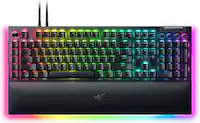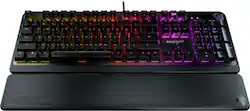
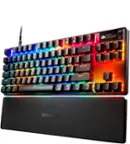
ROCCAT - Pyro Full-size Wired Mechanical Linear Switch Gaming Keyboard with RGB, Brushed Aluminum Top, and Detachable Palm Rest - Black
- Key Specs
- Lighting Type: RGB
- Form Factor: Full-size (The size, arrangement, and physical configuration of the product.)
- Keyboard Technology: Mechanical (Type of technology that detects a key press.)
- Key Switch Behavior: Linear (Refers to the mechanisms under the keycaps on a keyboard that enable you to type faster and more precisely. Linear switches move straight up and down without any sound or bump. Tactile switches provide a noticeable bump in the key press, and no sound. Clicky switches provide a bump in the key press and "clicky" sound.)
- Connection Type: Wired
- General
- Product Name: Pyro Full-size Wired Mechanical Linear Switch Gaming Keyboard with RGB, Brushed Aluminum Top, and Detachable Palm Rest
- Brand: ROCCAT
- Model Number: ROC-12-622
- Color: Black
- Features
- Lighting Type: RGB
- Customizable Lighting: true
- Numeric Keypad: true
- Touchpad: false
- Keyboard Type: Gaming
- Palm Rest: true
- Spill Resistant: false (Designed to resist some degree of accidental liquid spill. The level of spill-resistance is indicated by the product manufacturer, but the degree of protection may not be guaranteed after normal wear of the product.)
- Keyboard Features: Volume wheel, 5 shared media control keys, 50M key strokes lifetime, 1.8m USB cable, Gaming Profile, Weight: 1110g, Dimensions: 447 × 152 × 36mm, Switch: TTC linear, 45g Operating Force, 2.0mm actuation point, 4.0mm total travel
- Foldable: false
- Functions
- Form Factor: Full-size (The size, arrangement, and physical configuration of the product.)
- Keyboard Technology: Mechanical (Type of technology that detects a key press.)
- Adjustable Tilt Function: true
- Key Switch Behavior: Linear (Refers to the mechanisms under the keycaps on a keyboard that enable you to type faster and more precisely. Linear switches move straight up and down without any sound or bump. Tactile switches provide a noticeable bump in the key press, and no sound. Clicky switches provide a bump in the key press and "clicky" sound.)
- Rollover: Full-key (Refers to the number of keys that can be correctly registered when pressed simultaneously. Rollover may be referred to as n-key rollover (KRO) or anti-ghosting.)
- Multimedia Keys: true
- Internet Keys: false
- Connectivity
- Connection Type: Wired
- Wired Connectivity: USB Type A
- Detachable Cable: false
- Compatibility
- Operating System Compatibility: Windows
- Plug and Play Operation: true
- System Requirements: Windows® 7, 8 and 10 (software support), USB 2.0 (or higher), Internet connection (for driver software) (The software that a product must have for it to be able to integrate with another product.)
- Dimensions
- Product Depth: 5.2 inches (The out of box depth of the item. Depth is measured as the distance from the front of the item to the back as it would be primarily used or placed.)
- Mouse
- Mouse Included: false
- Other
- UPC: 731855526222
Ready to go mechanical? Look no farther than the The ROCCAT® Pyro Mechanical (Linear) PC Gaming Keyboard with Per-Key AIMO RGB Lighting, Brushed Aluminum Top Plate and Detachable Palm Rest. Its linear switches boast an optimized 2.0mm actuation point for a keystroke that is both responsive and reliable. Switches are tested to 50 million keystrokes, with a reinforcing brushed aluminum top plate providing added durability. Advanced anti-ghosting technology ensures gamers can press virtually all of the most-used keys simultaneously, with each of them registering and reacting in the heat of battle without fail. The Pyro is equipped with a detachable palm rest to suit both relaxed typing and aggressive gaming styles. Also featured is ROCCAT Easy-Shift[+] technology allowing deep control customization, doubling the function of every button just by holding down the designated modifier key (Caps Lock by default). The Pyro features the AIMO lighting engine, ROCCAT’s proprietary technology, with per-key illumination in 16.8 million RGB colors. AIMO reacts organically to your usage with vivid lighting displays right out of the box – without the need for extensive configuration. It also syncs with compatible products with state-of-the-art illumination scenarios flowing from device to device.
- Mechanical Switches: Accurate, linear (red) mechanical switches tested to 50 million presses and boasting an optimized 2.0mm actuation ensuring a responsive and reliable keystroke.
- Advanced Anti-Ghosting: Technology optimized for gamers to ensure every key stroke of the most-used keys is registered – no matter how frantic the action gets.
- Durable Design: The Pyro is reinforced by a brushed aluminum top plate ensuring robust durability, minimal flex when typing and delivering a premium look and feel.
- Easy-Shift[+] Technology: ROCCAT’s Easy-Shift[+] technology adds a secondary function to compatible keys. Just hold down the designated modifier key for double the command power in an instant. Fully customizable in Swarm.
- Detachable Palm Rest: Lets you adjust your setup to whatever’s comfortable for you, whether it’s a relaxed typing or aggressive gaming style.
- AIMO Intelligent Lighting Engine: The AIMO illumination ecosystem takes your setup to another level by adding organic light. It synergizes with other AIMO-compatible devices to create a vivid, state-of-the-art aesthetic without the need for extensive configuration.
- 2-Year Manufacturer Warranty: We’re confident in the quality and longevity of our products. To ensure additional peace of mind we provide a 2-year manufacturer warranty.
Whats Included
- ROCCAT Pyro Mechanical RGB Gaming Keyboard
- Detachable Palm rest
- Quick-start guide
Q: I have a nickel allergy. Will this trigger a breakout?
A: Hi and thank you for your interest in ROCCAT. We needed a little time to thoroughly research, however, we can now confirm that while some of the internal components of the keyboard are partially made of nickel, you would never be exposed to any of them during normal use, which includes taking off keycaps and cleaning the device. Only disassembling the keyboard, which would void the warranty, could result in exposure. You are therefore safe to use the keyboard so long as you use it as intended. You may also discuss this with your doctor for further advise. If you are looking for further information or have more questions, our support team is more than happy to provide any information you are looking for. Please feel free to reach out using the contact form on our official support website whenever you have a question.
Q: Is this compatible with a MAC computer? Thank you in advance!
A: Thanks for your inquiry! The Pyro keyboard is compatible with MacOS. However, the SWARM software that is designed to be used alongside it would only be compatible with Windows. This means that the keyboard's functions would be limited to those of a generic keyboard.
A: It's pretty quiet. I didn't want a super clicky mechanical keyboard, and this one is pretty quiet. Maybe not as quiet as non-mechanical, but a lot quieter than most mechanical keyboards. I forget which color of switches it has... I think brown? But they're the quieter ones compared to red or blue.
A: Hi and thanks for your interest in our product. The Pyro's FN button can not be toggled off or on permanently, you will therefore need to press FN whenever you want to use its functionality.
Q: Are the keys considered "analog" or simple on/off. Prefer the latter, myself.
A: The Pyro keyboard is not an analog keyboard and registers digital input instead, meaning there are two signal types only: Depressed and not depressed or put simply, on and off.
A: I mean you do need the software to do extra lighting, or wave rgb. Which means how the rgb shows or changes it pattern of lights. If you don’t have the app. The rgb will still work, but the customization is very limited
Q: is it comparable with xbox series x
A: Hi and thanks for your question regarding one of our devices. I believe you are asking whether the keyboard is compatible with your console, not comparable. If that indeed is your question, the keyboard should work with the console just like with any other console, but isn't fully supported. It only receives full support under Windows systems running ROCCAT Swarm, but given that the console generally supports keyboards and the application you are running on it does too, the keyboard should work without any issues.
Q: Am I able to change out the keycaps for a different color? If so, with what type of caps?
A: Yes. Pretty much any standard mechanical keyboard keycaps. I got a generic white mechanical keyboard from China and was able to use the white keys from it on this keyboard. Pretty neat look with the black background and white keys. Got the white mechanical keyboard for some special order keycaps to use for my wife's computer.











![Group 1:
* G
* 1
* F1
* !
* 2
* @
* 2
* F2
* 3
* 3#
* F3
* 4
* $
* F4
* 5
* 5%
* F5
* 6
* F6
* 7
* &
* F7
* 8
* F8
* 9
* F9
* o
* F10
* -
* F11
* +
* F12
* DEL
* TAB
* Q
* W
* E
* R
* T
* Y
* U
* I
* O
* P
* [
* ]
* I
* SCRLK
* INS
* CAPS
* S
* D
* F
* Y
* G
* H
* J
* K
* L
* PRINT
* PG UP
* PG DN
* HOME
* SHIFT
* z
* x
* C
* V
* N
* M
* SHIFT
* P/B
* END
* CTRL
* ALT
* ALT FN
* CTRL
* PRO](https://pisces.bbystatic.com/image2/BestBuy_US/images/products/b56a9eac-32fc-4d33-a36d-46ac587633f4.png;maxHeight=144;maxWidth=200?format=webp)

![esc 1! 2@ 3# 4$ 5% 6^ 7& 8* 9( 0) - _ + del tab Q W E R T Y U I O P [ { ] } pg up caps A S D F G H J K L ; : ' enter pg dn shift Z X C V B N M , . / ? shift ins ctrl alt fn ctrl](https://pisces.bbystatic.com/image2/BestBuy_US/images/products/df61bb42-fb75-4886-b839-2ea6cc541ed7.jpg;maxHeight=144;maxWidth=200?format=webp)

![ESC 1 TAB CAPS SHIFT CTRL ! @ 3 # 2 5 V% Q W A S Z X ALT 4 $ M E D 5 % PS R F V 6 A 16 T G 7 & Y H N f 8 * F8 U J M = + - - 0 I 9 I DEL P12 PH P10 I I 19 } [ { ] O P I POUP HOME PRINT ENTER " ; : K L PG DN END H SHIFT > / ? < CTRL ALT](https://pisces.bbystatic.com/image2/BestBuy_US/images/products/b9cc3a9c-2d36-48ab-8425-f5a6e975cced.jpg;maxHeight=144;maxWidth=200?format=webp)
![Sure, here is the corrected and grouped text from the image:
**Top Row:**
- ESC
- F1
- F2
- F3
- F4
- F5
- F6
- F7
- F8
- F9
- F10
- F11
- F12
- PRTSC
- DEL
**Number Row:**
- 1
- 2
- 3
- 4
- 5
- 6
- 7
- 8
- 9
- 0
- -
- =
- \
**Letter Row:**
- TAB
- Q
- W
- E
- R
- T
- Y
- U
- I
- O
- P
- [
- ]
- \
**Letter Row:**
- CAPS
- A
- S
- D
- F
- G
- H
- J
- K
- L
- ;
- '
**Letter Row:**
- SHIFT
- Z
- X
- C
- V
- B
- N
- M
- ,
- .
- /
**Function Row:**
-](https://pisces.bbystatic.com/image2/BestBuy_US/images/products/9be10b95-8e90-4a5d-b85f-cbc6a7d8e8df.png;maxHeight=144;maxWidth=200?format=webp)
![ESC 1! ! TAB Q CAPS A SHIFT Z CTRL ALT a F1 F2 F3 F4 2 3# 4$ $ 5% W E R T S D F G X C V F5 F6 6 7& & 8 Y U H J N M I K 1 F7 9 O 7 < F8 0) P ; 2 > / ? H4 114 F9 F10 F11 F12 =+ C 1) ] J 1/ / SHIFT PRINT LOCK P/B INS HOME PG DEL END PG ALT FN 11 CTRL](https://pisces.bbystatic.com/image2/BestBuy_US/images/products/01579c20-566e-4ca6-aed7-263e0dc745ab.jpg;maxHeight=144;maxWidth=200?format=webp)