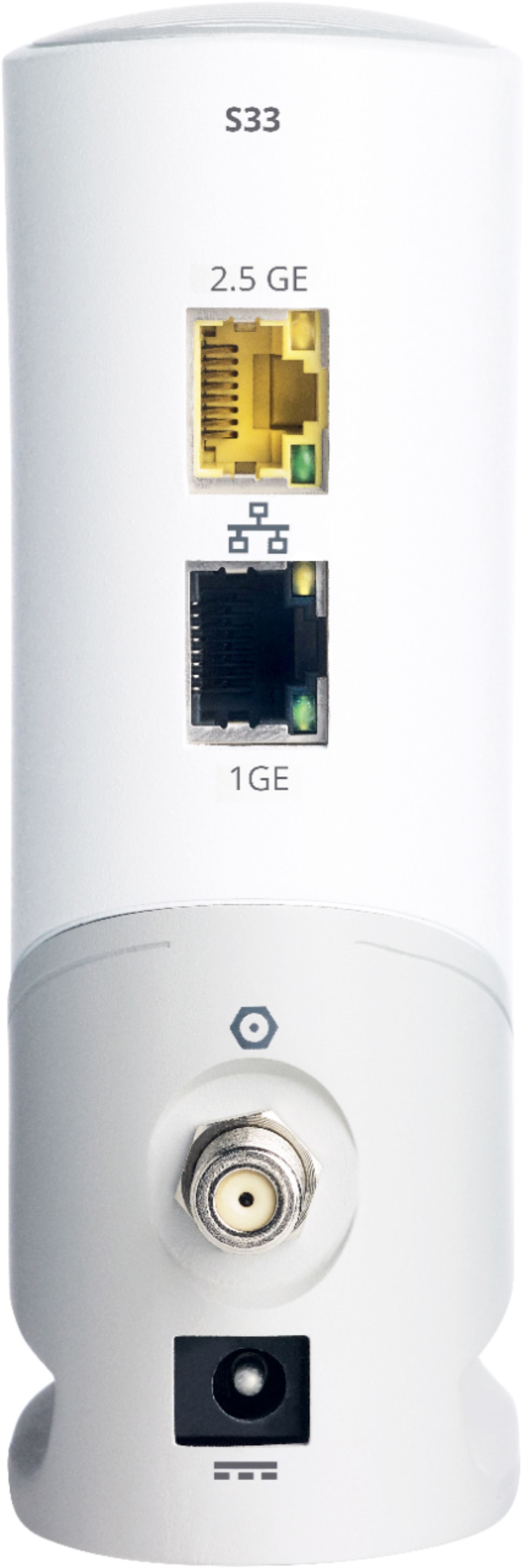
A:AnswerNo. You use the top one (2,5Ghz). In order to use both you would need two separate internet accounts from your provider which would cost extra.
A:AnswerOnly Armstrong can tell you this. Most providers have a page that goes through what works with their system and you should really stick to those recommendations so that you have a finger to point if there are problems.
A:AnswerYou will have to the get 2 static IP addresses from your ISP then you can setup link aggregation. Other than that, you can use either port to connect to your router.
A:AnswerYes it does, plug coax cable, power, wait 30 minutes call buckeye, and give s/n and mac, agree to consent forms. Works better then the hitron i had
A:AnswerI run my Sony Bravia TV on this think via Ethernet, it works amazing. It should do the same for your tv. You’ll experience lag once in a blue moon.
A:AnswerMine gets a little warm but has never gotten hot. I do have it in an open environment though so I can't speak for those who have it inside a console or shelving.
A:AnswerOnly Optimum can tell you this. Most providers have a page that goes through what works with their system and you should really stick to those recommendations so that you have a finger to point if there are problems.
A:AnswerYou do not need a special router for VoIP. VoIP comes in through a connected terminal adapter as provided by your VoIP provider. Any router with an available Ethernet port OR using an Internet switch for more ports will work. I run two VoIP lines, both of which are connected as written.
DOCSIS 3.0 and the newer 3.1 is a modem standard, not a router standard. If your ISP does not provide service for DOCSIS 3.1, there will be no immediate benefit to buying a DOCSIS 3.1 modem. Ask your ISP about what they are set up for.
A:AnswerOnly Suddenlink can tell you this. Most providers have a page that goes through what works with their system and you should really stick to those recommendations so that you have a finger to point if there are problems.