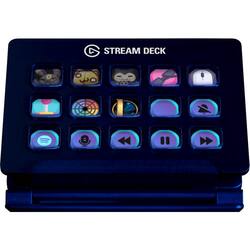
Elgato - 10GAA9901 Full-size Wired Mechanical USB Keypad with Stream Deck - Black
- Key Specs
- Lighting Type: RGB
- Form Factor: Full-size (The size, arrangement, and physical configuration of the product.)
- Keyboard Technology: Mechanical (Type of technology that detects a key press.)
- Connection Type: Wired
- General
- Brand: Elgato
- Model Number: 10GAA9901
- Product Name: 10GAA9901 Full-size Wired Mechanical USB Keypad with Stream Deck
- Color: Black
- Features
- Lighting Type: RGB
- Customizable Lighting: true
- Numeric Keypad: true
- Touchpad: false
- Keyboard Type: Keypad, Programmable
- Palm Rest: false
- Spill Resistant: false (Designed to resist some degree of accidental liquid spill. The level of spill-resistance is indicated by the product manufacturer, but the degree of protection may not be guaranteed after normal wear of the product.)
- Foldable: false
- Keycap Material: Other
- Functions
- Form Factor: Full-size (The size, arrangement, and physical configuration of the product.)
- Number Of Keys: 104
- Keyboard Technology: Mechanical (Type of technology that detects a key press.)
- Adjustable Tilt Function: false
- Multimedia Keys: true
- Internet Keys: false
- Connectivity
- Connection Type: Wired
- Wired Connectivity: USB Type C
- Number Of USB Port(s): 1 (The total number of USB ports including all generations and versions.)
- Compatibility
- Operating System Compatibility: Windows, Mac
- Plug and Play Operation: true
- System Requirements: Windows 10 (64-bit); Apple MacOS X 10.11 or later (The software that a product must have for it to be able to integrate with another product.)
- Dimensions
- Product Height: 0.8 inches (The out of box height of the item. Height is measured as the vertical distance from the bottom of the item to the top as it would be primarily used or placed.)
- Product Width: 4.6 inches (The out of box width of the item. Width is measured as the horizontal distance from one side of the item to the other as it would be primarily used or placed.)
- Product Weight: 6.7 ounces (The out of box weight of the item.)
- Mouse
- Mouse Included: false
- Other
- UPC: 813180020481
Create efficient video editing workflow with the Stream Deck keyboard. It has 15 keys and lets you program up to 210 actions, so you can launch media, switch scenes or command video software with a single touch. The Stream Deck keyboard integrates with a wide range of media tools for comprehensive control.
- 15 customizable LCD keys: Trigger unlimited actions and take control of your content.
- Stream Deck app: Helps to drag and drop actions onto keys, personalize them with custom icons, and switch between distinct profiles for your different games and apps.
- USB interface: Enables a simple wired connection to your computer.
- PC and Mac compatible: For use with your existing computer.
- 15 customizable LCD keys: Trigger unlimited actions and take control of your content.
- Stream Deck app: Helps to drag and drop actions onto keys, personalize them with custom icons, and switch between distinct profiles for your different games and apps.
- USB interface: Enables a simple wired connection to your computer.
- PC and Mac compatible: For use with your existing computer.
Whats Included
- Elgato Stream Deck USB Keypad
- Stand
- Elgato Stream Deck USB Keypad
- Stand
Product Manuals
Q: Can I use this to live stream from a digital camera to the Internet? Thanks.
A: This is a control device not a streaming encoder. It can be used to control software like vmix, obs and wirecast which can be used to stream to the internet.
Q: Can this hook up to a PS4 live stream
A: I’m not sure I understand your question but I’ll give it a whirl. This device is not meant to be used directly with a console (XBOX, PS, etc.) this is meant to be used for pc when running a console through it or a PC game via some sort of video capturing software like OBS.
Q: Will this play sound bites? (Sleigh bells, ringing phone, etc.).
A: Yes. Once you have a sound clip you can assign a button for it. There are some videos on YouTube to set it up but it is pretty straight forward.
Q: Can a stream deck be used with a PlayStation 5?
A: By itself, no. You need a capture card. However, once you have your capture card, you can set scenes in Streamlabs to go from your opening scene to the scene that you are streaming your PS5 from.
Q: I am just wondering if this works with Camtasia and Gameshow?
A: It can be used with anything that has a keyboard shortcut.
Q: Will this work for the hot keys for day trading? If so is it hard to set up
A: It depends upon the software you are using. The StreamDeck does have the ability to automatically switch to a certain layout based upon the application you are using and is active. I have a particular layout that I used with Photoshop, and with Adobe, and when that app is the active window within Windows, the Stream Deck automatically switches to that layout. You can also use keyboard shortcuts in order to create custom buttons - that is pretty much how I built up all of my Photoshop keys. If the functions you are looking at using have shortcut keys assigned to them - then yes. Very simple and easy to set up, just set the active program in the profile's settings (you can search for it if it doesn't show up in the list), and then under the "System" folder, select "Hotkey" as the button type, set your name or icon, and input the hotkey. That simple and easy. The hardest part is figuring out what the hotkeys are. The ability to use multiple nested folders makes it easy to organize the choices together as well.
A: This cannot be used as a capture card. And there are no inputs for it to take any type of video into it, just USB. What this s used for is for doing things easier in your streaming software, such as switching from one camera to another. This way it is just a button press and it is easier to do that without looking than it is to get your mouse and select the other camera. It does have a scripting system in it as well and can also tie into multiple streaming software. I can even launch websites for you or play a sound. But it will not work like a capture card.
Q: diff between this and mark 2 version?
A: Hi sam, The Mk.2 version introduces a new base and replaceable custom faceplates. If you'd like to learn more about it, reach out to our support team, we'd be happy to help you further: support.corsair.com -Brian








![Esc F1 F2 F3 F4 F5 F6 F7 F8 F9 F10 F11 F12 Print Screen Scroll Lock Pause Break 1 2 3 4 5 6 7 8 9 0 - + = Backspace Insert Home H Page Up A Num Look 1 I Tab Q W E R T Y U I o P { [ } ] I I Delete End IN Page Down 7 Home 8 9 Pg Up Caps A Lock A S D F G H J K L ; : DE g Enter 4 5 6 Shift Z X C V N M < > ? I Shift 1 End 2 3 Pp Dn Enter Ctrl Alt Alt Ctrl 0 Ins Del](https://pisces.bbystatic.com/image2/BestBuy_US/images/products/a588d446-5678-40ae-86b8-1f15e0026e66.jpg;maxHeight=144;maxWidth=200?format=webp)