Customer Ratings & Reviews

- Model:
- 10GAT9901
- |
- SKU:
- 11121810
Customer reviews
Rating 4.9 out of 5 stars with 772 reviews
(772 customer reviews)Rating by feature
- Value4.6
Rating 4.6 out of 5 stars
- Quality4.9
Rating 4.9 out of 5 stars
- Ease of Use4.7
Rating 4.7 out of 5 stars
Rated 5 out of 5 stars
More Useful than you think
||Posted . Owned for 6 months when reviewed.This reviewer received promo considerations or sweepstakes entry for writing a review.Great product. There are so many more uses than just using when live broadcasting. I set it up with shortcuts in Visual Studio and shortcuts for Resharper. I also have it set up for shortcuts in a few games. They keep updating the software and you can create pages of shortcuts and folders. I would recommend it for sure.
This review is from Elgato - Stream Deck XL Wired Keypad with Back Lighting - Black
I would recommend this to a friendRated 5 out of 5 stars
Everyday or streaming its great
||Posted . Owned for 3 months when reviewed.This reviewer received promo considerations or sweepstakes entry for writing a review.I love the stream deck. It's excellent for daily use, from opening programs with a one-hit button for "modes" gaming or works automatically opening and closing programs. The store has tons of free stuff to make this work however you need to.
This review is from Elgato - Stream Deck XL Wired Keypad with Back Lighting - Black
I would recommend this to a friendRated 5 out of 5 stars
Stream deck xl
||Posted . Owned for less than 1 week when reviewed.This reviewer received promo considerations or sweepstakes entry for writing a review.Best purchase I’ve made makes running games easier
This review is from Elgato - Stream Deck XL Wired Keypad with Back Lighting - Black
I would recommend this to a friendRated 5 out of 5 stars
Awesome Hardware from a Non-Streamer
||Posted . Owned for 1 month when reviewed.This reviewer received promo considerations or sweepstakes entry for writing a review.The one and old brand trust brand. Full disclosure, I don't use it for streaming or anything but more for just productivity and easy of use for music production or other Photoshop. I will eventually explore the many things you can do with this unit.
This review is from Elgato - Stream Deck XL Wired Keypad with Back Lighting - Black
I would recommend this to a friendRated 5 out of 5 stars
Great Product
||Posted . Owned for less than 1 week when reviewed.This reviewer received promo considerations or sweepstakes entry for writing a review.Great supplement to my keyboard when customizing my PC shortcuts, macros, scripts, etc. If I had to nitpick, I wish the default icon library had more variety and colors. However, I can easily just download more free ones from their store or just make them myself, although the latter is obviously time-consuming.
This review is from Elgato - Stream Deck XL Wired Keypad with Back Lighting - Black
I would recommend this to a friendRated 5 out of 5 stars
Work smarter not harder
||Posted . Owned for 1 month when reviewed.This reviewer received promo considerations or sweepstakes entry for writing a review.If youre thinking about buying a stream deck. You should buy a stream deck. The amount of productivity you gain from all the crazy stuff you can do with this is worth every penny
This review is from Elgato - Stream Deck XL Wired Keypad with Back Lighting - Black
I would recommend this to a friendRated 5 out of 5 stars
Not just for streaming!!!
||Posted . Owned for 1 week when reviewed.This reviewer received promo considerations or sweepstakes entry for writing a review.Our company purchased these units for several of our staff for command line programming of networking equipment and day to day computer operations using shortcuts and keystrokes. The possibilities are endless. Plugins are constantly being created and we are always finding new things to use the stream deck for. Great investment
This review is from Elgato - Stream Deck XL Wired Keypad with Back Lighting - Black
I would recommend this to a friendRated 5 out of 5 stars
Best macro/quick launch/hotkey platform
||Posted . Owned for 3 weeks when reviewed.This reviewer received promo considerations or sweepstakes entry for writing a review.StreamDeck is just fantastic! The buttons have a great feel, the display is beautiful and the intuitive companion app makes changes to the display in real time as you make edits to the programming. Supports a wide range of actions and can be programmed with multiple pages of buttons. Replaced an aging, very clunky and unsupported iPad app with this, never going back.
This review is from Elgato - Stream Deck XL Wired Keypad with Back Lighting - Black
I would recommend this to a friendRated 5 out of 5 stars
Good product
||Posted . Owned for 1 month when reviewed.This reviewer received promo considerations or sweepstakes entry for writing a review.==== Easy to setup and use. Highly recommended. ===
This review is from Elgato - Stream Deck XL Wired Keypad with Back Lighting - Black
I would recommend this to a friendRated 5 out of 5 stars
Truly The Tool For Livestreams
||Posted .This reviewer received promo considerations or sweepstakes entry for writing a review.I had heard so much about this as “the tool” for livestreaming. Well, it lived up to that title right out of the box. Easy to install, easy to set up multiple show profiles (took me 20 minutes to set up three while I was still learning how it all worked), and my first show was a dream. I should not have waited so long to pull the trigger and buy it.
This review is from Elgato - Stream Deck XL Wired Keypad with Back Lighting - Black
I would recommend this to a friendRated 5 out of 5 stars
Very solid
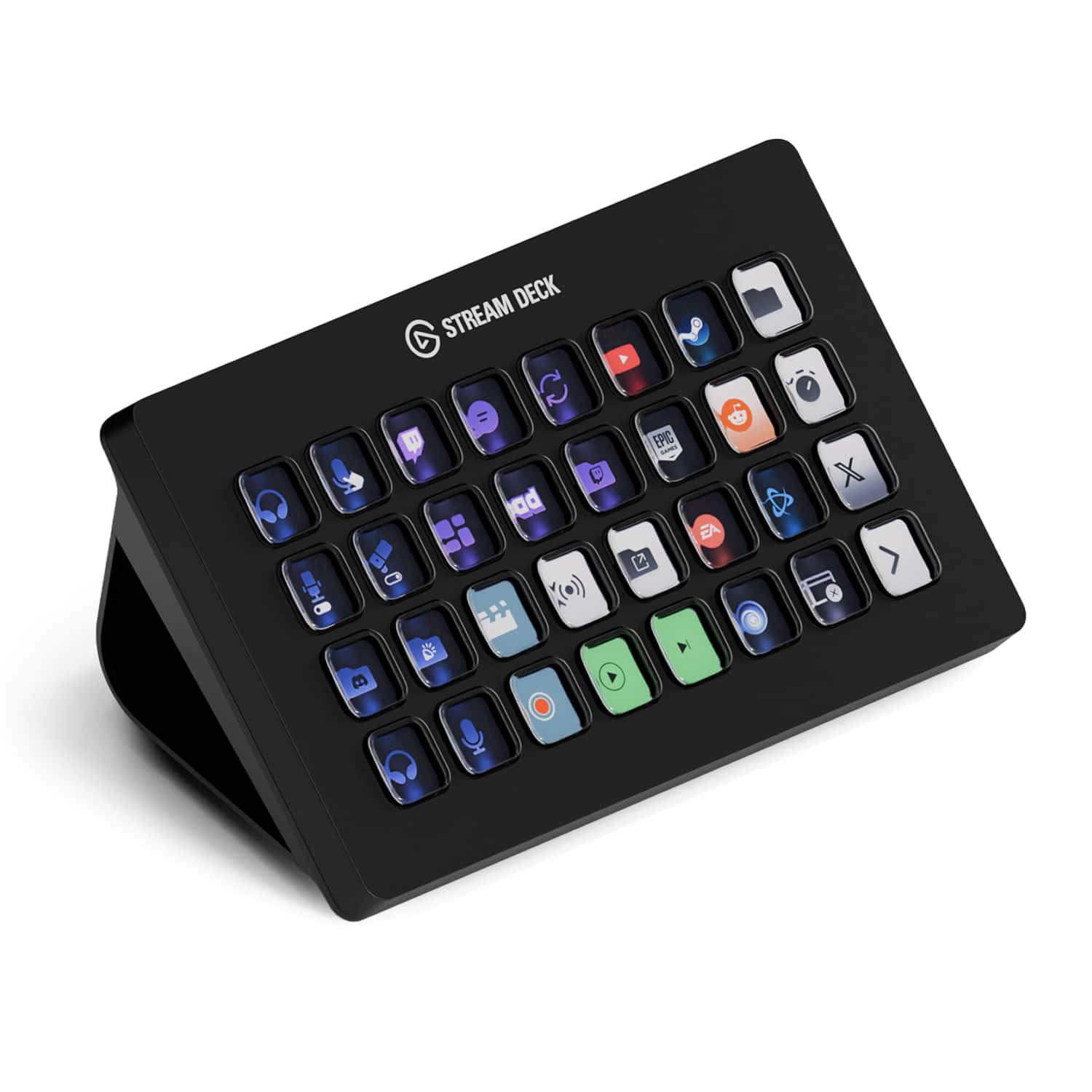
||Posted . Owned for 1 week when reviewed.This reviewer received promo considerations or sweepstakes entry for writing a review.I bought this primarily to use while playing an online game where I can control several other characters. I created macros in the game and use this to trigger the macros. I created little icons to use for each key press so that I can quickly identify what I need to press. I have to say that this works VERY well. It also has many 3rd party apps for it, one of which I use a lot which allows more advanced macros and includes options for short button press vs long press to send different commands to the computer. So this definitely lived up to my hopes for gaming. I can also see how amazing this would be for streaming and other application uses as it provides a easily identifiable array of buttons to press for different actions within your software. From a construction perspective, this is a nice solid piece of gear. It has an anti slip base and feels very solid. The buttons have just the right amount of force required to activate. It looks very sharp and the button displays are each very clear and bright (brightness is controllable too). Elgato really nailed it with this device and it's a must have for so many uses. I can't wait to discover other uses for it in my daily gaming and application use.
This review is from Elgato - Stream Deck XL Wired Keypad with Back Lighting - Black
I would recommend this to a friendRated 5 out of 5 stars
Xl Stream Deck
||Posted . Owned for 1 month when reviewed.This reviewer received promo considerations or sweepstakes entry for writing a review.I use this for Sim racing and it has met all require plus more. I have recommended this to a few other friends for its functionality with Photoshop and other apps.
This review is from Elgato - Stream Deck XL Wired Keypad with Back Lighting - Black
I would recommend this to a friendRated 5 out of 5 stars
Customizable and aesthetic!
||Posted . Owned for 4 months when reviewed.This reviewer received promo considerations or sweepstakes entry for writing a review.So many plugins and ways to customize this, I love it!!
This review is from Elgato - Stream Deck XL Wired Keypad with Back Lighting - Black
I would recommend this to a friendRated 5 out of 5 stars
Bigger and Better than the original
||Posted . Owned for 1 month when reviewed.This reviewer received promo considerations or sweepstakes entry for writing a review.The company that brought the best capture cards in the business then brought the stream deck, well here's its bigger brother more keys for macros and shortcuts with the same amazing software that made the original stream deck so amazing, must have for anyone looking to up there production value in streaming, podcasting, or editing.
This review is from Elgato - Stream Deck XL Wired Keypad with Back Lighting - Black
I would recommend this to a friendRated 5 out of 5 stars
More than double the keys of the previous model
||Posted . Owned for 2 weeks when reviewed.This reviewer received promo considerations or sweepstakes entry for writing a review.I use it primarily while streaming to switch between scenes and activate a soundboard. I also use it when playing certain games for either quick options, or to replace some keyboard functionality when I can't reach said keyboard (when using joysticks for instance)
This review is from Elgato - Stream Deck XL Wired Keypad with Back Lighting - Black
I would recommend this to a friendRated 5 out of 5 stars
Great device with many, many options!
||Posted . Owned for less than 1 week when reviewed.This reviewer received promo considerations or sweepstakes entry for writing a review.I absolutely love this device. I use it for FiveM gaming on the G3 Network and also with flightsim. I haven’t set it up for more yet but plan too. Extremely versatile. I used the StreamDeck app on my iPad prior and felt it would be worth the actual device and more buttons.
This review is from Elgato - Stream Deck XL Wired Keypad with Back Lighting - Black
I would recommend this to a friendRated 5 out of 5 stars
Love this
||Posted . Owned for 2 weeks when reviewed.This reviewer received promo considerations or sweepstakes entry for writing a review.This control deck is a must have for anyone interested in live streaming. Relatively easy to set up and use. Instructions are not the best so anyone non-tech savvi will need some assistance with setup and use. The user interface quickly makes anyone a pro.
This review is from Elgato - Stream Deck XL Wired Keypad with Back Lighting - Black
I would recommend this to a friendRated 5 out of 5 stars
Everything i didn’t realize i needed
||Posted . Owned for 1 week when reviewed.This reviewer received promo considerations or sweepstakes entry for writing a review.I’m a streamer ( hit up my YouTube “wtfisajuice” and sub please) and I thought I was fine without this. My life is 1000x better with this device. I’m having so much fun figuring out new and interesting things to do with this thing. Can’t recommend it enough!
This review is from Elgato - Stream Deck XL Wired Keypad with Back Lighting - Black
I would recommend this to a friendRated 5 out of 5 stars
Great product!
||Posted . Owned for 1 week when reviewed.This reviewer received promo considerations or sweepstakes entry for writing a review.This was a Christmas present for my son. He loves it! Works perfectly!
This review is from Elgato - Stream Deck XL Wired Keypad with Back Lighting - Black
I would recommend this to a friendRated 5 out of 5 stars
Great item
||Posted .This reviewer received promo considerations or sweepstakes entry for writing a review.This is great for presetting gifs or when I'm streaming, it's also good for gaming.
This review is from Elgato - Stream Deck XL Wired Keypad with Back Lighting - Black
I would recommend this to a friend